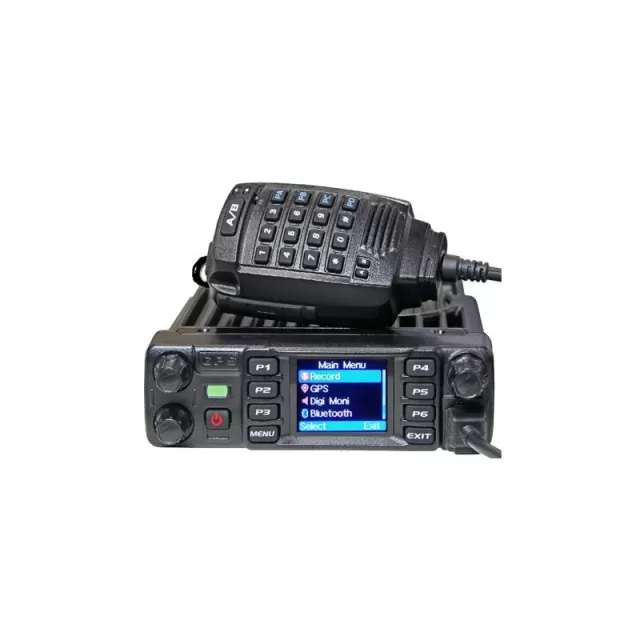
AnyTone AT-D578UV firmware
AnyTone · AT-D578UV · AT-D578UV · VHF/UHF transceiver
Also known as: AT-D578UV Pro
Latest firmware for the AnyTone AT-D578UV is v1.21 (June 19, 2024).
Specifications
AT-D578UV specifications
- Type
- Amateur VHF/UHF transceiver
- Frequency range
- Europe / TX: 144-146 / 430-440 MHz / RX: 87.5-108 / 136-174 / 400-480 MHz
- Modes
- TX: FM / NFM / DMR (Tier I & II) / RX: FM / NFM / DMR (Tier I & II) and WFM
Show the full specification Hide the full specification
General
- Mode
- TX: FM / NFM / DMR (Tier I & II) RX: FM / NFM / DMR (Tier I & II) and WFM
- Type
- Amateur VHF/UHF transceiver
- Weight
- 1.04 Kg (2.29 lb)
- Power supply
- 13.8 VDC ±15%
- Tuning steps
- 5 / 6.25 KHz
- Other features
- 1.77" color LCD. CTCSS/PL and DCS. DTMF. 2-tone/5-tone selcall. SMS via keyboard. APRS (TX only). Roaming. GPS and Bluetooth. VFO. VOX. Backlit buttons. Micro-USB. Twin RX (V/U, V/V, U/U).
- Frequency range
- Europe TX: 144-146 / 430-440 MHz RX: 87.5-108 / 136-174 / 400-480 MHz
- Dimensions (W*H*D)
- 188*40*141 mm (7.4*1.58*5.55")
- Frequency stability
- ±2.5 ppm @ -20 to +55°C (-4 to +131°F)
- Repeater shift / offset
- Freely programmable
- Channels / memory management
- 4000 regular 250 zones (160 channels per zone) 200000 contacts
- Antenna impedance / connector
- 50 ohm / SO-239
- Current drain/power consumption
- RX: ? mA TX: 15 A
Miscellaneous
- Manufactured
- China, 2019-202x
Receiver Section
- Selectivity
- FM: 70 dB (Adjacent channel) NFM: 60 dB (Adjacent channel)
- Sensitivity
- FM: 0.25 uV (12 dB SINAD) NFM: 0.35 uV (12 dB SINAD) DV: 0.3 uV (5% BER)
- AF output power / speaker
- 2 W at 5% distortion / 8 ohm
Transmitter Section
- RF output power
- TurboHighMidLow 2 m:55 W25 W10 W5 W 70 cm:40 W25 W10 W5 W
- Spurious emissions
- Better than -36 dB
- Microphone input level
- ? mV
- Max FM deviation (Factory set)
- FM: ±5 KHz NFM: ±2.5 KHz
- Microphone impedance / connector
- ? ohm / 8-pin (modular)
Changelog
AT-D578UV firmware changelog
-
v1.18v1.19.2Fixes Bluetooth freezing and frequency shift issues, improves scan speed. -
v1.17v1.18Fixes radio reset during scanning and APRS freeze; adds ARC4 encryption and communication synchronization options. -
v1.15v1.16Fixed GPS roaming causing random VFO jumps and radio crackling during SFR repeater operation -
v1.14v1.15Adds GPS Roaming for location-based zone switching and new APRS SMS messaging. -
v1.13v1.14Display customization and separate audio settings for digital/analog channels. -
v1.12v1.13Fixed APRS Beacon and B band decoding, eliminated audio click before PTT, expanded contact list. -
v1.11v1.12Adds APRS configuration options, key tone control, and 5Tone decode filtering.
Firmware history
All versions below were published by AnyTone on anytone.net and qixiang.com. Third-party and modified firmware is never listed.
-
Source:
anytone.netRelease notes & downloadShow release notes Hide release notes
- Improve the issue that the BT01 stuck at “ Roaming… Please Wait!”.when it works with the radio,
- Resolve the issue that “ Zone Hide” is invalid on BT01 bluetooth microphone.
-
Source:
anytone.netRelease notes & downloadShow release notes Hide release notes
- Improve the issue that the radio load 1.19.2 firmware, the green LED keeps on when power on the radio.
-
Fixes Bluetooth freezing and frequency shift issues, improves scan speed. — summary by updatemystuff.com
Source:
anytone.netRelease notes & downloadShow release notes Hide release notes
- Improve the scan speed, ignore some burst signal.
- Modify the SMS to support the Text Capture on BM.
- Modify the CPS to prohibit the CPS read the AES / ARC4 encryption from the radio, and prohibit the CPS read the AES / ARC4 encryption from the codeplug. We suggest you export the AES / ARC4 encryption codes from the old CPS and save it on your PC, in case you need to create the codeplug, you can import the encryption codes.
- Resolve the issue that sometimes D578UV stuck when use BT01 through bluetooth wireless connection.
- Resolve the issue that D578UV has a frequency shift when power on the D578UV with repeater function default ON.
- Modify the firmware to make the AES encryption have a variable Vector(IV) instead of fixed “ 12345678” .
-
Fixes radio reset during scanning and APRS freeze; adds ARC4 encryption and communication synchronization options. — summary by updatemystuff.com
Source:
anytone.netRelease notes & downloadShow release notes Hide release notes
- CPS->Digital->ARC4 encryption, add the ARC4 encryption which is compatible with Motorola.
- CPS->Optional Setting ->Digital -> Voice Header Repetitions, allows you set the voice header transmit times to sync the receive radio, it will improve the communication success rate with RX radio.
- CPS->Optional Setting - >Digital -> TX preamble to define the preamble time of the data transfer function (not needed for audio calls), and improve synchronization
- SMS confirmation mode improvements with better compatibility with other devices
- Call Alert fully compliant with ETSI recommendation
- Resolve the issue that when BT01 is connected, the radio freezes when sending APRS.
- Resolve the issue that BT MIC GAIN setting in CPS doesn’t load into BT01 when program into BT01 microphone.
- Resolve the issue that BT01 custom BT name is incorrect after reboot BT01 microphone.
- Resolve the issue that D578UV does a reset when the radio lose power during scan the air channels, which lead the D578UV has to reload the codeplug.
- Resolve the issue that D578UV doesn’t display the active air channel information during scanning, it still shows the initial air channel when start the scan.
-
Source:
anytone.netRelease notes & downloadShow release notes Hide release notes
- Channel -> Analog -> 5Tone ID, make the decode standard in current channel to be same as the 5Tone ID encode standard.
- Upgrade the firmware to work with BT01 bluetooth microphone.
-
Fixed GPS roaming causing random VFO jumps and radio crackling during SFR repeater operation — summary by updatemystuff.com
Source:
anytone.netRelease notes & downloadShow release notes Hide release notes
- Set the sub band default OFF when GPS roaming is turned On, to avoid the issue that sub band VFO channel jumps to random channel.
- Resolve the issue that export .dcf file doesn’ t work with Contact Manager V270.
- Improve the issue that radio cracks when SFR repeater is running, requires an upgrade on the SCT to resolve this issue.
- In CPS->Scan list-> Digi Group Hold Time, Digi Pri hold time, add the hold time setting when receive signal at digital channel during scanning. .
-
Adds GPS Roaming for location-based zone switching and new APRS SMS messaging. — summary by updatemystuff.com
Source:
anytone.netRelease notes & downloadShow release notes Hide release notes
- Allow to select TG and RX group list for the new channel created in radio menu.
- Improve the Single Frequency Repeater unstable problem.
- CPS->APRS->Analog, add 8 groups analog TX frequency. In CPS->Channel->Analog APRS Report Freq, allows select a TX frequency to transmit the analog APRS.
- CPS->Common Setting- >Channel ->DMR Mode, add “DCDM TS Split” mode. In this mode, the radio receives on the selected slot in channel, but in transmission it will use the other slot. This configuration is only in use when the radio talk through a D578UV in repeater mode with fixed slot.
- CPS->Optional Setting -> Auto repeater, add 3 new functions. These 3 functions are only working when Repeater function set ON. Rep CC Limit: Repeater is not working when the color code doesn’ t match. Rep Slot Path A: Repeater will receive at fixed slot on channel A and transmit in the other slot on channel B. Rep Slot Path B: Repeater will receive at fixed slot on channel B and transmit in the other slot on channel A.
- CPS->Common Setting - >GPS Roaming, allow user set a list of GPS locations, when GPS positioning is within the preset radiation radius of coordinates, the radio will switch to the corresponding zone.
- Common Setting- >Optional Setting ->GPS/Ranging -> GPS set ON.
- Common Setting- >Optional Setting ->GPS/Ranging -> GPS Roaming set ON.
- Common Setting- >Optional Setting ->GPS/Ranging -> Distance unit, select Meter or Feet for the radius.
- Common Setting- >GPS Roaming, complete the setting, maximum 16 coordinates can be set with matched zone.
- CPS->Common Setting ->Zone -> Zone hide, add Zone Hide function in the Zone menu, it allows user hide some zone when they don’ t need it on display. Since the Zone Hide is new inserted item, it may be checked automatically when open an existing codeplug. CPS->Tool-> Zone Hide Operation, allows you check or uncheck all Zone Hide.
- Add APRS SMS function in the radio menu, allows the radio to receive and transmit APRS message.
- CPS->Common Setting ->Channel -> Send Talker Alias, make the Talker Alias to be private setting for each channel, instead of public setting for all channels.
- CPS->Tool -> APRS information Manager, allows the CPS to read the received APRS message from radio and export.
- Add “Draft” in the Messages menu, unsuccessful SMS is saved in draft and can be resent.
- Add timezone GMT+5:30(India), GMT+5:45 (Nepal), GMT+4:30(Afganistan), GMT+3:30(Iran) GMT-3:30 (Newfoundland, Canada), GMT+8:30 (Eucla)
- Change the APRS message to be a lower priority than menu, the radio will not be kicked out of radio menu when receive the APRS message.
- Correct the analog APRS sending inaccurate altitude (height) issue.
- Correct the corrupted alert tone issue.
- Make the TOT valid for the cross band repeater function.
-
Display customization and separate audio settings for digital/analog channels. — summary by updatemystuff.com
Source:
anytone.netRelease notes & downloadShow release notes Hide release notes
- CPS->Optional setting - >Display->Date Display Format, allows the user set the date format on display.
- CPS->Optional setting - >Display->Display Channel type, allows the user turn off the channel type on display
- CPS->Optional setting - >Display->Display time slot, allows the user turn off the time slot on display
- CPS->Optional setting - >Display->Display color code, allows the user turn off the color code on display
- CPS-> Optional setting ->Alert Tone, add Ana idle channel tone, the digital channel and analog channel have separated idle channel tone setting.
- CPS->Channel -> Auto scan, tick on the box will allow the radio start scan automatically.
- CPS-> Optional setting - >Volume/Audio, separate mic gain setting for digital channel and analog channel
- CPS-> APRS ->Ana AprsTX, allows to set wide band or narrow band for analog APRS transmit.
- Add the alert tone setting in radio menu.
- CPS->Analog -> 2Tone Setting- > Auto Reset Time changes to maximum 250S. If you set Auto Reset Time to 25s, it keeps the squelch on carrier until there is 25 secs of silence, then it switches back to waiting for tones. If there is a transmission before the end of that 25 secs, the timer restarts. It is useful for the 2Tone Paging System.
- CPS->Analog -> 5Tone Setting- > Auto Reset Time changes to maximum 250S
- CPS->Analog -> DTMF-> Auto Reset Time changes to maximum 250S
-
Fixed APRS Beacon and B band decoding, eliminated audio click before PTT, expanded contact list. — summary by updatemystuff.com
Source:
anytone.netRelease notes & downloadShow release notes Hide release notes
- Resolve the issue that the talker alias transmit doesn’t match to selected Radio ID when there are several Radio ID set in radio.
- CPS->Digital ->Digital Contact list upgrade from 200K to 500K
- Resolve the issue that “ when sending APRS Beacon it transmits three times instead of once, when transmitting APRS Beacon with PTT it transmits it twice instead of once”
- Resolve the issue that B band can not decode APRS.
- Resolve the issue that “ If you activate the function Repeater FM to FM, the audio does not pass through (when the MAIN band is on A the audio works)”
- Resolve the issue that “A click-bump after PTT is pushed for tran smitting voice is sent before the audio modulation from mic is transmitted”
- CPS->Tool -> Options, add Analog APRS RX option, allows user choose whether the Analog aprs RX setting is valid according to the radio version.
-
Adds APRS configuration options, key tone control, and 5Tone decode filtering. — summary by updatemystuff.com
Source:
anytone.netRelease notes & downloadShow release notes Hide release notes
- CPS->APRS-> AprsDisTime, allows to set the APRS display time on the screen.
- CPS->APRS -> AprsAltData, allows to set the APRS altitude to fixed beacon use.
- CPS->Optional Setting -> Key function, rename the key function “ FM radio” to “AM/FM”
- CPS->Public -> APRS -> Analog- > Digipeater Path, allows to input more digipeater paths.. (for all D578UV models)
- CPS->Optional Setting ->GPS Ranging ->Time Zone change from GMT to UTC
- Change the channel type indicate icon to cyan color when the mixed channel receive analog signal.
- CPS->Optional Setting -> Alert Tone - > Key Tone, change to turn off the key tone only. Other beep tones are keeping on.
- CPS->Analog- >5Tone ->5Tone decode units, allows to filter the income 5Tone ID. For example, if the setting is 109, the radio will receive all the calls 5Tone ID start with 109.
-
Fixes cross band repeater audio transmission and simplex TX busy status display — summary by updatemystuff.com
Source:
anytone.netRelease notes & downloadShow release notes Hide release notes
- Improve the firmware issue that cross band repeater Analog –> Digital or Analog - > Analog doesn’ t transmit the audio.
- Improve the firmware issue that manual dial TG TX in simplex channel doesn’ t show busy when the radio is receiving. Simplex Channel for a Hotspot TX Permit = Channel free or Different CC Manual dial a TG When you PTT when the radio is RXing someone the Radio does not show Bussy It just lets you TX into the Hotspot It should see that it is in use and show Bussy
- Improve the CPS issue that channel setting TX permit set to Same Color Code, reopen the channel setting will show Always.
-
Fixed reception loss with sub band, first-word audio loss in DMR, and 5-tone timing; added APRS send. — summary by updatemystuff.com
Source:
anytone.netRelease notes & downloadShow release notes Hide release notes
- Improve the issue that radio will grab a TG when the repeater is in Call Hold Off time.
- Improve the issue that “GPS information doesn’t display with using a programmed “GPS info” key when only analog channels are in use” .
- Improve the issue that “By receiving Dmr in Simplex and Double Slot mode, several times the demodulated audio of first word is missing” .
- CPS->Channel -> Analog, R5toneBot, R5tone Eot, allows to set different 5Tone PTT ID for each channel.
- Resolve the issue that “ By composing a 5 tone using Manual Dial (Book, Manual Dial, typing Input ID and pressing PTT, the "stop code" defined in 5 tone setting is not considered as silence (stop code and stop time) but as a tone” .
- When 5Tone - > Beep Tone & Respond are enabled, the radio will respond with itself ID.
- CPS->Key function, add APRS send to the key function. The radio will transmit the APRS information (longitude, latitude, etc..) to the receiver when user press the “APRS send” key.
- Improve the issue that digital monitor displays wrong time slot.
- Improve the issue that “Keeping the sub band enabled, reception on the Main band is often lost or is very delayed”.
- Improve the issue that “After decoding a 5- tone call in repeater mode, the 5- tone response is sent only after the repeater has dropped out”.
- Improve the issue that “By configuring the 5 tones selective call for different call types, starting from when the RF carrier is on pushing PTT, the timing of the beginning of 5 tones sequence does not correspond to the summation of pauses configured in 5 tone setting windows in the CPS. Unexpected delay is also present using DTMF and 2 tone”
- CPS->Digital -> Talk Groups, allows the entry of talk group numbers maximum 16777215.
- When viewing Last Heard contact, Options selection is not available, like it is on the 878. Add the Options selection to D578.
-
Fixes radio freeze and scanning click sound, adds zone name color display option. — summary by updatemystuff.com
Source:
anytone.netRelease notes & downloadShow release notes Hide release notes
- CPS->Optional Setting ->Display -> Zone Name Colour, allows to set the display color of zone name.
- CPS->Optional Setting ->Other -> Auto shut down type, allows to set the auto power off count time be affect by call or not.
- Improve the issue that radio has Click sound during scan.
- CPS->Channel ->DataACK Disable, allows to disable the radio response to repeater data service request. It helps to improve the radio freeze issue.
- Press Menu key on radio to stay at the channel with signal permanently when it finds a signal during scanning. The radio is unable switch to that channel If the channel doesn’t belong to a zone.
- Change the default date time to year 2020.
- Separate the TOT prompt tone and the beep tone.
-
Android app release with APRS improvements and fixes for stuck radio, SMS, and DMR issues — summary by updatemystuff.com
Source:
anytone.netRelease notes & downloadShow release notes Hide release notes
- Allows the radio send APRS in the hold time.
- Improve the issue that radio gets stuck when both APRS and Roaming are ON.
- Improve the issue that SMS format is incorrect when CPS reads the data from radio.
- Set SMS default to M- SMS.
- Allows to set multiple signal paths for APRS and separate by comma.
- Improve the issue that DMR mode is incorrect when CPS reads the data from radio.
- Release the APP for Android mobile phone use.
-
Fixed APRS and transmission timing errors, improved CPS display and added import notice. — summary by updatemystuff.com
Source:
anytone.netRelease notes & downloadShow release notes Hide release notes
- Improve the issue that radio send APRS at wrong time slot.
- Improve the issue that radio transmit at wrong time slot randomly.
- Improve the issue that CPS doesn’t load the QX FW Update program as full screen.
- Add notice in CPS for Import Operation.
-
Fixes analog reception issues, adds display features, improves roaming and APRS stability. — summary by updatemystuff.com
Source:
anytone.netRelease notes & downloadShow release notes Hide release notes
- Resolve the issue that analog RX with CTCSS/DCS is intermittent.
- In CPS-Optional Setting - STE, add STE time setting, it is for analog squelch tail eliminator.
- Resolve the issue that export has problem when check on the “ Exclude Channel From Roaming” and “DMR MODE”.
- Add CTCSS/DCS Scan
- Resolve the issue that Call Tone /Call Reset Tone/Channel Idle Tone have noise.
- Resolve the issue that 220MHz analog repeater channel no RX audio.
- Change the APRS RX display to callsign instead of channel name display.
- Add the“channel name/frequency display switch” to the key function.
- Add SFE operations to the radio menu.
- Improve the TX cut off issue
- Improve the issue that no RX when receive a signal from analog repeater with CTCSS decode signaling (need verification from tester)
- Change the maximum bluetooth dormant time to 4minutes, and add OFF option to the BT dormant time.
- Improve the issue that radio transmit to wrong TG
- Rename the key function “Program Scan” to “VFO Scan” to avoid misunderstanding.
- Resolve the issue that auto APRS and auto Roaming don’ t work when the group call/private call hold time set to Infinite.
- Improve the issue that radio stuck /reboot when both auto roaming function and auto APRS function are on.
-
Fixes repeater, microphone, and roaming issues; adds GPS/Bluetooth key shortcuts and Talker Alias/SMS off options. — summary by updatemystuff.com
Source:
anytone.netRelease notes & downloadShow release notes Hide release notes
- Resolve the issue that Beep sound doesn’ t work when repeater is out of range.
- Resolve the issue that up/down key function on microphone is reverse in VFO mode.
- Revise the beep tone time setting.
- Add off option for Talker Alias and SMS
- Resolve the issue that APRS-Auto TX interval setting in CPS doesn’t match the radio menu.
- Add GPS On/Off in the key function
- Add BT On/Off in the key function
- During scanning, the removed channels from channel list will revert back after switching zone.
- CPS->Channel ->Digital ->multi- key , add encryption (MKE) function. (Note: When use the MKE function, make sure turn off the sub channel, otherwise the RX will be affected)
- CPS->Channel ->Digital ->radom key, allows the radio transmite the radom key encyrption.
- Resolve the issue that when roaming is ON, the POP-up screen shows OFF.
- Resolve the issue that in APRS section, Slot2 selection is radio broadcast for Slot1 and vice versa.
- Resolve the issue that the car audio stops when start the roaming function.
- Resolve the issue that the car audio stops when APRS is transmitting.
- Resolve the issue that the fan remains on after the temperature has returned “low”
- Resolve the issue that the power is low in single frequency repeater function.
- Optional Setting - >Display ->Standby Char Color, allows to set different colors.
- Resolve the issue that D578UV set encryption have Chinese prompt message
- Modify the Mode 0018 to allow receive on full frequency band.
- CPS-Optional Setting - Other- Weather Alert and Weather channels, matches to the radio menu.
- CPS-Public-Channel-SMS Confirmation, update the help information
- CPS-Public-Channel-Call Confirmation, update the help information
-
Adds programmable functions and fixes numerous cross-band repeater, audio, and reception issues — summary by updatemystuff.com
Source:
anytone.netRelease notes & downloadShow release notes Hide release notes
- In CPS- >Optional Setting -> Key function -> Short key push, long key push, allows the channel selector programmable for different functions.
- Resolved the analog APRS can not reach aprs.fi issue.
- Resolved the issue that the GPS info doesn’ t show on screen when press the programmed “GPS info” key in an analog channel.
- Resolved the issue that digital - digital cross band repeater function will cause the radio stuck.
- Improved the MMDVM RX signal chopping issue.
- Resolved the issue that B band digital channel no audio when A band analog channel in scanning mode.
- Resolved the green indicate light flash issue during scan.
- Improved the Weather alarm function.
- Resolved the issue that digital-analog cross band repeater function doesn’t work when digital monitor is ON.
- In CPS- >Optional Setting -> Key function, new key function “ repeater” which allows to assign a key to turn ON/OFF the cross band repeater function.
- Resolved the issue that # key will not save the contact and color code when digital monitor is ON.
- In radio menu - setting - radio set - Fan open, add “ both” option to allow the fan open in both conditions.
- When cross band repeater function is ON, the TX prohibit function will be invalid.
- Resolved the cross band repeater sometimes doesn’ t TX.
- Improved the MMDVM RX signal will cause radio stuck issue.
- Resolved the band doesn’t correctly save in DCF file.
- Resolved the issue that AES code only 32numbers when open a codeplug.
- Resolve the issue that APRS import/export doesn’t work well.
- When repeater function is ON, the radio will auto disable Optional Setting - Volume/Audio - Maximum Volume, to resolve the low audio issue in repeater mode.
- Resolved the issue that Menu and Exit key on microphone is invalid when repeater function is ON.
- Resolved the issue that certain callers will not decode and show up as being received on the D578UV radio
-
Fixes voltage indicator and microphone control; adds PA-PD key programmability and CPS improvements. — summary by updatemystuff.com
Source:
anytone.netRelease notes & downloadShow release notes Hide release notes
- Add functions Zone+ 、Zone-、Menu、 Exit to the PA-PD programmed keys in CPS
- Correct the microphone UP/DOWN key function
- Resolved the issue that Radio Voltage indicator shows wrong value:1.37 Volts instead of 13.7 Volts
- Resolved the issue that Chinese language is there when set up GPS antenna
- Allow the PUSH key to switch date/time set after Reset.
- Add “Export Data Conversion File” function in CPS.
- Allow the D578 CPS open D868/D878 codeplug directly
- Add “Exclude channel from roaming” function in CPS.
- Resolved the issue that CTCSS tone can not be edit in CPS.
Watch the AT-D578UV for updates
Get an email the moment AnyTone publishes new firmware. Just your email — no account or password needed.