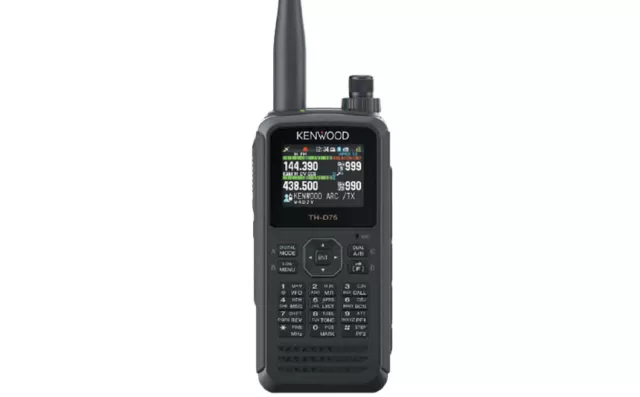
Kenwood TH-D74 firmware
Kenwood · TH-D74 · TH-D74 · Handheld
Latest firmware for the Kenwood TH-D74 is v1.11 (August 26, 2020).
Specifications
TH-D74 specifications
Figures for the TH-D74A.
- Type
- Amateur VHF/UHF transceiver
- Frequency range
- USA / TX: 144-148 / 222-225 / 430-450 MHz / RX: 0.1-524 MHz
- Modes
- TX: FM / NFM / DV (D-Star) / RX: AM / FM / NFM / WFM / SSB / CW / DV (D-Star)
Show the full specification Hide the full specification
General
- Mode
- TX: FM / NFM / DV (D-Star) RX: AM / FM / NFM / WFM / SSB / CW / DV (D-Star)
- Type
- Amateur VHF/UHF transceiver
- Weight
- 345 g (12.17 oz), with KNB-75L, antenna and belt clip
- Power supply
- 6-9.6 VDC (Battery pack) or 11-15.9 VDC (external)
- Tuning steps
- Standard steps: 5 / 6.25 / 8.33 / 9 / 10 / 12.5 / 15 / 20 / 25 / 30 / 50 / 100 KHz Fine tuning: 20 / 100 / 500 / 1000 Hz (Band B, AM/SSB/CW only)
- Other features
- CTCSS/PL. DCS. Micro-SD card. Micro-USB. Built-in GPS and APRS. Built-in bar entenna for 0.1-10 MHz RX. Color TFT. Weather alert. Audio equalizer. Hi-performance DSP. Clock. Bluetooth class 2. Backlit keyboard.
- Frequency range
- USA TX: 144-148 / 222-225 / 430-450 MHz RX: 0.1-524 MHz
- Dimensions (W*H*D)
- 56*120*34 mm (2.2*4.72*1.34"), with KNB-75L
- Frequency stability
- ±2 ppm @ -10 to +50°C (14 to 122°F)
- Repeater shift / offset
- ±0 to 29.95 MHz in 50 KHz steps
- Channels / memory management
- 1000 regular in 30 groups with alpha tags 100 program scan 1 priority Non-volatile storage
- Antenna impedance / connector
- 50 ohm / SMA
- Current drain / power consumption
- RX: 48-310 mA (GPS on adds an extra 115 mA) TX: 0.4-2 A
Miscellaneous
- Manufactured
- Malaysia, 2016-2022 (Discontinued)
Receiver Section
- Selectivity
- FM: 12 KHz (-6 dB) 30 KHz (-50 dB)
- Sensitivity
- AM (10 dB S/N) 0.3-0.52 MHz: 4 uV 0.52-1.8 MHz: 1.59 uV 1.8-54 MHz: 0.63 uV 54-76 MHz: 1.12 uV 118-174 MHz: 0.5 uV 200-250 MHz: 0.63 uV 382-412 MHz: 1.12 uV 415-524 MHz: 1.12 uV FM (12 dB SINAD) 28-54 MHz: 0.32 uV 54-76 MHz: 0.56 uV 118-144 MHz: 0.36 uV 144-148 MHz: 0.18 uV (Band A), 0.19 uV (Band B) 148-175 MHz: 0.36 uV 200-222 MHz: 0.36 uV 225-250 MHz: 0.36 uV 382-400 MHz: 0.5 uV 400-412 MHz: 0.36 uV 415-430 MHz: 0.36 uV 430-450 MHz: 0.18 uV (Band A), 0.2 uV (Band B) 450-490 MHz: 0.36 uV 490-524 MHz: 0.63 uV NFM (12 dB SINAD) 144-148 MHz: 0.22 uV (Band A), 0.24 uV (Band B) 430-450 MHz: 0.22 uV (Band A), 0.25 uV (Band B) WFM (12 dB SINAD) 76-95 MHz: 1.59 uV 95-108 MHz: 2 uV SSB (10 dB S/N) 1.8-54 MHz: 0.4 uV 54-76 MHz: 0.79 uV 144-148 MHz: 0.16 uV 222-225 MHz: 0.2 uV 430-450 MHz: 0.16 uV DV (PN9/GMSK, 4.8 kbps, BER 1%) 144-148 MHz: 0.2 uV 430-450 MHz: 0.2 uV
- Receiver system
- IF-matrix
- AF output power / speaker
- 400 mW at 10% distortion / 8 ohm
Transmitter Section
- RF output power
- HighMidLowELow 2 m:5 W2 W500 mW50 mW 70 cm:5 W2 W500 mW50 mW
- Modulation system
- FM: Reactance modulation DV: GMSK reactance modulation
- Spurious emissions
- Better than -60 dBc @ Hi/Mid settings
- Microphone input level
- ? mV
- Max FM deviation (Factory set)
- FM: ±5 KHz NFM: ±2.5 KHz
- Microphone impedance/connector
- 2 Kohm / ?-pin
Changelog
TH-D74 firmware changelog
-
v1.09v1.10APRS telemetry and message backup fixed; QSY enhanced to set D-STAR gateway without frequency data. -
v1.08v1.09Adds APRS telemetry decoding and D-STAR reflector XLX support with fast scroll; fixes frequency entry with Weather Alert -
v1.06v1.07New D-STAR reflector modes (DCS/XRF) and fixes for recording reboot and frequency input. -
v1.05v1.06Adds position memory copying to APRS Objects, fixes radio reset issue and KISS mode bugs. -
v1.04v1.05Improved Squelch in high-noise environments and enhanced APRS display. -
v1.03v1.04Fixes TX/RX instability and GPS transmission in DV/DR mode, plus Memory Scan issues. -
v1.02v1.03Fixed squelch in AM/SSB/CW modes, improved DV node device support, and corrected APRS Mic-E encoding.
Firmware history
All versions below were published by Kenwood on kenwood.com. Third-party and modified firmware is never listed.
-
Source:
kenwood.comRelease notes & downloadShow release notes Hide release notes
The following feature is updated.
- Enables display of the model name "FTM-300D" when received an APRS position packet from the Yaesu FTM-300DR/E.
-
APRS telemetry and message backup fixed; QSY enhanced to set D-STAR gateway without frequency data. — summary by updatemystuff.com
Source:
kenwood.comRelease notes & downloadShow release notes Hide release notes
The following feature is updated.
- APRS "Tune" (QSY) operation sets D-STAR gateway communication when D-STAR repeater information is included in the QSY information of the received APRS packets even if without frequency information.
The update is based on a revision of the QSY format. For details, please refer to the following web page by WB4APR Mr. Bob Bruninga (updated on September 30, 2019). http://www.aprs.org/info/freqspec.txt
The following symptoms are revised.
- APRS message line number may not be backed up when turning the transceiver off.
- APRS telemetry packets may not be displayed correctly.
-
Adds APRS telemetry decoding and D-STAR reflector XLX support with fast scroll; fixes frequency entry with Weather Alert — summary by updatemystuff.com
Source:
kenwood.comRelease notes & downloadShow release notes Hide release notes
The following features are updated.
- Enables decoding of standard APRS telemetry format.(Displays telemetry packets sent from the
PSAT2
.)
- Enables display of the model name "FT3D" when received an APRS position packet from the Yaesu FT3DR/E.
- In the D-STAR "Link to Reflector" screen, the radio is able to be set to "XLX" as well as "REF/DCS/XRF".
- In the D-STAR "Link to Reflector" screen, when selecting the reflector number (001 to 999), holding down (for 2 seconds) the [ ] (scroll up) or [ ] (scroll down) activates fast forward or reverse.
The following symptom is revised.
- When Weather Alert is On, frequency direct entry may not work correctly under certain conditions.(TH-D74A only)
-
Source:
kenwood.comRelease notes & downloadShow release notes Hide release notes
The following symptom is revised.
- After updating the firmware, when using a DC power supply without installing a battery pack the radio does not transmit.
-
New D-STAR reflector modes (DCS/XRF) and fixes for recording reboot and frequency input. — summary by updatemystuff.com
Source:
kenwood.comRelease notes & downloadShow release notes Hide release notes
The following features are updated.
- In DV/DR mode, even when the radio cannot receive Original Radio Headers at the beginning of transmissions, the radio displays interrupt screens by using information of Alternative Radio Headers embedded in Data Frames.
Due to the difference of data structure between Original Radio Headers and Alternative Radio Headers, the interrupt screen information may differ in some cases.
The function works only when Alternative Radio Headers are embedded in Data Frames.
- In the D-STAR "Link to Reflector" screen, the radio is able to be set to "DCS" and "XRF" as well as "REF".
The following symptoms are revised.
- The radio might reboot during audio recording.
- Inputting a direct frequency may not be successfully completed.
- The Tone Alert function may be activated in a non-data band.
- Tone squelch might not be canceled in modes other than FM.
- In DV/DR mode, speed data in received GPS Position information may not be converted correctly.
- In DV/DR mode, Fast Data communication may fail depending on the transmission timing.
- When the Tone function is On in FM mode, a beep tone sounds from a Bluetooth audio device (such as a headset or a speaker) at the end of received audio.
-
Adds position memory copying to APRS Objects, fixes radio reset issue and KISS mode bugs. — summary by updatemystuff.com
Source:
kenwood.comRelease notes & downloadShow release notes Hide release notes
The following feature is updated.
- Enables copying positional information from "Position Memory" to "APRS Object" as well as to "My Position".
Press [MARK] and select a stored Position Memory (0-99) as the copy source, and press [ENT] to display the selected Position Memory's details screen.
Next, press [A/B] and select "Copy to APRS Object", and press [A/B] to select an Object (1-3) as the copy target.
Then selected Object's details screen will appear, and press [A/B] to copy the information (Name, Position, Icon) from "Position Memory" to "APRS Object".
Please edit other Object settings in Menu No.516 (APRS Object).
The following symptoms are revised.
- Cannot copy the CALL Channel's memory name to the Priority Channel.
- The radio might reset automatically when sorting APRS Station List.
- In KISS mode, the special character 0xC0 (FEND) is not converted correctly.
- In KISS mode, outstanding TX data might not be sent correctly after STA icon goes off.
- In Memory Channel mode, stored D-STAR repeater's information might not be indicated correctly.
- After sending an APRS position packet in data band, the busy indicator in non-data band disappears.
-
Improved Squelch in high-noise environments and enhanced APRS display. — summary by updatemystuff.com
Source:
kenwood.comRelease notes & downloadShow release notes Hide release notes
The following features are updated.
- When displaying details of the APRS station's data (Page1/4~Page4/4), the D-STAR station's callsign under reception appears in the one line display area as well as the APRS station's callsign.
When Menu No.612 (Direct Reply) is set to "On" (default), D-STAR stations' callsigns appear preferentially than APRS stations' callsigns. And when the Direct Reply operation is available, "*" appears at the right side of the D-STAR station's callsign.
- QSO history on the same date is stored in the same QSO Log file created by each date.
- Improves Squelch characteristics in a high-noise environment.
The following symptom is revised.
- When pressing [F] while the D-STAR Repeater Information or D-STAR RX History Position data is displayed, the North Up / Heading Up does not change correctly.
-
Fixes TX/RX instability and GPS transmission in DV/DR mode, plus Memory Scan issues. — summary by updatemystuff.com
Source:
kenwood.comRelease notes & downloadShow release notes Hide release notes
The following symptoms are revised.
- In DV/DR mode, TX/RX function might become unstable.
- In DV/DR mode, NMEA sentences (GPS data) are not transmitted correctly.
- In DV/DR mode, "ATT" indicator is not displayed.
- In DR mode, unnecessary error indication appears when using Reflector menu functions.
- Memory Scan may not work correctly under certain conditions.
- Cannot recall locked-out memory channels from the memory channel list.
-
Fixed squelch in AM/SSB/CW modes, improved DV node device support, and corrected APRS Mic-E encoding. — summary by updatemystuff.com
Source:
kenwood.comRelease notes & downloadShow release notes Hide release notes
The following feature is updated.
- Supports some DV node devices' irregular data formats.
The following symptoms are revised.
- The "Mic-E Type Code" in an APRS position packet may not be sent correctly under specific settings.
- In AM/SSB/CW mode, squelch function might not work correctly.
-
Source:
kenwood.comRelease notes & downloadShow release notes Hide release notes
The following symptoms are revised.
- APRS popup screen may not appear correctly under certain conditions.
- In DR mode, current access repeater might not be backed up when turning the transceiver OFF.
-
Fixes RX History storage and audio recording issues in DV/DR mode — summary by updatemystuff.com
Source:
kenwood.comRelease notes & downloadShow release notes Hide release notes
The following symptoms are revised.
- In DV/DR mode, RX History may not be stored correctly.
- In DV/DR mode, receiving audio might not be recorded.
Applicable models/units :
The firmware updating program is applicable for the following models/units.
Models: TH-D74A, TH-D74E Serial numbers: From S/NO.B68xxxxx through S/NO.C09XXXXX approx.
Notes
You can find the serial number imprinted on the rear panel after removing the battery.; It consists of an 8-digit number beginning with "S/NO."
: You can check the firmware version of your TH-D74A/E by accessing Menu No.991. The firmware version appears in the LCD display.
Operating Environments
- Operating System (OS)
Windows ® 8.1 (32-bit or 64-bit)
Windows ® 10 (32-bit or 64-bit)
Notes
This software is designed to run on the above operating systems.
Applicable operating systems are subject to change without notice due to the end of the technical support by Microsoft Corporation or change of the product specifications.
The .NET Framework 4.6 which is available for download from Microsoft download center must also be installed. (Windows ® 10 users do not need to install the .NET Framework.).
- Processor
Faster than the recommended CPU for each OS.
- System Memory (RAM)
Larger than the recommended System Memory for each OS.
- Free Hard Drive Space
Larger than the system Hard Drive Space for each OS.
- Peripheral Devices
A display with resolutions higher than VGA (640 x 480)
A keyboard and a mouse, or other pointing devices.
USB 2.0 interface.
Attention
If you do not want to lose user data, save the data using the Memory Control Program MCP-D74 before updating the firmware and write the data back after updating the firmware.
Turn the transceiver OFF before connecting it to a PC.
You cannot connect the TH-D74A/E to a PC COM port via an RS-232C cable.
Notes on usage
Users are prohibited to assign, rent, lease, redistribute, or resell the software.
Users are prohibited to revise, change, translate, merge, de-compile, or reverse engineer the software.
JVCKENWOOD Corporation does not warrant that quality and functions of this software comply with each user's purpose of use of this software, and unless specifically described in this document, JVCKENWOOD Corporation shall be free from any responsibilities to any defects and indemnities to any damages or losses.
Selection and installation of this software shall be done by the user's own designation.
The user shall take full responsibility for the use and effects of this software.
JVCKENWOOD Corporation shall be free from any responsibilities for any incidental losses or damages, such as missing communications or a call opportunity, caused by a failure or performance error of this software.
JVCKENWOOD Corporation shall own all copyrights and other intellectual properties for the software and all manuals and documents attached to the software.
The user shall be allowed to use, not to resell, the software by obtaining a license from JVCKENWOOD Corporation.
While the media on which the software is stored is possessed by the user, the ownership for the software itself shall be reserved for JVCKENWOOD Corporation.
Installation:
Extract the downloaded file "TH-D74_V111E.zip" into a designated folder.
In the designated folder, a folder labeled "TH-D74_V111E" will be created.
In the folder labeled "TH-D74_V111E", two files "TH-D74_V111_e.exe" and "TH-D74_e.chm" are automatically created.
Updating:
- Start the program by double-clicking "TH-D74_V111_e.exe" icon.
- Connect the transceiver's USB port to your PC's USB port using a Micro-USB cable, and select the COM port you will use by following the Help file.
- Proceed firmware updating by following the explanations in the dialog boxes.
Uninstalling:
- Delete the folder labeled "TH-D74_V111E" manually using the Explorer or an alternative method.
- This software does not modify the system registry parameters or system folder.
If you agree with the details listed above, click the following link to download the firmware updating program.
(The latest version includes all previous updates.)
TH-D74 Firmware Update Version 1.11 (August / 2020)
TH-D74_V111E.zip : 7.65MB download
The download is currently suspended due to technical reasons. Sorry for inconvenience.
If you wish to update your TH-D74A/E, please ask your local service center, or click here to contact us.
- KENWOOD Customer Support (Japan HQ) will be closed from December 26, 2024 to January 5, 2025. Inquiries received during this period will be answered sequentially from January 6, 2025.
-->
- KENWOOD Customer Support (Japan HQ) will be closed from August 9, 2024 to August 18, 2024. Inquiries received during this period will be answered sequentially from August 19, 2024.
-->
Windows is a registered trademark or trademark of Microsoft Corporation in the United States and other countries.
.NET Framework is a registered trademark or trademark of Microsoft Corporation in the United States and other countries.
Global Site
Watch the TH-D74 for updates
Get an email the moment Kenwood publishes new firmware. Just your email — no account or password needed.