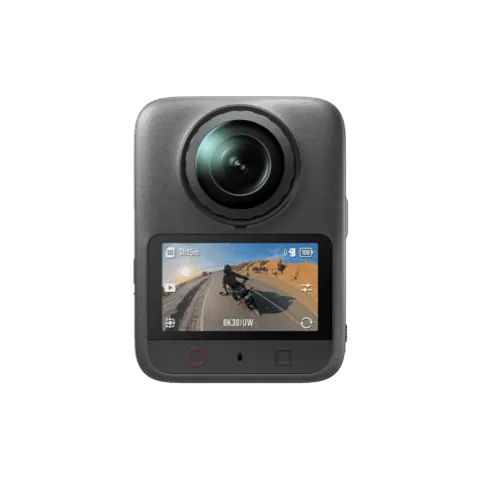
DJI Osmo 360 firmware
DJI · Osmo 360 · Video
Latest firmware for the DJI Osmo 360 is v01.02.07.21 (September 30, 2025).
Changelog
Osmo 360 firmware changelog
-
v01.01.06.41v01.02.07.20Introduces night recording, wireless mic connectivity, and album password protection. -
v01.01.06.30v01.01.06.41Adds a gesture-based Twist Shot feature and enhances panoramic video quality, D-Log color rendering, plus bug fixes. -
v01.01.06.20first tracked Added 8K 360° and SuperNight recording, bitrate controls, 5K video option, Endurance Mode for battery life, and GPS remote support.
Firmware history
-
Release notes & download
Show release notes Hide release notes
- Fixed some minor bugs.
-
Introduces night recording, wireless mic connectivity, and album password protection. — summary by updatemystuff.com
Release notes & downloadShow release notes Hide release notes
- Added SuperNight mode in Single Lens mode, supporting 2.7K 16:9, 2.7K 4:3, 4K 16:9, and 4K 4:3 recording at 25/30 fps with an ultra-wide field of view and enhancing video quality in night scenes.
- Added support for DJI Mic 3. Press and hold the linking button on a DJI Mic 3 transmitter for 2 seconds. Then, e nter the liveview on the camera and swipe down from the top of the screen, tap the Wireless Microphone icon, and tap TX1 /TX2 to connect. The camera can connect up to two transmitters simultaneously.
- Added the album password feature to enhance privacy protection. Enter the liveview and swipe down from the top of the screen. Then, tap the Settings icon and tap Password. Once the password takes effect, verification is required when accessing playback for the first time after powering on.
- Fixed some minor bugs.
-
Adds a gesture-based Twist Shot feature and enhances panoramic video quality, D-Log color rendering, plus bug fixes. — summary by updatemystuff.com
Release notes & downloadShow release notes Hide release notes
- Added the Twist Shot feature. When the camera is powered on, you can twist the selfie stick twice to take a photo or start recording. To enable this feature, enter the liveview and swipe down from the top of the screen. Then, swipe left and tap the Twist Shot icon.
- Enhanced panoramic video quality for 8K r ecording at 48 /50fps.
- Enhanced color reproduction and detail in D-Log Mmode.
- Fixed some minor bugs.
-
Release notes & download
Show release notes Hide release notes
- Enhanced panoramic video quality by o ptimizing Auto Exposure (AE) strategies and color rendering.
- Enhanced SuperNight video quality by optimizing noise reduction and color rendering.
- Fixed some minor bugs.
-
Added 8K 360° and SuperNight recording, bitrate controls, 5K video option, Endurance Mode for battery life, and GPS remote support. — summary by updatemystuff.com
Release notes & downloadShow release notes Hide release notes
- Supported 8K recording at 48 /50fps in 360° mode.
- Added SuperNight mode in 360° mode, supporting 8K/6K recording at 24/25/30fps and enhancing color performance in night scenes.
- Added bitrate settings. You can switch between high bitrate and standard bitrate in system settings.
- Added support for 5K recording at 50/60 fps in 4:3 aspect ratio when using Single Lens > Video mode.
- Added Endurance Mode to significantly extend battery life. To enable this mode, switch to Panoramic Video mode, tap the parameter adjustment icon on the right, and then tap Endurance Mode.
- Added support for Osmo Action GPS Bluetooth Remote Controller.
- Fixed some minor bugs.
Watch the Osmo 360 for updates
Get an email the moment DJI publishes new firmware. Just your email — no account or password needed.