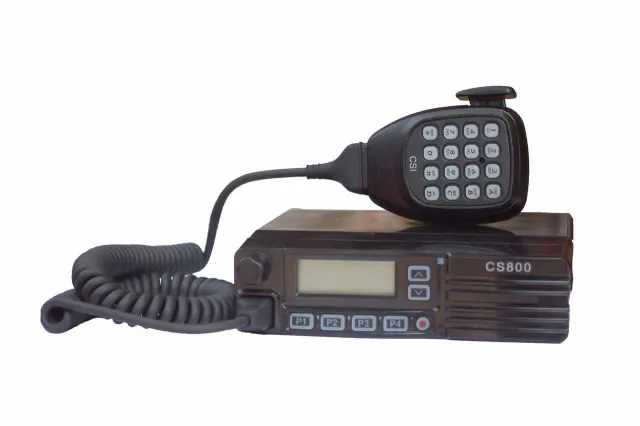
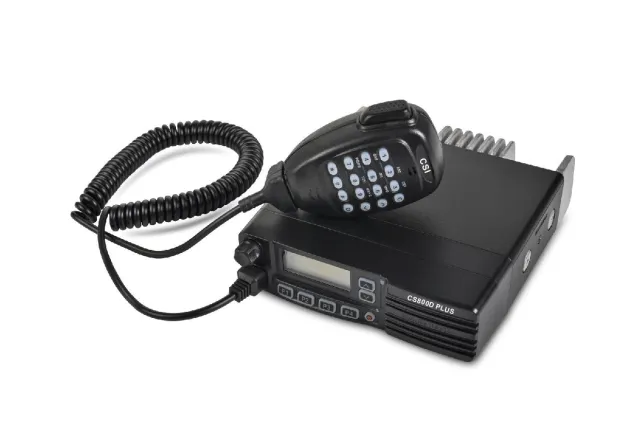
Connect Systems CS800D firmware
Connect Systems · CS800D · CS800D · VHF/UHF transceiver
Latest firmware for the Connect Systems CS800D is v30.55 (August 17, 2023).
Changelog
CS800D firmware changelog
-
v30.43v30.47Fixed random reboots and double-beep issue with user-defined tones -
v30.42v30.43Enables keypad entry for calls and optional call persistence across power and channel changes, plus bug fix. -
v30.41v30.42Group and private calls accessible from microphone keypad with optional persistence across channel and power cycles. -
v30.35v30.36Digital Rx Voice Gain Level activated, Scan Hang time replaced by Tx Dropout Delay -
v30.32v30.34Added digital channels to scan feature with improved speed; new parameter for Color Code and polling. -
v30.30v30.31Fixes contact list bug but requires code plug workaround
Firmware history
All versions below were published by Connect Systems on connectsystems.com. Third-party and modified firmware is never listed.
-
Source:
connectsystems.comRelease notes & downloadShow release notes Hide release notes
This firmware allows for the setting of Tx Preamble when sending SMS messages. As of this date, it has not been tested.
-
Fixed random reboots and double-beep issue with user-defined tones — summary by updatemystuff.com
Source:
connectsystems.comRelease notes & downloadShow release notes Hide release notes
This version fixed two problems:
- The radio would occasionally reboot in a middle of a conversation or at other times. This version no longer does that.
- When using the user defined tone instead of the default, the old version generated two beeps. This version works correctly and generates a single beep.
-
Enables keypad entry for calls and optional call persistence across power and channel changes, plus bug fix. — summary by updatemystuff.com
Source:
connectsystems.comRelease notes & downloadShow release notes Hide release notes
This version allows you to enter in the group call or private call from the microphone keypad. The call does not (optionally) disappear between channel changes or power on off cycles. This version fixed a minor problem from the last version.
-
Group and private calls accessible from microphone keypad with optional persistence across channel and power cycles. — summary by updatemystuff.com
Source:
connectsystems.comRelease notes & downloadShow release notes Hide release notes
This version allows you to enter in the group call or private call from the microphone keypad. The call does not (optionally) disappear between channel changes or power on off cycles.
There is a minor issue in this version.
When you set the default to group call it will make a private call and when you set the default to private call it will make a group call.
-
Source:
connectsystems.comRelease notes & downloadShow release notes Hide release notes
This version allows you to generate all 16 possible DTMF codes
-
Digital Rx Voice Gain Level activated, Scan Hang time replaced by Tx Dropout Delay — summary by updatemystuff.com
Source:
connectsystems.comRelease notes & downloadShow release notes Hide release notes
This version fixed a problem with Digital Rx Voice Gain Level. With the previous versions, this feature was not implemented. This version is implemented. The Scan Hang time in the settings menu is no longer operational. It has been replaced by Tx Dropout Delay in the scanning menu.
-
Source:
connectsystems.comRelease notes & downloadShow release notes Hide release notes
This version fixed a problem with enhanced encryption. If you are not using encryption there is no reason to update at this time.
-
Added digital channels to scan feature with improved speed; new parameter for Color Code and polling. — summary by updatemystuff.com
Source:
connectsystems.comRelease notes & downloadShow release notes Hide release notes
This version This version added the digital channels to the scan feature, improved digital channel scan speed, and added a new parameter called "Color Code and TIme Slot and Polling interval time" If using scan, do the following for both parameter choices: Set the Dwell Time to 2000 mS Set the Threshold parameter to 1 or greater Set the Tx Dropout delay to a non zero value Update to this version after you followed the directions in version MS.30.31
-
Source:
connectsystems.comRelease notes & downloadShow release notes Hide release notes
This version fixed a minor problem with the dynamic setting of the group or private call from the keypad. Update to this version after you followed the directions in version MS.30.31
-
Fixes contact list bug but requires code plug workaround — summary by updatemystuff.com
Source:
connectsystems.comRelease notes & downloadShow release notes Hide release notes
This version fixed a problem with the 260,000 contact list. There is an issue with this version that is fixed as follows:
- Read and save code plug with version R4.03.22 of the CPS.
- Update the firmware
- Write the code plug back to the radio. This problem will be fixed in future versions.
-
Added Operator Selected Tones feature to change CTCSS/DCS codes on the fly. — summary by updatemystuff.com
Source:
connectsystems.comRelease notes & downloadShow release notes Hide release notes
This version added the following changes 1.
To the CPS, in the button section, added OST Save and OST Temporary 2.
In the firmware, added the OST feaure.
OST is operator selected tones and is a way for the user to change the CTCSS and DCS functions on the fly With this feature you do the following: Press the appropriate button on your radio, select if you want CTCSS or DCS for Tx or Rx and then press the "O" key.
Then enter the CTCSS or DCS code and then press PTT
-
Added 10 features including DTMF stun/kill, LED color, and beep preference, plus known parameter configuration issues. — summary by updatemystuff.com
Source:
connectsystems.comRelease notes & downloadShow release notes Hide release notes
This version added the following changes 1.
Transmittind Delay drop out timer priority Channel 2.
Transmittind Delay drop out timer non priority Channel 3.
Dwell Time on priority Channel 4.
Dwell Time on non priority Channel 5.
Threshold Parameter Analog 6.
Threshold Parameter Digital 7.
Beep Preference 8.
Analog Promiscous Mode 9.
Scanning LED color 10.
Stun and Kill with DTMF Note: In this version, if you keep the Threshold Parameter at 0, the system will lockup with any noise.
This is not an error but predicable with how scanning works.
If Tx Drop Out Delay is set to zero and the system acquires a channel, the system will lock-up.
Don't leave that parameter at zero.
This bug will be fixed in the next version.
-
Source:
connectsystems.comRelease notes & downloadShow release notes Hide release notes
This version has the the following changes:
- Added DTMF Kill and Radio Check. To revive you must reload a code plug
- Fixed a minor bug in the CPS for the contacts.
-
Added voice annunciation for channels/zones, separate analog/digital gain controls, increased contacts to 260,000, and fixed issues. — summary by updatemystuff.com
Source:
connectsystems.comRelease notes & downloadShow release notes Hide release notes
This version has the the following changes:
- Increased the number of contacts to 260,000 in the radio.
- Changed the wording on the microphone gain to clearly show which parameters are for the analog and which parameters are for the digital.
- Channel and Zone voice annunication allows you to define each channel and each zone in your voice and to say whatever you want.
- MDC1200 Kill, MDC1200 Revive, and MDC1200 Radio Check allows you to remotely brick a radio and remotely revive the radio and also check if the remote radio is alive.
- Added seperate gain control for both Analog and Digital transmissions. Please set a value for those parameters when you first use the new CPS.
- Fixed the following problem: "The receiving radio in the all call mode will beep and interrupt the call every three seconds showing the calling radio ID and the all call text on the screen 7. Talker Alias no longer locks up the radio if the talker alias does not come in right.
- Designated spelled wrong in the CPS corrected.
- Battery reference either removed or grayed out in the CPS
- Text messages sent does no longer ends up in the text inbox.
- The CPS for the CS710 and the CS800D now consistent in how many clicks it takes to open up a category.
- Changed MISCELL to MISC in CPS
-
Source:
connectsystems.comRelease notes & downloadShow release notes Hide release notes
This version added the ability to output a logic level based on whether or not the radio detected carrier. This is very useful if you want to make a repeater out of two mobiles.
-
Source:
connectsystems.comRelease notes & downloadShow release notes Hide release notes
You can update your radio from whatever version you have to this version without having to go through any intermediate steps. SAVE YOUR CODE PLUG 1. Load the code plug from your radio using your the CPS that you normally use for that version of the firmware currrently in your radio.
- Save the code plug as you will need it later. UPDATE THE FIRMWARE USING THE DB15 PROGRAMMING CABLE Use Flashburn 3.00 to load the following programs. Use the USB to DB15 programming cable. See the instruction in the CS800D home page for instructions on how to use the Flashburn 3.00 Program.
- Get the radio into programming mode by pressing P1 as you turn on the radio. The LED should now blink showing multiple colors
- Load Bootloader R2.05D using Flashburn 3.00 if you do not already have it installed.
- Turn off the radio.
- Get the radio into programming mode by pressing P1 as you turn on the radio. The LED should now blink showing multiple colors
- Load CS800D_RCDB_Upgrade using Flashburn 3.00
- Turn off the radio.
- Get the radio into programming mode by pressing P1 as you turn on the radio. The LED should now blink showing multiple colors
- Load CS800D_Host_MS.30.16 using Flashburn 3.00.
- Turn off the radio.
- Turn on the radio. UPDATE THE FRONT PANEL USING THE RJ45 PROGRAMMING CABLE. Use the Front Panel Update Tool to load the following program. See the instruction in the CS800D home page on instructions on how to use the Front Panel Update Tool 1. Unzip the Front Panel Firmware 2. Load Front Panel Firmware UPDATE THE VOICE USING THE DB15 PROGRAMMING CABLE 1. Unzip the voice packet file 2. Reload the Voice Packets using the CPS RESTORE YOUR CODE PLUG 1. Using the CPS Data Translate program in CPS version R4.03.09, update the code plug saved earlier. See the instructions in the CS800D home page on instructions on how to do it.
- Write it back to your radio. IF THE RADIO IS BRICKED If the radio is truely bricked, then you have one more step to do before you complete the above steps. Contact us if that happens to you.
-
Adds talker alias and dual-slot digital monitoring, fixes occasional Rx audio dropouts — summary by updatemystuff.com
Source:
connectsystems.comRelease notes & downloadShow release notes Hide release notes
This version fixed a problem in version 11 (discontinued) that caused it to fail only on certain hardware versions.
This version should not be used and you should go directly to version MS.30.16 above.
This version correctly implements talker alias (New Feature) This version looks at both slots at the same time in digital monitor mode (New Feature) This version improved problems where the Rx Audio occasionaly dropped in the middle of a QSO.
To convert your old code plug using static zones to the new dynamic zone format, use conversion utility in tool pulldown menu of the CPS. (New feature)
-
Source:
connectsystems.comRelease notes not published by vendor — see official page.
Release notes & download -
Source:
connectsystems.comRelease notes not published by vendor — see official page.
Release notes & download -
Source:
connectsystems.comRelease notes & downloadShow release notes Hide release notes
This version should not be used and you should go directly to version MS.30.16 above.
Front Panel Firmware Version 2.00.14 is loaded with Front Panel Update Tool.
Load the front panel firmware first.
Must unzip front panel firmware before using it.
CS800D Firmware Version MS 20.59 and Bootloader Version R2.05D.bin is loaded with Flash Burn 3.00.
Load Bootloader before loading CS800D firmware.
Voice packets are loaded through the tools section of the CPS.
Updating voice packets should be done last.
Must unzip file before using it.
-
Source:
connectsystems.comRelease notes & downloadShow release notes Hide release notes
This version should not be used and you should go directly to version MS.30.16 above.
Watch the CS800D for updates
Get an email the moment Connect Systems publishes new firmware. Just your email — no account or password needed.