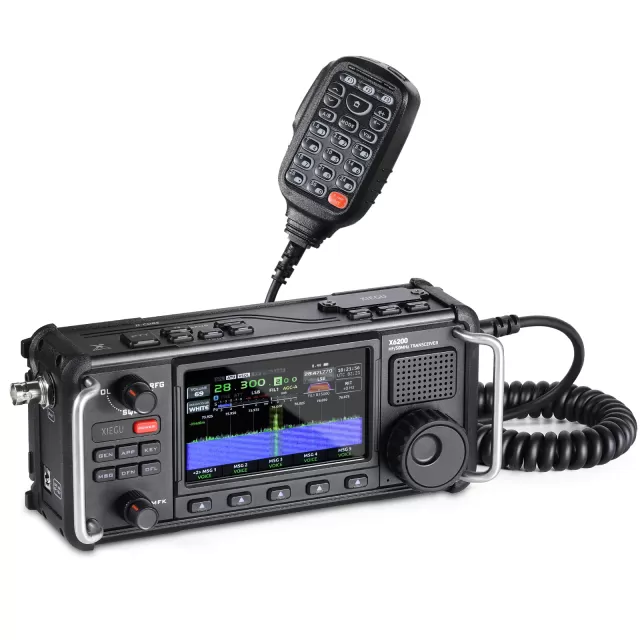
Xiegu X6100 firmware
Xiegu · X6100 · X6100 · SDR transceiver
Latest firmware for the Xiegu X6100 is v1.2.0 (December 13, 2025).
Specifications
X6100 specifications
- Type
- Amateur HF/VHF transceiver
- Frequency range
- TX: 10-160 m + WARC / 6 m / RX: 0.5-30 / 50-54 MHz
- Modes
- AM / FM / SSB / CW / RTTY
Show the full specification Hide the full specification
General
- Mode
- AM / FM / SSB / CW / RTTY
- Type
- Amateur HF/VHF transceiver
- Weight
- 880 g (1.94 lb)
- Power supply
- 7.4 VDC (Li-Ion battery pack) or 9-15 VDC external
- Tuning steps
- Down to 1 Hz
- Other features
- 4" color TFT. Built-in auto-ATU. SWR scanner. Voice memory keyer. CW keyer. Bluetooth. WiFi. Built-in sound card. USB-C. I/Q output. Dimmer. Spectrum display (96 KHz) and waterfall. MicroSD card slot. Clock. Internal mike and PTT. CW/RTTY/BPSK decoder.
- Frequency range
- TX: 10-160 m + WARC / 6 m RX: 0.5-30 / 50-54 MHz
- Dimensions (W*H*D)
- 180*86*49 mm (7.09*3.39*1.93")
- Frequency stability
- ±1.5 ppm @ 25°C (77°F), within 10-30 minutes after power on 1 ppm per hour thereafter
- Channels / memory management
- 200 regular with alpha tags
- Antenna impedance / connector
- 50 ohm / BNC
- Current drain / power consumption
- RX: 330 mA (Average) TX: Max 3 A
Miscellaneous
- Manufactured
- China, 2021-202x
Receiver Section
- Sensitivity
- AM (10 dB S/N) 0.5-2.0 MHz: 10 uV 2.0-30 MHz: 2 uV 50-54 MHz: 2 uV FM (12 dB SINAD) 28-30 MHz: 0.22 uV 50-54 MHz: 0.22 uV SSB/CW (10 dB S/N) 1.8-2.0 MHz: 0.35 uV 2.0-30 MHz: 0.2 uV 50-54 MHz: 0.2 uV
- Receiver system
- SDR, 24-bit
- AF output power / speaker
- 400 mW at 10% distortion / 8 ohm
- External speaker connector
- 3.5 mm (Stereo), 4-16 ohm
Transmitter Section
- RF output power
- Max Pwr @ BatteryMax Pwr @ 13.8V AM:1.5 W2.5 W FM:5 W10 W SSB (PEP):5 W10 W CW/RTTY:5 W10 W
- Modulation system
- AM: Low level FM: Variable reactance SSB: Balanced
- Spurious emissions
- 10-160 m: Better than -50 dB 6 m: Better than -60 dB
- Microphone input level
- ? mV
- Max FM deviation (Factory set)
- ±5 KHz
- Microphone impedance/connector
- 600 ohm (Nominal) / 8-pin (RJ45 / Modular)
Changelog
X6100 firmware changelog
-
v1.1.9v1.2.0Spectrum cursor mode for tuning, AGC redesigned with time constants and SNR improvement, Wi-Fi optimized. -
v1.1.7v1.1.8Receiver performance improved via baseband gain adjustment, but version withdrawn—use v1.1.9. -
v1.1.8v1.1.9Fixes TX problems and improves color scheme for better sunlight visibility. -
v1.1.3v1.1.7Added wfview server and updated battery management to use battery gauge. -
v1.1.3first tracked Low-battery shutdown adjusted to prevent false shutdowns, and 6m frequency range corrected
Firmware history
All versions below were published by Xiegu on xiegu.eu and xiegu.com. Third-party and modified firmware is never listed.
-
Spectrum cursor mode for tuning, AGC redesigned with time constants and SNR improvement, Wi-Fi optimized. — summary by updatemystuff.com
Source:
xiegu.euRelease notes & downloadShow release notes Hide release notes
File – Filename: x6100udimg-251213001.zip – SHA256: 47d136b51d6077c1b138e029e800dcb20386a6bf45d80b72805e32c1e91fcaa9
Changes
[Wi-Fi] – Optimized operating logic on the Wi-Fi settings page – Added HELP guidance within the Wi-Fi settings interface
[AGC]
– Adjusted AGC algorithm for improved signal-to-noise ratio (SNR)
[RADIO SETTING1]
– Renamed menu items 1 and 2 to AGC SLOW and AGC FAST – AGC values now represent time constants in milliseconds (ms) – Usage notes:
- AM / SSB voice: AGC SLOW provides smoother audio
- CW: AGC FAST improves signal detail and readability [Spectrum] – Added cursor mode for spectrum display operation – Cursor mode activation:
- Set CENTER MODE to OFF in RADIO SETTING1
- Use frequency wheel to align cursor with the desired signal – Operational tips:
- Moving the cursor farther from the zero point improves SNR
- Interference avoidance method:
– Shift tuned frequency to move the interference point – Align cursor with the desired signal to avoid interference Important Notes – A factory reset is REQUIRED after upgrading – Skipping the reset may result in:
- Incorrect band data
- Inability to switch bands
- Frequency display showing 0
-
Fixes TX problems and improves color scheme for better sunlight visibility. — summary by updatemystuff.com
Source:
xiegu.euRelease notes & downloadShow release notes Hide release notes
NOTICE
: The v1.1.8-240904002 update was withdrawn on request by Xiegu.
If you have updated your X6100 and experience TX failure issues, this update will resolve the issue. v1.1.9 240915001 Release Note Image File SHA256: a627dd9a2e18ef92a8df1ec03d51c430f03f92eb19b40fc0935dc2d188578c88 APP: V1.1.9 Sep 14 2024,12:11:57 BASE: V1.1.8 Sep 15 2024,15:22:37
- Fixed TX problem with specific hardware after updating to v1.1.8.
- Color scheme updated for better visibility in sunlight. v1.1.8 240904002 Release Notes Image File SHA256: 31d0bffe9817efbb2ce94db910c5cf2d1e72617976cd2326526298e22dfc04b2 APP: V1.1.8 Sep 4 2024,14:11:48 BASE: V1.1.7 Sep 4 2024,11:35:33 The gain allocation in the baseband section adjusted to improve the received signal to noise ratio, to reduce broadcast crosstalk, and o minimize birdies.
Adjusted the spectrum/waterfall automatic level tracking mode to improve the signal contrast when dealing with strong signals, easier to distinguish between signal and noise.
Added audio spectrum/oscilloscope switch, when turned off the spectrum/waterfall will be use the full svreen.
Fixed a bug where MFK tags could not be saved.
Optimized the NR, noise Reduction algorithm.
Adjusted the CI-V data format.
Adjusted the operation logic of the WLAN settings interface.
Adjusted the operation logic of BLUETOOTH setting interface.
-
Receiver performance improved via baseband gain adjustment, but version withdrawn—use v1.1.9. — summary by updatemystuff.com
Source:
xiegu.euRelease notes & downloadShow release notes Hide release notes
Xiegu keeps supporting their older models, including the X6100 HF/50MHz SDR transceiver, with firmware updates to improve the user experience.
Do you own a X6100?
This firmware update for the X6100 feature many improvements , the most prominent and update of the gain allocation in the baseband section for improved receiver performance .
The gain allocation in the baseband section adjusted to improve the received signal to noise ratio, to reduce broadcast crosstalk, and o minimize birdies.
Adjusted the spectrum/waterfall automatic level tracking mode to improve the signal contrast when dealing with strong signals, easier to distinguish between signal and noise.
Added audio spectrum/oscilloscope switch, when turned off the spectrum/waterfall will be use the full svreen.
Fixed a bug where MFK tags could not be saved.
Optimized the NR, noise Reduction algorithm.
Adjusted the CI-V data format.
Adjusted the operation logic of the WLAN settings interface.
Adjusted the operation logic of BLUETOOTH setting interface.
Color scheme updated for better visibility in sunlight.
Note : v1.1.8-240904002 firmware update was withdrawn on request by Xiegu.
If you have updated your X6100 and experience TX failure issues, this update will resolve the issue.
Make sure you only use Firmware Update v1.1.9 (2024-09-15) when updating your X6100.
Download the update here.
-
Added wfview server and updated battery management to use battery gauge. — summary by updatemystuff.com
Source:
xiegu.euRelease notes & downloadShow release notes Hide release notes
V1.1.7 Release Note Image File SHA256: BF153B10AB3D942060E65BE35A64A2D6C419A5EFF8D941E5C8CE93CE6DD44305 APP: V1.1.7 Jul 26 2023,11:50:55 BASE: V1.1.6 Mar 7 2023,09:57:03 NOTICE: Consider this version experimental! For normal use we recommend version 1.1.6.
- Added wfview server to enable support for wfview, see included ‘x6100 wfserver.pdf’ file for setup instructions. wfview is a free and open source program that allows many modern Icom ham radio transceivers (such as the Xiegu X6100, IC-7300, IC-9700, IC-7610, IC-R8600, the IC-705, and many others) to be controlled via a computer. wfview shows the gorgeous spectrum display on whatever display is connected, including projectors, touch screens, and TVs. wfview allows for full radio (remote) control from a computer keyboard and basic control from a numeric keypad. wfview can run on hardware ranging from the $35 Raspberry Pi to laptops to desktops. wfview runs on recent versions of Linux, macOS, and Windows. wfview supports rig control over ethernet/wifi as well as over the traditional USB serial CIV bus. wfview also allows older radios to be accessed over the internet, for full control and low-latency audio streaming.
More information about wfview is found at wfview.org .
Tips & Note: #### The X6100 internal WiFi antenna is only usable when adjacent to the access point.
Consistent performance is achieved by connecting a wired USB-C LAN dongle to the HOST connector using a LAN cable between the radio and access point.
Always read the enclosed update log!
ATTENTION: If you have firmware older than the previous January 17 update, please see the below information regarding the battery management update;
- The built-in battery gauge is enabled to manage the battery cell. After the upgrade, the battery voltage will no longer be used as the management data, but the battery capacity measured by the battery gauge will be used as the management data. The relevant precautions are as follows:
1.1 After updating the firmware, please perform 4 full charge and full discharge cycles in a row, after which the fuel gauge will measure accurately.
Just after updating the firmware, before the 4 times of charge and discharge are completed, the displayed power error is large, so don’t pay attention to it.
The charging process should be kept as continuous as possible until the charging instruction is completed, which is conducive to the accurate capacity determination of the fuel gauge. 1.2 The updated charging indicator status is as follows: Blinking: Indicates charging Steady on: Indicates that charging is complete Off: When the charging option is turned off in the menu, the indicator light will not be on. 1.3 After the update, when the power is lower than 10%, the battery symbol shows red and the interior is empty, and the device will automatically shut down. 1.4 The battery voltage is no longer used as the basis for the judgment of low battery.
-
Low-battery shutdown adjusted to prevent false shutdowns, and 6m frequency range corrected — summary by updatemystuff.com
Source:
xiegu.euRelease notes & downloadShow release notes Hide release notes
Jan 25 2022 important update with correction to 6m transmit frequency range (50-54 MHz) and change of low-battery shutdown level to prevent low voltage shutdown when battery gauge has not been calibrated.
App: Version V1.1.3 Jan 15 2022,14:48:38 Correct the problem of wrong frequency division of 6m (original division: 50.1M~54.0M, modified to: 50.0M~54.0M) The conditions of low-battery shutdown are modified to: battery <10% and voltage lower than 7.3V to prevent low-battery shutdown by mistake when the fuel gauge is not calibrated.
Base: Version number V1.1.3 Jan 25 2022,14:21:03 Fix the problem that the RTS signal of the CI-V/CAT port could not control the CW transmission ⇒ Xiegu X6100 Firmware Update v1.1.3 (2022-01-25) Always read the enclosed update log!
Instructions for FW update: Download “ Xiegu X6100 Firmware Update Tutorial ” and “ SD Card Creation Tool ” needed for updating of FW separately. (if you already did the 4 full charge and full discharge cycles you can ignore the below instruction).
ATTENTION: If you did not install the previous January 17 update, please see the below information regarding the battery management update (if you already did the ;
- The built-in battery gauge is enabled to manage the battery cell. After the upgrade, the battery voltage will no longer be used as the management data, but the battery capacity measured by the battery gauge will be used as the management data. The relevant precautions are as follows:
After updating the firmware, please perform 4 full charge and full discharge cycles in a row, after which the fuel gauge will measure accurately.
Just after updating the firmware, before the 4 times of charge and discharge are completed, the displayed power error is large, so don’t pay attention to it.
The charging process should be kept as continuous as possible until the charging instruction is completed, which is conducive to the accurate capacity determination of the fuel gauge.
The updated charging indicator status is as follows: Blinking: Indicates charging Steady on: Indicates that charging is complete Off: When the charging option is turned off in the menu, the indicator light will not be on.
After the update, when the power is lower than 10%, the battery symbol shows red and the interior is empty, and the device will automatically shut down.
The battery voltage is no longer used as the basis for the judgment of low battery.
Watch the X6100 for updates
Get an email the moment Xiegu publishes new firmware. Just your email — no account or password needed.