Icom IC-7850 firmware
Icom · IC-7850 · IC-7850 · HF transceiver
Latest firmware for the Icom IC-7850 is v1.41 (May 15, 2024).
Specifications
IC-7850 specifications
- Type
- Amateur HF/VHF transceiver
- Frequency range
- TX: 10-160 m + WARC / 6 m (Also 137 KHz for Europe) / RX: 0.03-60 MHz
- Modes
- AM / FM / SSB / CW / RTTY / PSK31/63
Show the full specification Hide the full specification
General
- Mode
- AM / FM / SSB / CW / RTTY / PSK31/63
- Type
- Amateur HF/VHF transceiver
- Weight
- 23.5 Kg (52 lb)
- Power supply
- Mains: 85-265 VAC (3-pin IEC C14 connector)
- Tuning steps
- Down to 1 Hz
- Other features
- Four 32 bit DSP's. RTTY/PSK31 encoder/decoder. Auto-AT. USB-connector. 7" color TFT with DVI output. Twin RX. Spectrum scope. Digital voice recorder RS-232C. Built-in voice synthesizer. Compact Flash card for storing personal settings. CTCSS/PL with tone scan.
- Frequency range
- TX: 10-160 m + WARC / 6 m (Also 137 KHz for Europe) RX: 0.03-60 MHz
- Dimensions (W*H*D)
- 424*150*420 mm (16.69*5.91*16.54")
- Frequency stability
- ±0.05 ppm @ 0 to 50°C (32 to 122°F)
- Repeater shift / offset
- ±0 to 9.999 MHz in 1 KHz steps
- Channels / memory management
- 99 regular 2 scan edge Non-volatile EEPROM storage
- Antenna impedance / connector
- 50 ohm / Four SO-239 HF: 16.7-150 ohm with ATU on 6 m: 20-125 ohm with ATU on
- Current drain / power consumption
- RX: 150 VA TX: Max 800 VA
Miscellaneous
- Manufactured
- Japan, 2015-2015 (Discontinued)
Receiver Section
- Selectivity
- AM (BW: 6 KHz) 6 KHz (-3 dB) 15 KHz (-60 dB) FM (BW: 15 KHz) 12 KHz (-6 dB) 20 KHz (-60 dB) SSB/RTTY (BW: 2.4 KHz) 2.4 KHz (-3 dB) 3.6 KHz (-60 dB) CW/RTTY/PSK (BW: 500 Hz) 500 Hz (-3 dB) 700 Hz (-60 dB)
- Sensitivity
- AM (10 dB S/N. BW=6 KHz) 0.1-1.8 MHz: 6.3 uV (Preamp 1 on) 1.8-30 MHz: 2 uV (Preamp 1 on) 50-54 MHz: 1 uV (Preamp 2 on) FM (12 dB SINAD. BW=15 KHz) 28-29.7 MHz: 0.5 uV (Preamp 1 on) 50-54 MHz: 0.32 uV (Preamp 2 on) SSB/CW/RTTY/PSK (10 dB S/N. BW=2.4 KHz) 0.1-1.8 MHz: 0.5 uV (Preamp 1 on) 1.8-30 MHz: 0.16 uV (Preamp 1 on) 50-54 MHz: 0.13 uV (Preamp 2 on)
- Image rejection
- Better than 70 dB
- Receiver system
- Double conversion superheterodyne 1st IF: 64.455 MHz (Main and sub) 2nd IF: 36 KHz
- AF output power / speaker
- 2.6 W at 10% distortion / 8 ohm
- External speaker connector
- 3.5 mm
Transmitter Section
- RF output power
- Pwr AM:5-50 W FM:5-200 W SSB (PEP):5-200 W CW/RTTY:5-200 W PSK:5-200 W 137 KHz: More than -20 dBm (European version only) 100% duty cycle!
- Modulation system
- AM: Low power modulation FM: Phase modulation SSB: PSN modulation
- Spurious emissions
- HF: Better than -60 dB 6 m: Better than -70 dB
- Microphone input level
- ? mV
- Max FM deviation (Factory set)
- ±? KHz
- Microphone impedance / connector
- 600 ohm / 8-pin (Metal locking ring connector)
Changelog
IC-7850 firmware changelog
-
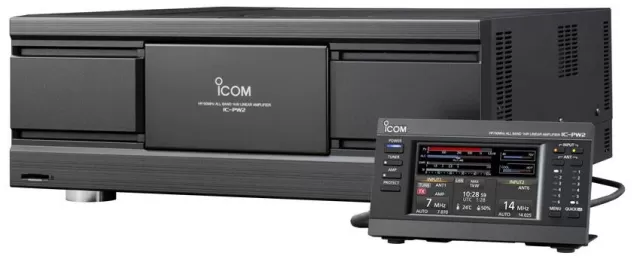
v1.40v1.41Adds IC-PW2 linkage capabilities and improves All Reset operation. -
v1.31v1.40Spectrum scope scroll mode adjusts based on frequency; settings retained after updates -
v1.30v1.31Fixed Ethernet audio output issue when rebooting from Remote Standby mode -
v1.20v1.30Supports RS-BA1 Version 2, expands SSB data passband to 100-2900 Hz, improves stability. -
v1.13v1.20Added MIC+USB modulation input option and enabled RC-28 desktop dial support. -
v1.12v1.13Transmit meter indications corrected in Dual scope mode -
v1.11v1.12Spectrum scope screen enhanced. -
v1.10v1.11Improves transmit audio waveform display on the audio scope. -
v1.01v1.10Dual-band tracking and waterfall marker auto-hide added; S-meter issue fixed. -
v1.01first tracked Faster audio output when switching from transmit to receive mode.
Firmware history
All versions below were published by Icom on icomjapan.com, icomamerica.com, icomeurope.com and icom.co.jp. Third-party and modified firmware is never listed.
-
Adds IC-PW2 linkage capabilities and improves All Reset operation. — summary by updatemystuff.com
Source:
icomjapan.comRelease notes & downloadShow release notes Hide release notes
Changes from Version 1.40
[Added linkage function with IC-PW2]
- Supported for the Linked manual tuning with IC-PW2.
- Supported for the IC-PW2 Dual Connection Mode.
- Supported for the IC-PW2 Transmission Interlock control.
[Any other changes]
- Improved the All Reset operation.
When the [POWER] key cannot turn ON or OFF the transceiver, holding down the [F-IMP] and [MW] keys and turning ON with the [I/O] key on the Rear panel instead of the [POWER] key will perform an All Reset.
For details, please refer to "Information IC-7850/IC-7851 Version 1.41."
-
Spectrum scope scroll mode adjusts based on frequency; settings retained after updates — summary by updatemystuff.com
Source:
icomjapan.comRelease notes & downloadShow release notes Hide release notes
Changes from Version 1.31
[Spectrum scope is improved]
- A Scroll mode that can seamlessly change the displayed scope range, depending on the operating frequency, is added.
- A popup screen that displays when SPAN or EDGE is selected is added.
- The number of FIX EDGE memories is expanded to 4.
- The Reference level is independently memorized for each band.
- The Reference level of the Center mode scope screen while transmitting is fixed at set level independent of the user’s selection.
- The Scope function of the RS-BA1 is improved.
[Other changes]
- The transceiver’s settings are now retained after updating the firmware. (not when reverting to an older version)
- When the firmware is downgraded to Version 1.40 from a newer version, the transceiver's setting may be initialized.
- While operating in the Data mode, the Receive Tone Control is deactivated.
- The default setting of the CI-V USB Port is changed to “Unlink from [REMOTE].”
Refer to INFORMATION IC-7850/IC-7851 Version 1.40 for details.
-
Fixed Ethernet audio output issue when rebooting from Remote Standby mode — summary by updatemystuff.com
Source:
icomjapan.comRelease notes & downloadShow release notes Hide release notes
Changes in this version
Fixed the problem that the voice audio may not be output through the Ethernet (LAN) port when rebooting the transceiver from the Remote Standby mode.
To update the firmware
Thoroughly read Section 10. USING AN SD CARD OR USB FLASH DRIVE and Section 17. UPDATING THE FIRMWARE of the
INSTRUCTION MANUAL
and follow the instructions displayed on the transceiver's LCD screen.
BE SURE to make a backup copy of your data settings to an SD card/USB flash drive before updating the firmware.
-
Supports RS-BA1 Version 2, expands SSB data passband to 100-2900 Hz, improves stability. — summary by updatemystuff.com
Source:
icomjapan.comRelease notes & downloadShow release notes Hide release notes
Changes in this version
RS-BA1 Version 2 is supported.
A SET MODE item is added to expand the transmission passband width for the SSB data mode up to "100 to 2900 Hz".
A SET MODE item is added to make the USB SEND/USB Keying function active immediately after USB port connection.
Stability of the ALC meter is improved.
Output signal for an external display is improved.
Refer to IC-7850/IC-7851 Firmware Update Information Ver.1.30 for more details.
To update the firmware
Thoroughly read Section 10. USING AN SD CARD OR USB FLASH DRIVE and Section 17. UPDATING THE FIRMWARE of the
INSTRUCTION MANUAL
and follow the instructions displayed on the IC-7850 or the IC-7851 LCD screen.
-
Added MIC+USB modulation input option and enabled RC-28 desktop dial support. — summary by updatemystuff.com
Source:
icomjapan.comRelease notes & downloadShow release notes Hide release notes
Changes in this version
A combination of [MIC] and [USB] is now selectable for the Modulation input connector selections in the SET MODE.
The optional RC-28 directly connected to the IC-7850 or the IC-7851 is now usable as a desktop dial.
To update the firmware
Thoroughly read Section 10. USING AN SD CARD OR USB FLASH DRIVE and Section 17. UPDATING THE FIRMWARE of the
INSTRUCTION MANUAL
and follow the instructions appeared on the display of the IC-7850 or the IC-7851.
-
Transmit meter indications corrected in Dual scope mode — summary by updatemystuff.com
Source:
icomjapan.comRelease notes & downloadShow release notes Hide release notes
Changes in this version
Incorrect indications on the transmit meters, while in the Dual scope mode, have been fixed.
To update the firmware
Thoroughly read Section 10. USING AN SD CARD OR USB FLASH DRIVE and Section 17. UPDATING THE FIRMWARE of the
INSTRUCTION MANUAL
and follow the instructions appeared on the display of the IC-7850 or the IC-7851.
-
Spectrum scope screen enhanced. — summary by updatemystuff.com
Source:
icomjapan.comRelease notes & downloadShow release notes Hide release notes
Improvement
This firmware adds an improvement to the Spectrum scope screen.
To update the firmware
An SD card or an SDHC card is required.
Format the card in the IC-7850 or IC-7851 before using it for the update. (First, save any data that is on the card, if necessary.)
Unzip and save the downloaded firmware file in "IC-7850_7851" folder that is on the card.
Save the transceiver’s data onto a separate card before doing the update. It is possible that your data gets lost or corrupted during the update. Thoroughly read Section 10 (USING AN SD CARD OR USB MEMORY) of the Instruction Manual for details.
Thoroughly read Section 17 (UPDATING THE FIRMWARE) of the Instruction Manual before starting the update.
Never turn OFF the transceiver power during the update.
-
Improves transmit audio waveform display on the audio scope. — summary by updatemystuff.com
Source:
icomjapan.comRelease notes & downloadShow release notes Hide release notes
Improvement
The firmware update improves the transmit audio waveform display on the audio scope.
The firmware can be updated using an SD card or USB flash drive. Thoroughly read Section 17 (UPDATING THE FIRMWARE) of the instruction manual to know what the update requires.
Backup your transceiver’s data onto an SD card or USB flash drive as it is possible that your data could get lost or corrupted during the update. Thoroughly read Section 10 (USING AN SD CARD OR USB FLASH DRIVE) of the instruction manual for details.
Never turn OFF the transceiver power during the update.
-
Dual-band tracking and waterfall marker auto-hide added; S-meter issue fixed. — summary by updatemystuff.com
Source:
icomjapan.comRelease notes & downloadShow release notes Hide release notes
I mprovements
A Tracking function has been added to change the Main and Sub band frequencies in the same tuning steps at the same time using the Main dial.
A Waterfall Marker Auto-hide function has been added to automatically hide the marker on the Waterfall display 2 seconds after you stop it in place.
CI-V commands for antenna controllers and the spectrum scope have been added.
The firmware update solves a problem where the S-meter may stop operating.
Refer to IC-7850 Firmware information - version 1.10 or IC-7851 Firmware information - version 1.10 for details.
The firmware can be updated using an SD card or USB flash drive. Thoroughly read Section 17 (UPDATING THE FIRMWARE) of the instruction manual to know what the update requires.
Backup your transceiver's data onto an SD card or USB flash drive as it is possible that your data could get lost or corrupted during the update. Thoroughly read Section 10 (USING AN SD CARD OR USB FLASH DRIVE) of the instruction manual for details.
Never turn OFF the transceiver power during the update.
-
Faster audio output when switching from transmit to receive mode. — summary by updatemystuff.com
Source:
icomjapan.comRelease notes & downloadShow release notes Hide release notes
Improvement
The firmware update improves DSP processing to reduce the time to output received audio after the transceiver is switched from transmit to receive with the squelch OFF.
(Including audio data output to the S/P DIF, LAN and USB connectors.)
The firmware can be updated using an SD card or USB flash drive. Thoroughly read Section 17 (UPDATING THE FIRMWARE) of the instruction manual to know what the update requires.
Backup your transceiver's data onto an SD card or USB flash drive as it is possible that your data could get lost or corrupted during the update. Thoroughly read Section 10 (USING AN SD CARD OR USB FLASH DRIVE) of the instruction manual for details.
Never turn OFF the transceiver power during the update.
Watch the IC-7850 for updates
Get an email the moment Icom publishes new firmware. Just your email — no account or password needed.