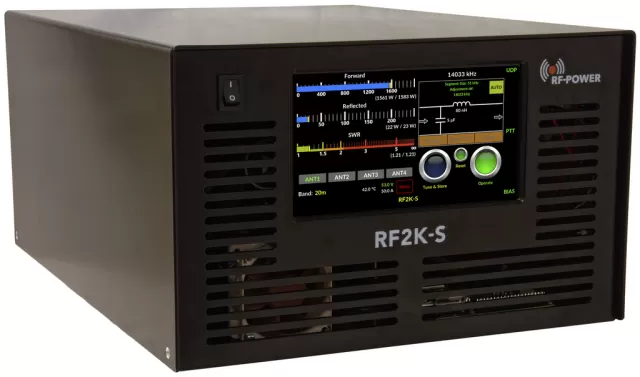
RF-Kit RF2K+ firmware
RF-Kit · RF2K+ · RF2K+ · Amplifier
Latest firmware for the RF-Kit RF2K+ is vG108C132 (January 9, 2022).
Changelog
RF2K+ firmware changelog
-
vG92C112vG108C132Implements API for external program control with minor bug fixes -
vG91C109vG92C112Fixes controller timing bug that caused incorrect model identification. -
vG82C100vG91C109Adds SunSDR TCI support and 6m tuner functionality, with minor bug fixes. -
vG73C94vG82C100Added cross needle and contest display modes with per-band tuner control and boot fix. -
vG73C94first tracked Multiple antenna selection per band with external antenna switch and display controls
Firmware history
All versions below were published by RF-Kit on rf-kit.de. Third-party and modified firmware is never listed.
-
Implements API for external program control with minor bug fixes — summary by updatemystuff.com
Source:
rf-kit.deRelease notes & downloadShow release notes Hide release notes
RF2K-S and 2K+ with controller upgrade SW G108C132 Release information and upgrade procedure
Release features:
- Implemented API
- We would like to thank Dave WO2X for his test effort and valuable feedback. Great job !
With this API ( Application Programming Interface ) the RF2K can be controlled from any program like Note-Red
You’ll find the documentation on our website under Docu JSON file for download is also there.
Minor bug fixes
Upgrade procedure:
This update can be installed using the build in update function
What’s next?
Amplifier TCI command structure extension
Revisit and improve existing functions
Update documentation with the new functions
Vy73 de DH3NAB
Reinhard and Team
-
Fixes controller timing bug that caused incorrect model identification. — summary by updatemystuff.com
Source:
rf-kit.deRelease notes & downloadShow release notes Hide release notes
RF2K-S SW G92C112 Release information and upgrade procedure
We would like to inform you that we needed to release a bug fix SW updae which is mandatory to all RF2K-S and RF2K+ with new controller.
Release features:
- Bug fix for SW identification of RF2K-S and RF2K+
- To identify the version of your amp we introduced jumper C on the controller.
- During boot up the SW is reading the status of this jumper and behaves like an RF2K-S or RF2K+
- Timing issue in the controller could boot your RF2K-S as an RF2K+ which is incorrect.
- We fixed the issue and it has been tested by Betta Tester as well.
Upgrade procedure:
This update can be installed using the build in update function.
What’s next?
Amplifier TCI command structure extension as there are no TCI or CAT commands defined for amplifier.
Updating User Manuals to include latest changes.
Vy73 de Reinhard DH3NAB
-
Adds SunSDR TCI support and 6m tuner functionality, with minor bug fixes. — summary by updatemystuff.com
Source:
rf-kit.deRelease notes & downloadShow release notes Hide release notes
RF2K-S SW G91C109 Release information and upgrade procedure
We would like to inform you that we released
G91C109
which you can online upgrade starting today July 30.
With this release RF2K-S and RF2K+ with controller upgrade are the first amplifier who supports Expert Electronics SunSDR TCI command structure.
Release features:
- SunSDR TCI support with frequency taken from EESDR
- The Host IP address to use is not the SunSDR radio but the IP address of you PC with EESDR
6m Tuner usage now possible On 6m most antennas are mono-band antennas and don’t need much tuning.
Therefor only manual tuning is possible on 6 with limited L and C combination.
Up to 255nH and 51pF are allowed .
Due to the 100kHZ segmentation just a few settings are need to be stored to cover the 6 band.
On QSY Tuner will go automatically in AUTO if in MAN.
Minor bug fixing
Upgrade procedure:
This update can be installed using the build in update function.
Once upgraded you need to install TCI in the Interface / TCI - Menu
What’s next?
Amplifier TCI command structure extension as there are no TCI or CAT commands defined for amplifier.
Updating User Manuals to include latest changes.
At this point I would like to say thank you to the Expert Electronic team for their very professional support to get to this stage.
I also wish all SunSDR users fun with the new feature.
Vy73 de DH3NAB
Reinhard and team
-
Added cross needle and contest display modes with per-band tuner control and boot fix. — summary by updatemystuff.com
Source:
rf-kit.deRelease notes & downloadShow release notes Hide release notes
RF2K-S SW G82C100 Release information and upgrade procedure
We would like to inform you that we released
G82C100
which you can online upgrade starting today.
With this release we completed all promised features and even more. Some of the already implemented features we’ll be revisited and improved in the future. We’ll not stop making the RF2K one of the most advanced amplifier.
Release features:
- Implemented Cross needle display
- You can switch between the displays just touch the power reading area
Implemented Contest Display. Contest Display can be selected in Menu Display Type. You can size the display with VNC to a much smaller area of your PC display and still have the most important information visible. You might change your VNC Scaling to your needs
Implemented display parameter in in Linux config.sys This should fix the issue with black screen after booting up the amp
Implemented Tuner Off on a per band base You can now select on which band you like to use the build in tuner on a per band base.
This way you don’t have to store bypass for any given band you don’t need the tuner.
The RF-KIT Logo is displayed in the Tuner area clearly indicating that the tuner is of.
Implemented Band Data output on the DB-15 connector
Minor bug fixing
Upgrade procedure:
Due to some changes in the Linux system you need to reboot the RF2K-S twice . Just follow the instruction on the display.
What’s next?
TCI interface Integration together with SUNSDR Go all IP.
+++++
Have fun
Vy73 de DH3NAB
Reinhard and team
-
Multiple antenna selection per band with external antenna switch and display controls — summary by updatemystuff.com
Source:
rf-kit.deRelease notes & downloadShow release notes Hide release notes
RF2K-S SW G73C94 Release information and upgrade procedure
We would like to inform you that we released
G73C94
which you can online upgrade starting later today.
Release features:
- Changed antenna selection.
- Now you can assign more than one antenna per band.
- Last used antenna will be used returning to the band.
Changed antenna selection on main display.
Implemented support of an external antenna switch. Supporting up to 16 antennas with stored tuner values..
Changed some naming in the menu structure
Reset button will turn red when error
Sleep Timer implemented
Display On/Off implemented This feature came too late for the documentation but is a kind of self-explaining.
Minor bug fixing
Also today we release the updated User Manual in German and English (can befound in Docu aera). Some of the features out of the last SW release were not described in the user manual, so it was time to do some work on documentation as well.
Joerg DF9LJ did a video about his antenna switching using the external antenna switch feature.
I recommend to watch that video for a better understanding about the new feature.
https://youtu.be/Sv7Jwvotogw
Upgrade procedure:
This upgrade may be installed using the built in update function.
What’s next?
Band Data output
Cross needle power meter
Contest display Minimum info and control of the RF2K-S to fit on a busy display.
+++++
Have fun
Vy73 de DH3NAB
Reinhard and team
Watch the RF2K+ for updates
Get an email the moment RF-Kit publishes new firmware. Just your email — no account or password needed.