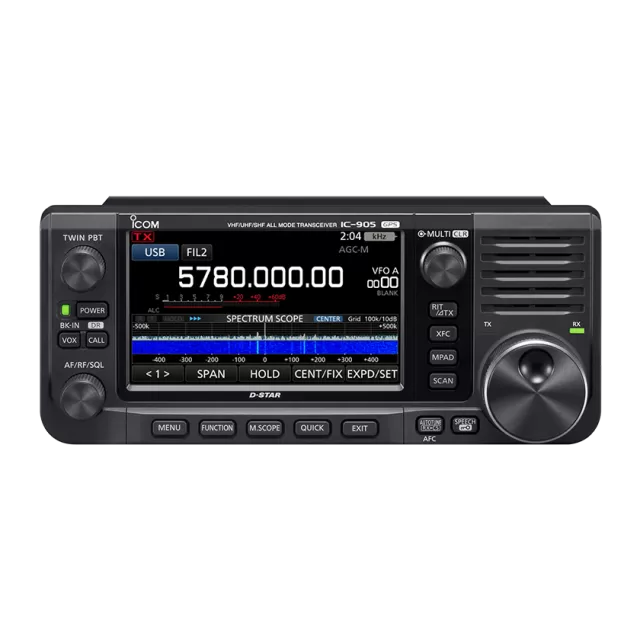
Icom IC-9700 firmware
Icom · IC-9700 · IC-9700 · VHF/UHF transceiver
Latest firmware for the Icom IC-9700 is v1.50 (August 21, 2025).
Specifications
IC-9700 specifications
- Type
- Amateur VHF/UHF transceiver
- Frequency range
- Europe / TX/RX: 144-146 / 430-440 / 1240-1300 MHz / USA / TX/RX: 144-148 / 430-450 / 1240-1300 MHz / Korea / TX/RX: 144-146 / 430-440 / 1260-1300 MHz / ITR / TX/RX: 144-146 / 430-434 / 435-438 / 1240-1245 / 1270-1298 MHz / TPE / TX/RX: 144-146 / 430-432 /
- Modes
- AM / FM / NFM / SSB / CW / RTTY and DV/DD (D-Star)
Show the full specification Hide the full specification
General
- Mode
- AM / FM / NFM / SSB / CW / RTTY and DV/DD (D-Star)
- Type
- Amateur VHF/UHF transceiver
- Weight
- 4.7 Kg (10.4 lb)
- Power supply
- 13.8 VDC ±15%
- Tuning steps
- Down to 1 Hz
- Other features
- SDR-technology. Spectrum scope & waterfall. CTCSS/PL with tone scan. 4.3" TFT touch screen. Satellite mode. SD-card. CI-V, LAN and USB-connectors. Voice synthesizer. VOX. Twin RX.
- Frequency range
- Europe TX/RX: 144-146 / 430-440 / 1240-1300 MHz USA TX/RX: 144-148 / 430-450 / 1240-1300 MHz Korea TX/RX: 144-146 / 430-440 / 1260-1300 MHz ITR TX/RX: 144-146 / 430-434 / 435-438 / 1240-1245 / 1270-1298 MHz TPE TX/RX: 144-146 / 430-432 / 1260-1265 MHz
- Dimensions (W*H*D)
- 240*94*238 mm (9.45*3.7*9.37")
- Frequency stability
- ±0.5 ppm @ -10 to +60°C (14 to 140°F)
- Repeater shift / offset
- Programmable
- Channels / memory management
- 99 regular per band with alpha tags 3 scan edge pairs per band 2 call per band 2500 repeater 300 GPS Non-volatile EEPROM storage
- Antenna impedance / connector
- 50 ohm / One SO-239 and two N-jack
- Current drain / power consumption
- RX: 1.2 to 1.8 A TX: Max 18 A
Miscellaneous
- Manufactured
- Japan, 2019-202x
Receiver Section
- Selectivity
- AM (BW=6 KHz) 6 KHz (-3 dB) 15 KHz (-60 dB) FM (BW=15 KHz) 12 KHz (-6 dB) 20 KHz (-60 dB) SSB (BW=2.4 KHz) 2.4 KHz (-3 dB) 3.6 KHz (-60 dB) CW (BW=500 Hz) 500 Hz (-3 dB) 700 Hz (-60 dB) RTTY (BW=500 Hz) 500 Hz (-3 dB) 700 Hz (-60 dB) DV (12.5 KHz spacing) -50 dB DD (300 KHz spacing) -40 dB
- Sensitivity
- AM: 1 uV (10 dB S/N. Filter=Soft. Preamp on) FM: 0.18 uV (12 dB SINAD. Filter=Soft. Preamp on) SSB/CW: 0.11 uV (10 dB S/N. Filter=Soft. Preamp on) DV: 0.35 uV (1% BER. Filter=Soft. Preamp on) DV: 1.59 uV (5% BER. Filter=Soft. Preamp on)
- Noise figure
- Around 4.2 dB with preamp on
- Image rejection
- AM/FM/DV: 60 dB (2 m/70 cm), 50 dB (23 cm) SSB/CW: 70 dB (2 m/70 cm), 50 dB (23 cm) DD: 50 dB (23 cm)
- Receiver system
- Direct sampling (2 m / 70 cm) Down conversion direct sampling (23 cm) IF: 311-371 MHz
- AF output power / speaker
- 2 W at 10% distortion / 8 ohm
- External speaker connector
- Two TS "Minijacks" (3.5 mm), 4-8 ohm
Transmitter Section
- RF output power
- 2 m70 cm23 cm AM:0.12-25 W0.12-18 W0.05-2.5 W FM/NFM:0.5-100 W0.5-75 W0.1-10 W SSB (PEP):0.5-100 W0.5-75 W0.1-10 W CW:0.5-100 W0.5-75 W0.1-10 W RTTY:0.5-100 W0.5-75 W0.1-10 W DV/DD:0.5-100 W0.5-75 W0.1-10 W
- Modulation system
- AM: Digital low power FM: Digital reactance SSB: Digital PSN DV: Digital GMSK DD: Digital quadrature
- Spurious emissions
- 2 m: Better than -63 dB 70 cm: Better than -62 dB 23 cm: Better than -53 dB
- Microphone input level
- ? mV
- Max FM deviation (Factory set)
- FM: ±5 KHz NFM: ±2.5 KHz
- Microphone impedance / connector
- 600 ohm / 8-pin (Male locking ring jack)
Changelog
IC-9700 firmware changelog
-
v1.44v1.50Supports SDXC cards up to 256GB, improves repeater list and picture sharing functions. -
v1.43v1.44Fixed freezing and network delays during standby/power ON operations -
v1.32v1.40Adds DV Repeater Monitor function with route icons in logs and screens, improves call sign handling and fixes playback bar bug. -
v1.31v1.32Fixes lockup during power-off and improves satellite mode frequency tracking between bands. -
v1.30v1.31Settings preserved when upgrading from prior versions; spectrum scope display issues fixed. -
v1.24v1.30Spectrum scope Scroll mode and per-band Reference level, FT8 presets, key customization; GPS display fix. -
v1.23v1.24Transmission quality improved in 1.2 GHz band; settings reset when updating from pre-1.20.
Firmware history
All versions below were published by Icom on icomjapan.com, icomamerica.com, icomeurope.com and icom.co.jp. Third-party and modified firmware is never listed.
-
Supports SDXC cards up to 256GB, improves repeater list and picture sharing functions. — summary by updatemystuff.com
Source:
icomjapan.comRelease notes & downloadShow release notes Hide release notes
Changes from Version 1.44
- Improved the importing repeater list.
Supported importing repeater list while retaining the existing order.
- Added the ability to select other near repeaters using the dial after entering an access repeater using the Near Repeater Search function on the DR screen.
- Improved the Share Pictures function.
- Added the percentage display for the picture data received.
- Added the visibility of the received block.
- Improved so that a beep sounds after finishing the transmission using the DV Fast Data function.
- Added an option for the Digital Repeater Set function.
- Supported for SDXC cards up to 256GB
Formatting on the transceiver is required.
-
Fixed freezing and network delays during standby/power ON operations — summary by updatemystuff.com
Source:
icomjapan.comRelease notes & downloadShow release notes Hide release notes
Changes from Version 1.43
- Fixed a bug that caused freezing when repeating the Standby/Power ON operation.
- Fixed a bug that caused a delay in responding to the network or disconnection from the RS-BA1 during the Standby/Power ON operation from the RS-BA1.
-
Source:
icomjapan.comRelease notes & downloadShow release notes Hide release notes
Changes from Version 1.42
- Fixed a problem in which the [kHz/M-CH] key did not work while operating a memory channel in the Satellite mode.
-
Source:
icomjapan.comRelease notes & downloadShow release notes Hide release notes
Changes from Version 1.41
- Improved that when the DV Repeater Monitor function is ON, and the Destination Repeater (TO) is changed, but the Monitor Audio may not change from the Previous Repeater.
-
Source:
icomjapan.comRelease notes & downloadShow release notes Hide release notes
Changes from Version 1.40
- Fixed a bug that a part of the Transmit Frequency Display was missing on the Voice Player screen when playing back a recorded QSO audio in the Satellite mode.
-
Adds DV Repeater Monitor function with route icons in logs and screens, improves call sign handling and fixes playback bar bug. — summary by updatemystuff.com
Source:
icomjapan.comRelease notes & downloadShow release notes Hide release notes
Changes from Version 1.32
- Added the DV Repeater Monitor function. (You can connect to a DPlus-compatible repeater.)
When monitoring the Destination repeater selected in “TO,” it is necessary to read the Connection IP Address List file.
You can download the Connection IP Address List sample file from here .
- Displays the Receiving (or Transmitting) route icon (RF or TM: Terminal mode or MONI: DV Repeater Monitor) on the RX History Log and QSO Log.
- Displays the Receiving (or Transmitting) route icon (RF or TM: Terminal mode or MONI: DV Repeater Monitor) to the chunk information in the QSO audio file.
- Displays the Receiving route icon (TM: Terminal mode or MONI: DV Repeater Monitor) to the following screens;
RX HISTORY screen
GPS POSITION (RX) screen
QSO audio, PLAY FILES screen
QSO audio, FILE INFORMATION screen
-Improves the CI-V command 1F 01 (DV transmit call sign) so you can set only the “UR” call sign without the other call signs.
-Improved the Terminal/AP Call sign setting of the DV GATEWAY screen can be registered call signs where the seventh character is not blank.
-Fixed a bug that the position of the playback bar could be incorrect when playing back a recorded QSO audio.
-
Fixes lockup during power-off and improves satellite mode frequency tracking between bands. — summary by updatemystuff.com
Source:
icomjapan.comRelease notes & downloadShow release notes Hide release notes
Changes from Version 1.31
- Improved an issue where the amount of frequency change between the MAIN band and the SUB band sometimes differed while tracking in the Satellite mode.
- Improved to enable forcing an All Reset by connecting an external power source while holding down [PBT] and [V/M], even if you cannot turn the transceiver ON or OFF by using the [POWER] key.
- Fixed an issue where the transceiver might lock up while powering OFF.
-
Settings preserved when upgrading from prior versions; spectrum scope display issues fixed. — summary by updatemystuff.com
Source:
icomjapan.comRelease notes & downloadShow release notes Hide release notes
Changes from Version 1.30
- When in the Center mode of the Spectrum scope screen, the REF level setting does not reflect the scope waveform during transmission.
- This firmware update version 1.31 has been improved, so it will not reset settings and memories.
If the firmware is updated from version 1.30 or earlier, the settings and memories are not reset.
However, if the firmware is reverted to 1.31 from a later version (after 1.31), the settings and memories may be reset.
- Improved the transceiver to not display a thick white line indicating the center when in the Center mode of the Spectrum scope screen.
-
Spectrum scope Scroll mode and per-band Reference level, FT8 presets, key customization; GPS display fix. — summary by updatemystuff.com
Source:
icomjapan.comRelease notes & downloadShow release notes Hide release notes
Changes from Version 1.24
[Spectrum scope is improved]
- A Scroll mode that can seamlessly change the displaying scope range, depending on the operating frequency, is added.
- A popup screen that displays when SPAN or EDGE change is added.
- The number of FIX EDGE memories is expanded to 4.
- Each band independently memorizes the Reference level.
- Improved the Scope function of the RS-BA1.
[Preset function is added for FT8 operation]
-A Preset function that can set each operation is added.
[Other changes]
- A Front Key Customization function that can change the function of [VOX/BK-IN], [AUTOTUNE/AFC], and [TONE/RX>CS] is added.
- A MIC Key Customization function that can change the function of [UP] and [DOWN] is added.
- A Touch function is added to the GPS icon.
- The "ddd.dddd°" format is added for the Latitude/Longitude display.
- While operating in the Data mode, the receive tone control is deactivated.
- A menu item that can return to the normal mode is added to the QUICK MENU of Terminal Mode and Access Point Mode.
- Fixed an issue where the time may not be displayed in the GPS POSITION screen.
Refer to INFORMATION IC-9700 Version 1.30 for details.
The compatible programming software for firmware update Version 1.30 can be downloaded here .
The Scroll mode for the RS-BA1 Version 2 software will be added to Version 2.30.
-
Transmission quality improved in 1.2 GHz band; settings reset when updating from pre-1.20. — summary by updatemystuff.com
Source:
icomjapan.comRelease notes & downloadShow release notes Hide release notes
Changes from Version 1.23
Improved transmission quality in the 1.2 GHz band.
To update the firmware
Thoroughly read 13. UPDATING THE FIRMWARE of the
ADVANCED MANUAL
and follow the instructions displayed on the IC-9700 LCD screen.
This update initializes the transceiver's settings when updating from a firmware earlier than version 1.20. Save your current settings before updating the firmware, and then write it back to keep the previous setting on the updated firmware.
The firmware will be updated to the following versions.
Main CPU: 1.24
Sub CPU: 1.00
Front CPU: 1.00
FPGA Program: 1.07
FPGA Data: 1.00
DV DSP: 1.06
-
Fixes standby beep delay after PTT, DV Gateway function restart, and screen layout on exit — summary by updatemystuff.com
Source:
icomjapan.comRelease notes & downloadShow release notes Hide release notes
Changes from Version 1.21
Changed the screen drawing sequence to keep the previous frequency screen layout when exiting from a function displayed in fullscreen.
Fixed an issue where the standby beep may sound approximately two seconds after receiving a reply when simply pushing PTT to key up the repeater.
Changes from Version 1.22
Fixed an issue where the DV Gateway function may not work properly when it is turned off and then turned on again.
Fixed an issue where the RTTY DECODE screen was displayed while leaving the Mark Frequency and Shift Width settings at other than 2125Hz and 170Hz.
To update the firmware
Thoroughly read 13. UPDATING THE FIRMWARE of the
ADVANCED MANUAL
and follow the instructions displayed on the IC-9700 LCD screen.
This update initializes the transceiver's settings when updating from a firmware earlier than version 1.20. Save your current settings before updating the firmware, and then write it back to keep the previous setting on the updated firmware.
The firmware will be updated to the following versions.
Main CPU: 1.23
Sub CPU: 1.00
Front CPU: 1.00
FPGA Program: 1.06
FPGA Data: 1.00
DV DSP: 1.06
-
Fixes scan that won't stop and eliminates standby beep delay with third-party DV equipment. — summary by updatemystuff.com
Source:
icomjapan.comRelease notes & downloadShow release notes Hide release notes
Changes from Version 1.20
Fixed the problem where the scan might not stop, even when the transceiver receives a signal.
With the previous firmware, there was a delay in sounding the standby beep when the transceiver communicated with other manufacturers' DV equipment*.
With the latest firmware, the transceiver sounds the standby beep with no delay, even when the transceiver communicates with other manufacturers' DV equipment.
- It does not occur when directly communicating with transceivers and/or application software made by Icom or Kenwood.
To update the firmware
Thoroughly read 13. UPDATING THE FIRMWARE of the
ADVANCED MANUAL
and follow the instructions displayed on the IC-9700 LCD screen.
This update initializes the transceiver's settings when updating from a firmware earlier than version 1.20. Save your current settings before updating the firmware, and then write it back to keep the previous setting on the updated firmware.
The firmware will be updated to the following versions.
Main CPU: 1.21
Sub CPU: 1.00
Front CPU: 1.00
FPGA Program: 1.06
FPGA Data: 1.00
DV DSP: 1.05
-
Adds Share Pictures function, new DCS and XLX reflector types, and microphone PTT detection mode. — summary by updatemystuff.com
Source:
icomjapan.comRelease notes & downloadShow release notes Hide release notes
Changes from Version 1.13
Added the Share Pictures function.
Added a Set mode item to detect the microphone PTT while transmitting using other than the microphone PTT.
Added Reflector types "DCS" and "XLX".
Detailed information is available here .
The programming software compatible with this firmware is available here .
To update the firmware
Thoroughly read 13. UPDATING THE FIRMWARE of the
ADVANCED MANUAL
and follow the instructions displayed on the IC-9700 LCD screen.
This update initializes the transceiver's settings. Save your current settings before updating the firmware, and then write it back to keep the previous setting on the updated firmware.
The firmware will be updated to the following versions.
Main CPU: 1.20
Sub CPU: 1.00
Front CPU: 1.00
FPGA Program: 1.05
FPGA Data: 1.00
DV DSP: 1.04
-
Refines frequency tuning and squelch, adds settings save prompt, fixes repeater and spectrum issues. — summary by updatemystuff.com
Source:
icomjapan.comRelease notes & downloadShow release notes Hide release notes
Changes from Version 1.11
Added a function that prompts the user to save settings during the firmware update dialog.
Refined the tuning scale of the reference frequency adjustment.
Optimized the squelch characteristics.
Fixed an issue where a repeater may not be selectable from the TX History.
Fixed an issue where the transmit signal in a particular band is shown shifted on the spectrum scope.
Detailed information is available here .
The programming software compatible with this firmware is available here .
To update the firmware
Thoroughly read 13. UPDATING THE FIRMWARE of the
ADVANCED MANUAL
and follow the instructions displayed on the IC-9700 LCD screen.
This update initializes the transceiver's settings when updating from a firmware earlier than version 1.10. Save your current settings before updating the firmware, and then write it back to keep the previous setting on the updated firmware.
The firmware will be updated to the following versions.
Main CPU: 1.13
Sub CPU: 1.00
Front CPU: 1.00
FPGA Program: 1.04
FPGA Data: 1.00
DV DSP: 1.03
-
Fixes hang-up when using multifunction dial. — summary by updatemystuff.com
Source:
icomjapan.comRelease notes & downloadShow release notes Hide release notes
Changes from Version 1.10
Fixed an issue where the IC-9700 may hang up on a multifunction dial operation.
To update the firmware
Thoroughly read 13. UPDATING THE FIRMWARE of the
ADVANCED MANUAL
and follow the instructions displayed on the IC-9700 LCD screen.
This update initializes the transceiver's settings when updating from a firmware earlier than version 1.10. Save your current settings before updating the firmware, and then write it back to keep the previous setting on the updated firmware.
The firmware will be updated to the following versions.
Main CPU: 1.11
Sub CPU: 1.00
Front CPU: 1.00
FPGA Program: 1.03
FPGA Data: 1.00
DV DSP: 1.02
-
Adds Home CH Beep, Sync to REF IN, and UDP Hole Punch; fixes CI-V commands 25 and 26 — summary by updatemystuff.com
Source:
icomjapan.comRelease notes & downloadShow release notes Hide release notes
Changes from Version 1.06
"Sync to REF IN" function is added for the reference frequency adjustment.
"UDP Hole Punch" function is added to the DV Gateway function.
"Home CH Beep" function is added.
An indication showing Shifted Digital Twin PBT is added in the filter icon.
SCAN key action is changed.
A file format to save the settings readable with older version firmware is added.
The CI-V commands 25 and 26 work correctly.
Detailed information is available here .
The programming software compatible with this firmware is available here .
To update the firmware
Thoroughly read 13. UPDATING THE FIRMWARE of the
ADVANCED MANUAL
and follow the instructions displayed on the IC-9700 LCD screen.
This update initializes the transceiver's settings. Save your current settings before updating the firmware, and then write it back to keep the previous setting on the updated firmware.
The firmware will be updated to the following versions.
Main CPU: 1.10
Sub CPU: 1.00
Front CPU: 1.00
FPGA Program: 1.03
FPGA Data: 1.00
DV DSP: 1.02
-
Eliminated RX audio dropout when changing IF filters in DV mode, improved calibration accuracy, and fixed display indication. — summary by updatemystuff.com
Source:
icomjapan.comRelease notes & downloadShow release notes Hide release notes
Changes from Version 1.05
Improved accuracy of the automatic reference frequency calibration.
Fixed unintended indication on the DR screen.
Eliminated RX audio gap when changing the IF filter in the DV mode.
To update the firmware
Thoroughly read 13. UPDATING THE FIRMWARE of the
ADVANCED MANUAL
and follow the instructions displayed on the IC-9700 LCD screen.
Making a backup file of programmed contents and settings onto the SD card before updating the firmware is recommended.
The firmware will be updated to the following versions.
Main CPU: 1.06
Sub CPU: 1.00
Front CPU: 1.00
FPGA Program: 1.03
FPGA Data: 1.00
DV DSP: 1.02
-
Faster startup, improved call sign display and transmission, realigned DR function layout. — summary by updatemystuff.com
Source:
icomjapan.comRelease notes & downloadShow release notes Hide release notes
Changes from Version 1.04
Faster boot-up time.
Improved TX/RX Call Sign Display function.
Realigned the display layout when using the DR function.
Fixed an issue where "MY CALL SIGN" may not be properly transmitted.
To update the firmware
Thoroughly read 13. UPDATING THE FIRMWARE of the
ADVANCED MANUAL
and follow the instructions displayed on the IC-9700 LCD screen.
Making a backup file of programmed contents and settings onto the SD card before updating thefirmware is recommended.
The firmware will be updated to the following versions.
Main CPU: 1.05
Sub CPU: 1.00
Front CPU: 1.00
FPGA Program: 1.02
FPGA Data: 1.00
DV DSP: 1.01
Watch the IC-9700 for updates
Get an email the moment Icom publishes new firmware. Just your email — no account or password needed.