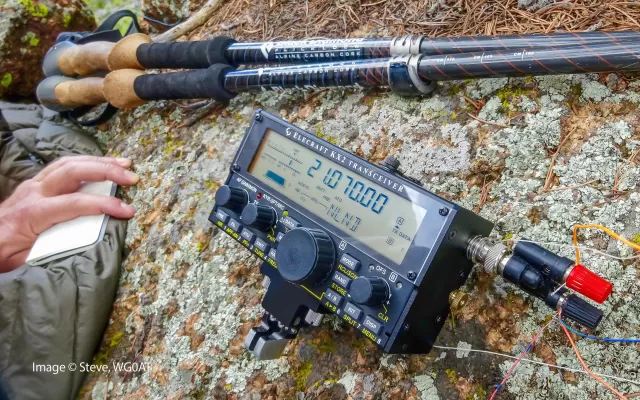
Elecraft KX3 firmware
Elecraft · KX3 · KX3 · HF transceiver
Latest firmware for the Elecraft KX3 is v3.02 (April 8, 2022).
Specifications
KX3 specifications
- Type
- Amateur HF/VHF transceiver
- Frequency range
- TX: 10-160 m + WARC / 6 m (2 m option) / RX: 0.31-32 / 44-54 MHz / 144-148 MHz / 2 m option
- Modes
- AM / FM / SSB / CW / Data (PSK31 & RTTY)
Show the full specification Hide the full specification
General
- Mode
- AM / FM / SSB / CW / Data (PSK31 & RTTY)
- Type
- Amateur HF/VHF transceiver
- Weight
- 680 g (1.5 lb), without options
- Power supply
- 9.6-12 VDC (Internal battery pack) or 9-15 VDC external
- Tuning steps
- 1 / 10 Hz, 1 KHz
- Other features
- SDR. 32-bit DSP. Built-in auto-AT. Built-in keyer with paddle. Built-in PSK/RTTY/CW decoder. I/Q output for use with PC.
- Frequency range
- TX: 10-160 m + WARC / 6 m (2 m option) RX: 0.31-32 / 44-54 MHz 144-148 MHz / 2 m option
- Dimensions (W*H*D)
- 188*88*41 mm (7.4*3.5*1.6")
- Frequency stability
- ±1 ppm @ 0 to 50°C (32 to 122°F)
- Channels / memory management
- 100 regular 4 quick memories per band
- Antenna impedance / connector
- HF/6 m: 50 ohm, BNC 2 m: 50 ohm, SMA (With 2 m option)
- Current drain / power consumption
- RX: 150-190 mA TX (1 W): 750 mA TX (5 W): 1.2 A TX (10 W): 2.1 A TX (12 W): 2.4 A
Miscellaneous
- Manufactured
- USA, 2011-202x
Receiver Section
- Sensitivity
- HF: -138 dBm (20 dB preamp) 6 m: -140 dBm (30 dB preamp) 2 m: -142 dBm (500 Hz BW), with KX3-2M Sensitivity rolls off below 1.8 MHz due to protective high-pass filtering
- Image rejection
- 55-70 dB depending on filter settings etc.
- Receiver system
- Direct conversion (6-160 m)
- AF output power / speaker
- 500 mW at ?% distortion / ? ohm
Transmitter Section
- RF output power
- 0-12 W (Depending on voltage, band and setting)
- Spurious emissions
- HF: Better than -50 dB 6 m: Better than -60 dB
- Microphone input level
- ? mV
- Max FM deviation (Factory set)
- ±? KHz
- Microphone impedance / connector
- ? ohm / 4-pin (3.5 mm)
Changelog
KX3 firmware changelog
-
v2.98v3.02Extended CW mode operation at lower supply voltage and fixed ACC IO sidetone. -
v2.90v2.95Added SWR read command and improved AM mode TX power control -
v2.76v2.82Sidetone volume adjustable lower, VFO A lock prevents accidental tuning, auto-off timer range expanded. -
v2.72v2.76Dual ATU data sets for different locations, restored AF gain, finer control increments. -
v2.70v2.72Fixed sidetone hang in digital modes and corrected PX3 preamp data updates. -
v2.52v2.70Scanning below 1.0 MHz now works properly, and host commands are blocked during transmit to prevent audio issues.
Firmware history
All versions below were published by Elecraft on elecraft.com. Third-party and modified firmware is never listed.
-
Extended CW mode operation at lower supply voltage and fixed ACC IO sidetone. — summary by updatemystuff.com
Source:
elecraft.comRelease notes & downloadShow release notes Hide release notes
MCU 3.02 / DSP 1.52
- FIXED TX INHIBIT PROBLEM WITH ACC IO OUTPUT: Previously, when ACC IO was used as a TX inhibit output, keying in CW mode could lead to a “stuck” sidetone. This has been corrected for both the LO=INH and HI=INH settings of the ACC IO menu entry.
- MORE OPERATIMG TIME AT 10 W IN CW MODE: In CW mode, the KX3 now provides up to 10 W output as long as the supply is above 9.0 V (on key-down). In other modes the criteria for 10 W output is still 10.0 V. This is required to preserve low transmit IMD.
-
Source:
elecraft.comRelease notes & downloadShow release notes Hide release notes
MCU 2.98 / DSP 1.52
- ATU TUNING IMPROVED WITH LOW SUPPLY/BATTERY VOLTAGE: ATU tuning should now be reliable down to as low as 8.5 V. Also increased relay settling time.
-
Added SWR read command and improved AM mode TX power control — summary by updatemystuff.com
Source:
elecraft.comRelease notes & downloadShow release notes Hide release notes
MCU 2.95 / DSP 1.52
- AM MODE TX POWER CONTROL IMPROVED: AM mode power output level is now maintained closer to the target.
- ADDED SWR READ COMMAND: "SW;" returns the most recent SWR reading in transmit or TUNE mode, e.g. "SW023;" for an SWR of 2.3:1. The value is not automatically updated on band change; update always occurs on any transmit. Max value returned is "SW99;" (SWR = 99.9:1).
-
Source:
elecraft.comRelease notes & downloadShow release notes Hide release notes
MCU 2.90 / DSP 1.52
- TX CARRIER NULL ALIGNMENT FIX: Negative values of parameters now handled correctly.
-
Source:
elecraft.comRelease notes & downloadShow release notes Hide release notes
MCU 2.85 / DSP 1.52
- MIC PTT “N/A” BUG FIX: Tapping PTT would sometimes flash “N/A” on the VFO B display and generate an audible tone.
-
Source:
elecraft.comRelease notes & downloadShow release notes Hide release notes
MCU 2.83 / DSP 1.52
- MEMORY RECALL “BUZZ” FIXED: In some cases, recalling or displaying an uninitialized frequency memory could result in a “buzz” sound, requiring that the KX3 be turned off and back on.
-
Sidetone volume adjustable lower, VFO A lock prevents accidental tuning, auto-off timer range expanded. — summary by updatemystuff.com
Source:
elecraft.comRelease notes & downloadShow release notes Hide release notes
MCU 2.82 / DSP 1.52
- SIDETONE VOLUME CAN BE SET LOWER: MON=1 is now about 12 dB lower in volume than it was originally. MON=50 is about the same as the original maximum.
- AUTO-OFF TIMER RANGE IS 5 TO 100 MINUTES: Auto-power-off (MENU: AUTO OFF) allows the radio to turn itself off if no controls are touched for the specified length of time. (The original range was 3 to 20 minutes.) If auto power-off is not desired, set the menu parameter to INFINITE (default).
- VFO A LOCK DISABLES COARSE VFO A TUNING WITH OFS/B CONTROL: This is intended to prevent accidental frequency changes due to touching the OFS/B control. As long as VFO A is locked, the offset-tuning feature will also be locked. (RIT, if used, is still *not* locked. RIT may be needed to fine-tune received signals even if the VFO itself is locked on a given transmit frequency.) Note: Coarse tuning steps for VFO A are set up per-mode using MENU: VFO CRS. The OFS/B control can be used to coarse-tune VFO A if RIT and XIT are both turned off and the control is not assigned to VFO B (“B” LED).
- FILTER BANDWIDTH & ULTIMATE ATTENUATION FIX: Filter bandwidth settings ending in x00 Hz are now increased internally to x50 Hz to ensure excellent ultimate attenuation (stop band). For example, a setting of 400 Hz becomes 450 Hz. This is a temporary workaround for a DSP algorithmic issue with the x00 settings that will be corrected in a future release. Available bandwidth settings are now 50 Hz, 150 Hz, 250 Hz, 350 Hz, etc. These are entirely adequate for virtually all operating purposes.
- TXCRNUL MENU PARAMETER FIX: This parameter now has a range of -9999 to +9999.
-
Dual ATU data sets for different locations, restored AF gain, finer control increments. — summary by updatemystuff.com
Source:
elecraft.comRelease notes & downloadShow release notes Hide release notes
MCU 2.76 / DSP 1.50
- FINER STEPS FOR AF GAIN AND MONITOR LEVEL: Both the monitor level (MON) and AF gain control now provide somewhat smaller increments.
- AF GAIN LEVEL RESTORED: An earlier firmware release unintentionally reduced the KX3s maximum AF gain.
- ATU DATA SETS FOR USE AT DIFFERENT LOCATIONS: The KX3 will now store two full sets of per-band data for the internal ATU (KXAT3). Use the ATU DATA menu entry to select which set to use. Typically SET 1 is used at a home location, and SET 2 for field operation. Note: This has no effect on KXAT100 ATU data, which is stored separately for each of the KXPA100 amplifiers antenna jacks.
- ATU LC NETWORK VALUE DISPLAY: In either the ATU.DATA or ATU MD menu entry, tapping the "ATU" switch shows the present values of L (inductance), C (capacitance) and N (L-network configuration). This applies only to the internal ATU (KXAT3). The displayed data format is LxxCxxNy. <xx> is a 2-digit hexadecimal value that, when converted to binary, shows which ATU L or C relays are engaged. <y> shows which side of the L-network the capacitance is on: Nt = TX side, and NA = antenna side.
- ATU CLEAR AFFECTS ONLY CURRENT DATA SET: Within the ATU DATA or ATU MD menu entries, CLR (hold of the OFS/B knob) now clears KXAT3 ATU data only for the presently selected data set (SET 1 or SET 2) on the present band. As before, CLR is recommended when using the internal ATU with a new antenna. Once the data is cleared, very few ATU tune operations will usually be needed to cover an entire band. Note: If a KXPA100 amplifier is connected, the CLR operation applies to the KXAT100 ATUs per-band/per-antenna data, not to the data for the internal KXAT3 ATU.
-
Fixed sidetone hang in digital modes and corrected PX3 preamp data updates. — summary by updatemystuff.com
Source:
elecraft.comRelease notes & downloadShow release notes Hide release notes
MCU 2.72 / DSP 1.49
- PX3 UPDATED WITH CORRECT PREAMP DATA: When the MENU: PREAMP setting is changed, we now update the PX3.
- PSK-D/FSK-D SIDETONE HANG FIXED: Corrected a problem where sending characters at very slow speeds or with paddles continuously pressed could cause a transmit timeout, leaving the sidetone on.
-
Scanning below 1.0 MHz now works properly, and host commands are blocked during transmit to prevent audio issues. — summary by updatemystuff.com
Source:
elecraft.comRelease notes & downloadShow release notes Hide release notes
MCU 2.70 / DSP 1.49
- SCANNING WORKS WITH FREQUENCIES BELOW 1.0 MHz. Previously, scanning would stall in this case.
- DT, FR, and FT HOST COMMANDS DISALLOWED IN TX MODE: Previously, these commands (data submode, unsplit, and split) could be sent to the K3 during transmit from software applications. This could sometimes cause side effects such as muting of transmit audio in DATA modes.
-
RIT clear switch now updates RIT offset on PX3 Panadapter, with fixes to power control and remote PSK mode selection. — summary by updatemystuff.com
Source:
elecraft.comRelease notes & downloadShow release notes Hide release notes
MCU 2.52 / DSP 1.37
- RIT CLEAR SWITCH UPDATES RIT OFFSET AT PX3 PANADAPTER.
For software developers:
- POWER-OUTPUT CONTROL COMMAND (“PC”) FIXED: The PC command now correctly handles the KX3s power ranges (up to 12 W or 15 W depending on band).
- PSK31/PSK63 SELECTION (ETC.) VIA REMOTE COMMAND: When the DATA submode is being modified under remote control, a software application can now select between PSK31/PSK63 using the UP/DN control commands. Similarly, UPB/DNB can be used to select the desired TEXT decode mode (DEC OFF, TX ONLY, RX THRn). To determine the current state of any of these parameters, use the DS or DB commands. Refer to the Programmers Reference.
-
AM transmit bandwidth expanded and ALC power control algorithm fixed with improved power display. — summary by updatemystuff.com
Source:
elecraft.comRelease notes & downloadShow release notes Hide release notes
MCU 2.46 / DSP 1.37
- AM TX BANDWIDTH INCREASED: The AM transmit bandwidth is now approximately 100-4000 Hz (was 100-3000). TX EQ can be used to further shape the passband.
- AM TX ALC IMPROVEMENTS: Fixed a bug in the AM power-control algorithm that was causing power output to start too high, then decrease over time when the operator is speaking. In addition, peak power output is now displayed, rather than power/4 (25%). This is intended to make the operator aware of the actual output from the radio, which accounts for the observed current drain, stress on dummy loads or antennas, etc.
-
Power output increased to 15W on 80-20 meter bands; PSK63 digital mode added. — summary by updatemystuff.com
Source:
elecraft.comRelease notes & downloadShow release notes Hide release notes
MCU 2.38 / DSP 1.37
- POWER OUT NOW 15 WATTS MAX, 80-20 M: On 80-20 meters, the PWR control can now be set as high as 15 W (max is still 12 W on other bands). Supply voltage must be over 12.8 V on key-down as indicated by the KX3s voltage display (tap DISP, rotate VFO B). Note: The KX3 will automatically reduce power as required if current, SWR, or temperature is excessive, or if supply voltage is too low. If a band other than 80-20 m is selected, power output will be cut back to 12 W max. It must then be manually set above 12 W after switching to 80-20 m.
- PSK63 MODE ADDED: Tap DATA, rotate VFO B until PSK D is displayed, then use VFO A to select 31 or 63 baud. The default is PSK31.
-
Improved 4-meter power output by adjusting IF band-pass filter configuration — summary by updatemystuff.com
Source:
elecraft.comRelease notes & downloadShow release notes Hide release notes
MCU 2.36 / DSP 1.33
- 4-METER POWER OUTPUT IMPROVED: Changed IF band-pass filter configuration to increase drive level on 4 meters. This should improve 4-meter power output in cases where it was marginal due to filter rolloff.
-
10 W output from 10-V supply enabled; 2-m and 4-m transmit current increased — summary by updatemystuff.com
Source:
elecraft.comRelease notes & downloadShow release notes Hide release notes
MCU 2.34 / DSP 1.33
- 10 W OUTPUT DOWN TO 10-V SUPPLY: The KX3 can now put out up to 10 W from a supply voltage as low as 10 V on key-down, assuming that other parameters remain within range (current, temperature, and SWR). This will allow the use of up to 10 W for much longer when running from an 11-V battery, such as a 3-cell Li-ion pack. While we still recommend the use of 11 V or higher when using 10 watts output, this change will allow you to get a few extra dB in the field when you really need it.
- 2 METER/4 METER TX CURRENT LIMIT INCREASED: Transmit current can now be somewhat higher when using the internal 2-m or 4-m module. Previously, some units were not able to attain full power output.
-
60m band limits corrected; experimental QSK mode reduces CW audio artifacts — summary by updatemystuff.com
Source:
elecraft.comRelease notes & downloadShow release notes Hide release notes
MCU 2.33 / DSP 1.33
- EXPERIMENTAL CW QSK MODE: Tapping 3 (APF) in the CW WGHT menu entry selects either OLD QSK (original) or NEW QSK (which purges the DSPs audio pipeline on every key-down). NEW QSK reduces audio artifacts heard in the receiver during CW keying on a noisy band, at the expense of a slightly longer receive-recovery time. (We hope to speed up RX recovery in a future release.) To verify the benefit of NEW QSK: First select a CW RX filter bandwidth of 400-1000 Hz, then transmit 20 WPM dits (at 0.0 watts) on top of an S5 or stronger carrier, or in the presence of S7 or stronger atmospheric noise. While transmitting, you can be in the CW WGHT menu entry, alternating between OLD and NEW QSK by tapping 3 (APF).
- 60-M U.S. BAND LIMITS CORRECTED: CW/DATA, TUNE, and ATU TUNE are now usable on all 5 channels. Previously, BND END was displayed in some cases. Note: This also applies to other countries where the U.S. band limits are used.
- RX EQ NO LONGER APPLIED IN DATA MODES: Previously, the RX EQ settings for voice modes were being applied to data modes.
- KX3 CHANNEL HOPPING UPDATES PX3 DISPLAY PER-MODE: When channel hopping is used (by tuning the VFO or scanning), the PX3 display is now updated based on the mode of each “channel” (frequency memory) in the hop range. This is especially useful on 60 m, which includes both CW/DATA and SSB allocations. See page 17 of the owners manual for scanning/channel-hopping setup instructions.
-
Improved 2-M/4-M power output and speech compression with consistent CW dot timing, frequency entry fixed. — summary by updatemystuff.com
Source:
elecraft.comRelease notes & downloadShow release notes Hide release notes
MCU 2.30 / DSP 1.32
- SPEECH COMPRESSION IMPROVED: Corrected internal DSP stage gain, resulting in higher output levels with compression turned on.
- 2-M/4-M SSB POWER OUTPUT IMPROVED: Max power output improved with and without speech compression turned on. Note: The KX3 will automatically reduce 2-m/4-m power output if safe levels of SWR, current, or temperature are exceeded. (Youll see HI SWR, HI CUR, or HI TEMP flashed on the VFO B display.) This is more likely to happen when heavy speech compression is used, or when using a whip connected directly to the radio. We recommend reducing power to 2 to 2.5 W as required in this case to avoid the automatic power rollbacks or RFI problems.
- 2-M/4-M CW TIMING IMPROVED: Dot length is now more consistent.
- 4-M/6-M DIRECT FREQ ENTRY FIXED: Direct frequency entry to 6 or 4 meters now works correctly with a KX3-4M module installed.
-
Source:
elecraft.comRelease notes & downloadShow release notes Hide release notes
MCU 2.28 / DSP 1.30
- FALSE PA AUTO-OFF FIXED: No check for missing PA during DVR record/play or firmware load. These conditions were sometimes resulting in the PA MODE menu entry getting set to OFF.
-
RX I/Q port automatically enables with PX3 attached, firmware loading improved. — summary by updatemystuff.com
Source:
elecraft.comRelease notes & downloadShow release notes Hide release notes
MCU 2.27 / DSP 1.30
- RX I/Q PORT TURNED ON AUTOMATICALLY WITH PX3 ATTACHED: The KX3 now turns on the RX I/Q output whenever it detects an attached PX3. This eliminates the problem of image signals in the PX3 display due to RX I/Q being off.
- IMPROVED FIRMWARE LOADING: Now handling case where new MCU firmware is incompatible with old DSP firmware in the middle of a full firmware load sequence. An error message may still appear in this case, but load timing will not be affected, allowing the new DSP firmware to be loaded correctly.
-
Fixed PX3 passband display in DUAL RX mode, restored OFS/B knob independence, and extended CW speed display time — summary by updatemystuff.com
Source:
elecraft.comRelease notes & downloadShow release notes Hide release notes
MCU 2.25 / DSP 1.30
- PX3 NOW DISPLAYS VFO B PASSBAND CORRECTLY: The PX3 was showing the wrong VFO B filter bandwidth or passband location when using DATA modes or DUAL RX (dual watch).
- DUAL RX DOES NOT FORCE OFS/B KNOB TO BE USED AS VFO B: The operators OFS/B knob assignment is no longer lost when DUAL RX is in effect.
- FAST-PLAY DISPLAY ERROR FIXED: With fast-play enabled (1-touch message play using BAND+/- and FREQ ENT.), a band change originating from a PC application no longer flashes “END” on VFO B.
- CW SPEED DISPLAY TIME INCREASED WHEN TEXT DECODE IS ON: In CW mode, speed is now displayed for 1.0 sec. In FSK-D and PSK-D modes, it's .5 sec. The time is shorter for DATA modes because character transmission rates are usually faster, and the operator might miss important text due to the speed display.
- PA BYPASS METERING FIXED: If the KXPA100 goes to bypass because of an error condition, the KX3 drops to 5 W. The RF meter is now correctly set to low range.
- TEXT DECODE LOCKOUT FIX: Adjustment of NR, NB, NTCH, etc. no longer causes loss of CW/DATA text decode on the VFO B display.
- HOST COMMANDS “UP”, “DN”, and “DT”: These are now working with the PX3.
-
Adds PX3 text-decode display support via LABELS switch — summary by updatemystuff.com
Source:
elecraft.comRelease notes & downloadShow release notes Hide release notes
MCU 2.24 / DSP 1.30
- SUPPORT FOR PX3 TEXT DISPLAY: To enable text decode on the PX3, hold LABELS switch to switch to text-decode mode (requires PX3 rev. 1.12 or later). Text decode must also be enabled at the KX3.
-
Source:
elecraft.comRelease notes & downloadShow release notes Hide release notes
MCU 2.23 / DSP 1.30
- DUAL RX NOW ALLOWED WITH RX SHFT=8.0. In this case, VFO A can be from -7 below VFO B to +23 above it (vs. +/- 15 for RX SHFT=NOR).
-
Fixed CW-in-SSB keying truncation with external keyers and extended PA mode detection time. — summary by updatemystuff.com
Source:
elecraft.comRelease notes & downloadShow release notes Hide release notes
MCU 2.22 / DSP 1.30
NOTE TO PX3 USERS: Please use PX3 rev. 1.08 or later firmware with KX3 rev. 2.22. This corrects a PX3 display-freeze issue when a KXPA100 is also present.
- PA MODE (KXPA100) AUTO-OFF TIME CHANGED: The KX3s PA MODE menu entry will revert from ON to OFF if the amplifier is not found within 8 seconds (was 4 seconds).
- CW-IN-SSB KEYING FIXED: When using an external keying device, the KX3 was returning to SSB mode too soon, truncating the CW waveform and causing key clicks.
- UNEXPECTED KX3 RELAY SWITCHING WITH PX3 AND KXPA100 ATTACHED: The KX3 was occasionally misinterpreting a KXPA100 band-number poll as a band-change command. This has been corrected.
-
SPLIT/RIT/XIT preserved on band changes, PA MODE turns off without amplifier, PX3 SLEEP mode disabled. — summary by updatemystuff.com
Source:
elecraft.comRelease notes & downloadShow release notes Hide release notes
MCU 2.20 / DSP 1.30
- SPLIT/RIT/XIT SAVE: Now preserving SPLIT/RIT/XIT on band change and in memories. (2-m note: SPLIT can be used to set up odd repeater splits in VFO A and B.)
- PA MODE TURNS OFF AUTOMATICALLY IF NO KXPA100 FOUND: If you set the PA MODE menu entry to ON, but no KXPA100 is connected, the menu entry will be set back to OFF. This corrects a problem where some users had PA MODE set to ON unintentionally, losing their internal ATU setup (KXAT3).
- PX3 USED WITH KX3 ON 2 or 4 METERS DISABLES “SLEEP”: If a PX3 is connected and turned on, SLEEP mode (2 and 4-meter FM battery save) is automatically disabled to prevent the spectrum display from shifting down during SLEEP cycles.
Misc.
bug fixes
- PX3 DISPLAY UPDATED WHEN REV SWITCH USED: REV changes only VFO A on the PX3, just as it only changes VFO A on the KX3 display.
- MORSE-CODE SWITCH TONES FIXED ON 2 and 4 METERS: USB and LSB (U and L) were reversed. Frequency readout had decimal in the wrong location.
- 60-METER UPPER BAND LIMIT (U.S.) CORRECTED: Now accommodates DATA and CW mode operation on the highest-frequency channel.
- SCROLLING VFO B INFO MESSAGES FIXED: Informational messages that use “Times Square” scrolling format now work even when a special VFO B display or text decode is in use. (Example: The “USE PHONES” reminder when turning on DUAL RX.)
-
Source:
elecraft.comRelease notes & downloadShow release notes Hide release notes
MCU 2.19 / DSP 1.30
- PX3 SUPPORT: On a band change, the first command sent by the KX3 to the PX3 is “BN” (band number) to ensure correct handling of subsequent commands.
-
Adds support for 2M adapter module for ATU-free configurations. — summary by updatemystuff.com
Source:
elecraft.comRelease notes & downloadShow release notes Hide release notes
MCU 2.18 / DSP 1.30
- KX3-2M ADAPTER SUPPORT (non-ATU): The KX3-2M-ADAPT module provides the physical and electrical interface to the KX3 when there is no ATU installed. If the adapter is installed, make sure the ATU MD menu entry is set to NOT INST. NOTE: If ERR 2M appears on the VFO B display, the value shown on VFO A identifies specific error conditions relating to the adapter module: d=003: KX3-2M-ADAPT control register test failed d=004: KX3-2M-ADAPT hardware ID test failed d=005: Neither KXAT3 or KX3-2M-ADAPT module located at power-on
-
Source:
elecraft.comRelease notes & downloadShow release notes Hide release notes
MCU 2.17 / DSP 1.30
- CW TIMING BUG FROM REV 1.95 CORRECTED: Element lengths with the internal keyer were slightly too short due to a calculation error.
-
PL tone deviation corrected (recalibration needed) and antenna jack now outputs optional +5VDC for transverters. — summary by updatemystuff.com
Source:
elecraft.comRelease notes & downloadShow release notes Hide release notes
MCU 2.16 / DSP 1.30
- KXPA100 AUTO POWER-ON WITH PX3: If a PX3 and KXPA100 are both in the system, KXPA100 automatic power-on will now work even if the PX3 is turned on first. (Note that at present there is no way to do automatic power-on of the PX3 itself.)
- PL TONE FM DEVIATION ERROR: The PL tone deviation displayed in the menu was about 40% lower than the actual deviation value in effect. Because of this, repeater users should re-check their PL deviation setting. To do this, locate the FM DEV menu entry, then tap 1 to switch to PL DEV. Set the value to 0.35 (kHz)the new defaultunless some other value is applicable.
- 2M/4M ANT. JACK PROVIDES OPTIONAL +5VDC DURING TRANSMIT: Many high-band transverters and other gear can use a DC voltage of 3-12 V on the center conductor of the antenna coax to provide T/R switching or other functions. The KX3-2M/-4M module can now place +5VDC (+/- 0.3 V) on the antenna jack if desired. To turn this feature on/off, locate the 2M/4M menu entry and tap 2 (ATTN switch). The parameter will be either TXant 5V- (off) or TXant 5V+ (on). “ant” is displayed as a small antenna symbol.
-
CW-in-SSB respects QSK delay with external keying, 2-meter entry from other bands, and TX power restored on limited bands. — summary by updatemystuff.com
Source:
elecraft.comRelease notes & downloadShow release notes Hide release notes
MCU 2.15 / DSP 1.30
- CW-IN-SSB IMPROVEMENT: The operators specified CW QSK delay is now used during CW-in-SSB, even with external CW keying. (This was already working with the internal keyer.)
- 2-M DIRECT FREQUENCY ENTRY FROM OTHER BANDS: Range is 120-168 MHz. Note: Sensitivity falls off as you move out of the 144-148 MHz range.
- 2-M TX FREQUENCY RANGE LIMITED: 144-148 MHz (144-146 in some countries).
- INCREASE IN ALLOWED TX CURRENT: Allows full-power output on some bands where previously a drop to 5 watts had been observed (with an external 12-14 V supply).
-
Source:
elecraft.comRelease notes & downloadShow release notes Hide release notes
MCU 2.13 / DSP 1.30
- KX3-2M BAND-CHANGE FIX: With SLEEP enabled, a band change from 2 meters to any other band was causing the 2-m module to be left powered up.
-
Improved 40-meter transmit image suppression by fixing 40-m band-pass filter in transmit. — summary by updatemystuff.com
Source:
elecraft.comRelease notes & downloadShow release notes Hide release notes
MCU 2.12 / DSP 1.30
- 40-METER TRANSMIT IMPROVEMENT: The 40-m band-pass filter was being bypassed in transmit mode, due to a change in rev. 1.94 that allowed MARS operation from 8.5-9 MHz. This resulted in reduced suppression of narrowband 40-meter transmit images, most notably in FSK-D mode. (The low-pass filter setting was correct, though, which made this error hard to detect. Wideband spurious suppression specs were met.)
-
New FAST MESSAGE PLAY mode allows quick message access via BAND+/BAND- switches with MSG button long-hold. — summary by updatemystuff.com
Source:
elecraft.comRelease notes & downloadShow release notes Hide release notes
MCU 2.11 / DSP 1.30
- FAST MESSAGE PLAY: A long-hold of MSG (~3 sec) puts the KX3 into FAST PLAY mode. In this mode, the BAND+, BAND-, and FREQ_ENT switches can be used to play/repeat messages 1, 2, and 3 immediately, without the need to first tap MSG. To turn off fast play, hold MSG for ~3 seconds again, or turn the KX3 off and back on. Notes: (1) In voice modes (using the built-in DVR), only messages 1 and 2 are available, corresponding to BAND+ and BAND- in fast-play. (2) At present, message chaining is only available in CW modes (with both normal and fast-play).
-
Source:
elecraft.comRelease notes & downloadShow release notes Hide release notes
MCU 2.10 / DSP 1.30
- KX3-4M POWER CONTROL: Scaled drive level to match slightly higher gain of 4-meter unit vs. 2 meters.
-
Source:
elecraft.comRelease notes & downloadShow release notes Hide release notes
MCU 2.09 / DSP 1.30
- KX3-to-KXPA100 SERIAL COMMUNICATIONS IMPROVED: Added better syntax checking.
-
KXPA100 power control improved; transient fault diagnostics and PX3 Panadapter support added. — summary by updatemystuff.com
Source:
elecraft.comRelease notes & downloadShow release notes Hide release notes
MCU 2.08 / DSP 1.30
- MORE ACCURATE KXPA100 “TUNE” POWER OUTPUT (PA ALC): More accurate control of the KXPA100s power output during TUNE from the KX3 (PA ALC) now applies up to 70 W (60 W on 6 meters). Above this point, KXPA100 drive is still estimated based on the 75-W factory calibration. This prevents accidental overdrive in conditions sometimes found during full-power portable or mobile operation, such as high SWR, high current, etc. NOTES: (1) To disable PA ALC, locate MENU: PA MODE, then tap 1 (PRE) until you see “PA ALC-”. (2) PA ALC only applies during TUNE, not during normal transmit. Also, if you change bands or adjust PWR, and want to fine-tune the KXPA100s power output again, youll need to do another TUNE. (3) PA ALC does not apply if TUN PWR is in effect, since its limit is 10 W, bypassing the amp.
- KXPA100 TRANSIENT FAULT DISPLAY: Common KXPA100 faults requiring operator notification, such as high SWR, are always reported on the KX3s display. Transient faults such as serial port errors are normally not displayed, since they rarely impact operation. For diagnostic purposes, such faults can now be displayed as “FAULT nnn” where nnn is a 3-digit number originating from the KXPA100. To enable this mode, go into the KX3s PA MODE menu entry and tap 6 (DLY) until you see “XFAULT+”.
- FULL SUPPORT FOR PX3 PANADAPTER.
-
Adds 1750-Hz tone burst for EU repeaters with adjustable deviation range. — summary by updatemystuff.com
Source:
elecraft.comRelease notes & downloadShow release notes Hide release notes
MCU 2.06 / DSP 1.30
- 1750-HZ TONE BURST FOR EU REPEATERS: Set PITCH to 1750. This adds an 0.5-second tone burst at start of any transmission. You can also hold PITCH indefinitely anytime after starting a transmission. This applies even if the receiver was unsquelched, or if PL TONE was set to OFF, as long as the selected tone is 1750 Hz.
- PL TONE DEVIATION RANGE ADJUSTED FOR 1750-HZ TONE: The range in this case is 0.7-3.0 kHz, with a default of 1.8. To adjust PL tone deviation for the 1750-Hz tone, first select 1750 Hz using the PITCH control, then locate the FM DEV menu entry and tap 1 (PRE) to change the menu entry name to PL DEV. Adjust the parameter as required.
-
2M/4M menu now has toggle for TX temperature sensing, defaulting to enabled. — summary by updatemystuff.com
Source:
elecraft.comRelease notes & downloadShow release notes Hide release notes
MCU 2.05 / DSP 1.29
- 2M/4M MENU ENTRY CONTROLS TX TEMP SENSING: In the 2M/4M menu entry, tap '1' to toggle between TX TMP+ and TX TMP-. Default is TX TMP+. If TX TMP- is in effect, 2-m/4-m PA temperature will *not* be measured during transmit. This is only required on some early field-test units that have not yet been modified.
-
Temperature sensing now works only in receive mode as temporary fix for transmit-mode accuracy issues. — summary by updatemystuff.com
Source:
elecraft.comRelease notes & downloadShow release notes Hide release notes
MCU 2.04 / DSP 1.29
- KX3-2M TEMPORARY CHANGE TO TEMPERATURE SENSING: Some field-test units have a problem that results in inaccurate temperature readings while in transmit mode. This results in max key-down time being artificially shortened. In this temporary release (2.04), temperature sensing is only done in receive mode, and only if the PA.2 xxC temperature display is in use.
-
Transmit monitoring checks supply current, PA temperature, SWR, and drive, rolling back power or stopping transmit if out of range. — summary by updatemystuff.com
Source:
elecraft.comRelease notes & downloadShow release notes Hide release notes
MCU 2.03 / DSP 1.29
- KX3-2M TRANSMIT MONITORING IMPROVEMENTS: Now checking for excess supply current, high PA temperature, high SWR, and excessive drive. If any parameter is out of range, power will be rolled back, and in some cases transmit will be terminated.
-
Faster 2-M excess drive reduction, tripled temp/RF switching settling time, and XVn offset applied. — summary by updatemystuff.com
Source:
elecraft.comRelease notes & downloadShow release notes Hide release notes
MCU 2.02 / DSP 1.29
- EXPERIMENTAL: XVn OFS NOW APPLIED (synthUpdate1()). Not recommended for internal transverters since they're keyed to the Si570 anyway.
- EXPERIMENTAL: 2-M EXCESS DRIVE REDUCTION HAPPENS MUCH FASTER. Can also disable drive roll-back completely by holding DISP on power-up.
- EXPERIMENTAL: 2-M TEMP/RF SWITCHING SETTLING TIME INCREASED 3X. See txMeter().
-
Adds 70 MHz band support via KX3-4M module, reduces receive power drain by up to 50%, improves KXPA100 amplifier control. — summary by updatemystuff.com
Source:
elecraft.comRelease notes & downloadShow release notes Hide release notes
MCU 2.01 / DSP 1.29
- SUPPORT FOR KX3-4M MODULE (70 MHZ BAND) ADDED: The 2M MODE menu entry has been renamed as 2M/4M since it now applies to both the KX3-2M and KX3-4M modules. The 4-meter module is set up the same way as the 2-m module, except that XVn RF should be set to 70, and XVn IF should be set to 21. All modes and features are supported on this band. Maximum power output and other specifications are to be determined.
- 2-M FM CURRENT DRAIN REDUCED: The 2M/4M menu entry now has several “sleep” selections: SLEEP .25 (0.25 seconds) through SLEEP 1.0 (1.0 seconds). These specify the sleep time between receive-signal checks when the receiver is squelched. With these settings, average receive-mode current drain is reduced by up to 50%, especially useful when running from a small battery.
- MORE ACCURATE KXPA100 POWER CONTROL: The KX3s PWR control can be used to set the KXPA100s power output. However, actual output varies somewhat with load impedance, supply voltage, and per-band gain. The operator can now obtain more accurate amplifier output by using the TUNE function immediately after setting PWR or changing bands. Power will be automatically adjusted to the target level within a few seconds, by using wattmeter data read from the amp (via the control cable).
-
Power control now limits to match export-configured KXPA100 amplifier settings. — summary by updatemystuff.com
Source:
elecraft.comRelease notes & downloadShow release notes Hide release notes
MCU 1.96 / DSP 1.28
- KXPA100 PER-COUNTRY POWER LIMIT : Some KXPA100s are configured for export with a lower max power level (e.g. 50 watts). If the KX3 is connected to such a KXPA100 via the control cable, the PWR control range will be limited accordingly.
-
Added TX RF delay adjustment for amplifiers and fixed power spike with KXPA100. — summary by updatemystuff.com
Source:
elecraft.comRelease notes & downloadShow release notes Hide release notes
MCU 1.95 / DSP 1.28
- TX RF DELAY MENU ENTRY ADDED: You can now vary the delay in milliseconds between key-down and RF output. This is useful with external power amplifiers having slow T/R relays. There are actually two TX DLY settings, one for HF-6 meters and the other for transverter bands. To set the delay, use MENU: TX DLY. The “NOR” setting 5 ms; this is the recommended setting when using the KX3 (and KXPA100, if applicable) without a following high-power amp. A delay of up to 20 ms can be set for slower amps. Use the smallest delay possible. Longer delays can add some timing variation in CW mode at higher code speeds.
- NO POWER SPIKE WITH “TUN PWR” MENU ENTRY AND KXPA100: The TUN PWR menu entry can be used to set up a TUNE-switch power level of 10 W or less. If a KXPA100 is attached, it will now immediately be bypassed, in the TUN PWR case, when TUNE is used. Previously, if the PWR knob was set for something higher than 10 W, using TUNE with the TUN PWR feature would result in a brief high-power spike at the KXPA100 output. This has been corrected.
-
Fixed low power output in 8.5-9.5 MHz band, enabling normal ATU operation. — summary by updatemystuff.com
Source:
elecraft.comRelease notes & downloadShow release notes Hide release notes
MCU 1.94 / DSP 1.28
- 8.5-9.5 MHz TRANSMIT AND ATU OPERATION IMPROVED: Corrected low power output in this range, which also allows the ATU to function normally. Note: Applies only if the KX3 is enabled for transmit in this range (U.S. “MARS” allocations, etc.).
-
KXPA100 power control smooth across 10-11 watts, AF limiter now functional. — summary by updatemystuff.com
Source:
elecraft.comRelease notes & downloadShow release notes Hide release notes
MCU 1.93 / DSP 1.28
- KXPA100 POWER SETTING IMPROVEMENT: The KX3s PWR control can now be adjusted across the 10-watt/11-watt boundary in either direction during transmit (including TUNE mode) without causing a large spike in KXPA100 power output. Also, during TUNE, the “TX” knob function is now always assigned to power output rather than keyer speed or mic gain.
- AGC-OFF AF LIMITER NOW WORKING: Some operators prefer to turn off AGC and control gain manually using the KX3s RF GAIN control. However, if an extremely strong signal is present with AGC off, audio output can be uncomfortably loud. The KX3 provides an AF limiter for the AGC-off case. Use the AF LIM menu entry to adjust the threshold at which limiting takes place.
For application programmers:
- "PO" (POWER OUTPUT READ) COMMAND NOW USABLE IN QRO MODE (KXPA100 ENABLED): As with the KX3s bar graph, the “PO” command returns an estimate of KXPA100 power output based on KX3 drive level. You can use the KXPA100s “^PF” command to read the amps power output more accurately.
- "OM" COMMAND NOW SHOWS KXAT100 AND KX3-2M OPTIONS: These are represented by the letters T and X respectively in the “OM” response. Refer to the K3/KX3 Programmers Reference.
- ATU.X MD MENU ENTRY (KXAT100 MODE) NOW ACCESSIBLE: When the PA MODE menu entry is set to ON, the ATU MD menu entry changes to ATU.X MD to show the mode of the KXAT100 external ATU. The “MP” command can now be used to read (but not set) the KXAT100s mode in this case. (To change the mode, use the KXPA100s ^MP command.)
-
2-meter power output limited to 3.0W maximum with automatic reduction based on SWR or current. — summary by updatemystuff.com
Source:
elecraft.comRelease notes & downloadShow release notes Hide release notes
MCU 1.91 / DSP 1.28
- 2-METER POWER CONTROL CHANGES: Power output from the KX3-2M module is limited to 3.0 watts or lower to ensure safe and reliable operation. The KX3 will automatically reduce the 2-meter power setting if SWR or current drain is too high. The maximum desired setting of the PWR control on 2 meters must be configured using the XVn PWR menu entry.
-
External amplifier stays in QRO mode at lower battery voltages; TX gain display corrected. — summary by updatemystuff.com
Source:
elecraft.comRelease notes & downloadShow release notes Hide release notes
MCU 1.87 / DSP 1.28
- WITH KXPA100 IN, LOW SUPPLY VOLTAGE DOESNT DROP KX3 TO 5 W: If the KXPA100 is connected via the special control cable, and PA MODE = ON, the KX3 will not drop out of QRO mode and go to 5 W at 11 V, as it does without the amp present. This allows the KX3+amp to be used with somewhat depleted 12-V batteries. The operator should monitor key-down battery voltage (e.g., by using the KX3s “DISP” function) and reduce target power output if necessary. For example, if the key-down voltage is ~11 V, target power should be set no higher than 40-50 W. If its ~10 V, battery life should be conserved by using the KX3 at QRP levels. (To minimize current drain in this case, set PA MODE to OFF.) Some 12-V batteries, such as gel-cells, can be permanently damaged if discharged below about 10.5 V.
- TX GAIN MENU ENTRY FIXED: Wasnt always displaying per-band drive power accurately in QRO mode (i.e., with PA MODE = ON).
-
New AM broadcast band receive optimization option for improved sensitivity with KXAT3 ATU installed. — summary by updatemystuff.com
Source:
elecraft.comRelease notes & downloadShow release notes Hide release notes
MCU 1.84 / DSP 1.28
- AM BROADCAST BAND (BCB) RECEIVE OPTIMIZATION: If you have a KXAT3 ATU installed, you can select one of two optimizations for reception below 1300 kHz. While in the ATU MD menu entry, tap 1 (PRE) to select either BCB NOR (the original setting, which reduces the amplitude of received harmonic images), or BCB=160 (a new setting that may improve receive sensitivity by using the 160 meter ATU settings even below 1300 kHz). BCB NOR is recommended unless you need BCB=160 in order to copy a weak AM station. You can also improve sensitivity by using higher preamp gain settings (use the PREAMP menu entry, which is per-band).
-
Added Heil HC-6 microphone element support with higher mic gain capability. — summary by updatemystuff.com
Source:
elecraft.comRelease notes & downloadShow release notes Hide release notes
MCU 1.81 / DSP 1.28
- SUPPORT FOR HEIL HC-6 MIC ELEMENTS: Mic gain can now be set as much as 20 dB higher to support these low-sensitivity elements. NOTE: USE LOW “MON” (VOICE MONITOR) LEVEL IF MIC GAIN IS SET ABOVE 50. Otherwise you may hear acoustic feedback. Also, higher gain settings in general can make any transceiver more susceptible to noise pickup. If this is a problem, consider using a more conventional mic element that has greater output. The Elecraft MH3 has excellent frequency response, comparable to earlier Heil elements, yet it has far higher output than the HC-6.
-
TX GAIN displays KXPA100 drive power for 75W; per-band calibration improved. — summary by updatemystuff.com
Source:
elecraft.comRelease notes & downloadShow release notes Hide release notes
MCU 1.79 / DSP 1.27
- KXPA100 PER-BAND POWER CALIBRATION IMPROVED.
- KXPA100 DRIVE CAL DATA SHOWN BY TX GAIN MENU ENTRY: If the PA MODE menu entry is set to ON or Pout CAL, and PWR is set above 10 W, the TX GAIN menu entry will show drive power in watts needed to hit 75 W at the KXPA100 amp . A letter 'A' or 'T' prefixes the drive power value shown, depending on whether the source of the calibrated drive value is the Amp or the Transceiver.
-
Improves power output accuracy and adds 75-W calibration mode with KXPA100 support. — summary by updatemystuff.com
Source:
elecraft.comRelease notes & downloadShow release notes Hide release notes
MCU 1.76 / DSP 1.27
- MENU: PA MODE NOW HAS POWER-OUT CAL (P out CAL) SETTING: This enables 75-W power calibration in TUNE mode. When PWR is adjusted, and “P out CAL” mode is in effect, setting power to 75 watts shows “CAL 75W” on VFO B.
- KXPA100 DRIVE POWER CAL DATA UTILIZED: If the KXPA100s per-band 75-W drive power has been saved at the factory, the KX3 will use it. If not, the KX3's own per-band amplifier drive data is used (if available). This data is created by setting PA MODE to Pout CAL (see above), then doing a TUNE on each band at 75 W.
- IMPROVED POWER CONTROL. As the KX3s PWR control is adjusted, the KXPA100s output now more closely approximates the requested value.
-
100-watt RF power scale now correctly restored after ATU TUNE with KXAT100. — summary by updatemystuff.com
Source:
elecraft.comRelease notes & downloadShow release notes Hide release notes
MCU 1.74 / DSP 1.27
- 100-WATT RF POWER SCALE FIX: After doing an ATU TUNE with the KXAT100 ATU installed (in the KXPA100), the 100-W RF scale is now correctly restored. (When ATU TUNE is done with the KXAT100 installed, power is temporarily dropped to 5 W.)
-
Adds DTMF tone generation in FM mode and removes KXPA100 fault limit overrides. — summary by updatemystuff.com
Source:
elecraft.comRelease notes & downloadShow release notes Hide release notes
MCU 1.73 / DSP 1.27
- DTMF TONE SUPPORT ADDED IN FM MODE: To generate DTMF tones: (1) Hold PTT; (2) tap FREQ ENT switch to enable DTMF keypad; (3) tap desired switches [0-9, * (ATU TUNE), # (MSG), A (MODE), B (A/B), C (DATA), D (A>B)]. Release PTT or tap FREQ ENT to disable DTMF keypad. Switches can be held indefinitely to generate longer-duration tones.
- REMOVED KXPA100 FAULT LIMIT OVERRIDES. Use newest KXPA100 firmware, which already has these limits set.
-
Source:
elecraft.comRelease notes & downloadShow release notes Hide release notes
MCU 1.72 / DSP 1.26
- KX3-2M SUPPORT (instructions TBD).
- FM RX & TX IMPROVED: Reduced FM distortion on receive. TX deviation max now 6.0; default 5.0 (U.S. standard).
-
Source:
elecraft.comRelease notes & downloadShow release notes Hide release notes
MCU 1.69 / DSP 1.23
- KXPA100 PER-BAND POWER CAL NOW AT 75 W. Fixed bug in power cal that was making it hard to calibrate some bands.
-
Fixed SSB low power output and improved KXPA100 external amplifier controls. — summary by updatemystuff.com
Source:
elecraft.comRelease notes & downloadShow release notes Hide release notes
MCU 1.68 / DSP 1.23
- LOW POWER (UNDER 1 W) NOW WORKS IN SSB MODE: Previously, with very low power settings, SSB power output could drop to 0. 1 W or so and stay there.
- TURNING KXPA100 OFF ON POWER-DOWN OF KX3. See KXPASWcommand().
- KXPA100 PER-BAND POWER CALIBRATION: Set KX3 to 80 W and do TUNE on each band with a dummy load at the KXPA100.
- KXPA100 PLACED IN-LINE WHEN PWR SET ABOVE 10 W. This applies when the PA MODE menu entry is set to ON. If its OFF (which bypasses the PA and external ATU entirely), the KX3s PWR can still be set up to 12 W.
-
Fixed MIC GAIN control behavior when switching from CW-in-SSB to audio data modes. — summary by updatemystuff.com
Source:
elecraft.comRelease notes & downloadShow release notes Hide release notes
MCU 1.65 / DSP 1.23
- ESSB DISALLOWS USE OF CMP: If attempted, shows "N/A".
- DATA-A/AFSK-A/etc. BUG FIX: MIC GAIN control works as specified. In the previous release, adjustment of keyer speed while using the CW-in-SSB feature would leave the MIC GAIN control set to keyer speed when the user switched to an audio data mode.
-
Fixed power rollback issues, improved AM and SSB transmission, and completed ESSB mode. — summary by updatemystuff.com
Source:
elecraft.comRelease notes & downloadShow release notes Hide release notes
MCU 1.61 / DSP 1.23
- AM TRANSMIT IMPROVED: Depth of modulation increased.
- SSB SPEECH COMPRESSION IMPROVED: Significant cleanup of opposite-sideband intermodulation (IMD) products with speech compression turned on.
- CURRENT DRAIN LIMITS ADJUSTED: Receive and transmit current drain limits were set a bit too low, occasionally causing an unexpected roll-back of power output or turn-off of the KX3. Note: If rollback of power output still occurs, it is probably because the supply voltage is dipping below 11 V on keydown, or because of excessive transmit current drain, possibly due to a low-impedance load.
- ESSB MODE IMPROVED: Speech compression is now automatically disabled when ESSB mode is turned on. This completes the ESSB implementation. To turn on ESSB, use the TX ESSB menu entry. Tap 1 to turn ESSB on/off; use VFO A to adjust the transmit bandwidth from 3.0 to 4.0 kHz. (These menu changes cannot be made while in transmit mode.)
- ROOFING FILTER USE CONFIGURABLE IN SSB MODE: Roofing filter FL2 (3 kHz) can now be inserted when the upper edge of the receive passband is either 2.4 kHz (original value) or 2.9 kHz. When the passband edge is higher than this point, FL1 is used (wide filter). If the KXFL3 filter option is not installed, FL1 is always used.
If you frequently encounter QRM in SSB modes, use the 2.9 kHz selection; this will insert FL2 when normal passband settings are used.
If QRM is less of an issue or you frequently use ESSB, use the 2.4 kHz selection (original value); this will insert FL1 for normal passband settings.
The PBT knob can override either selection (see below).
To select the desired FL2 insertion point: Locate the PBT SSB menu entry.
Tap 1 to select either 2.4 or 2.9 kHz using the criteria above.
Impact of FL2 configuration on the NORM function: If 2.4 kHz is selected, NORMalizing the passband (by holding the PBT knob) will select FL1 (wide filter).
If 2.9 kHz is selected, NORM selects FL2 (narrow).
Impact of FL2 configuration on the PBT I/II functions: When LO-HI CUT is in effect for SSB, the FL2 setting determines when FL2 is inserted as HI CUT (PBT II) is adjusted (2.4 or 2.9 kHz).
When WIDTH / SHIFT (NOR) is in effect, the FL2 setting affects both adjustments.
For example, with the passband NORMalized, reducing WIDTH (PBT I) inserts FL2 at either 1.7 kHz or 2.8 kHz, for the 2.4 and 2.9 kHz FL2-insert selections, respectively.
However, the insertion point for FL2 is also affected by the SHIFT setting (PBT II).
Note on SSB demodulation methods used for FL1 vs.
FL2: When FL1 is in selected (wide filter), the KX3 uses conventional SSB demodulation, providing the best overall audio fidelity.
When FL2 is selected (3 kHz filter), the KX3 uses “Weaver” SSB demodulation, which introduces a narrow 1.5 kHz notch into the receive passband as part of the DSP algorithm.
This notch typically has no impact on speech intelligibility, but it can sound slightly different to an operator who is most concerned about fidelity.
- KXPA100/KXAT100 SUPPORT: (1) Tapping ATU TUNE tunes the KXAT100 if applicable. KX3 power output is set to 5.0 watts during auto-tuning, then restored to the users selected level. (2) KXPA100 amp/tuner faults are displayed on the KX3 and can be cleared by any switch tap. (3) The FW REVS menu entry shows the KXPA100 firmware revision (rotate VFO A to see all firmware revisions uC, DSP, PA). Note: All KXPA100 integration features require use of the KX3-to-KXPA100 control cable, and the PA.X MD menu entry must be set to ON.
-
Eliminates 12-kHz spur; improves ATU and Weaver mode reception — summary by updatemystuff.com
Source:
elecraft.comRelease notes & downloadShow release notes Hide release notes
MCU 1.57 / DSP 1.22
- 12-kHz AUDIO SPUR ELIMINATED: Some operators reported hearing a very weak 12-kHz tone at the headphone jack, even with the volume turned all the way down. This tone has now been suppressed by an additional 20 dB (approx.).
- “WEAVER MODE” SSB RECEIVE IMPROVED: When the high end of the KX3s SSB receive passband is set below about 2.4 kHz using the PBT control, the DSP switches to “Weaver” demodulation mode. This allows roofing filter FL2 to be used. In previous releases, Weaver demodulation had poor opposite-sideband image rejection; this has been corrected. Note: It is not necessary to re-do RXSBNUL calibration.
- ATU IMPROVEMENTS: Tapping ATU TUNE now recalls stored LC settings for the current VFO frequency prior to tuning, avoiding auto-tuning from scratch in most cases. Also, ATU settings are now reloaded (if necessary) when the A/B, A>B, REV, FREQ ENT, or SPLIT switches are used. This increases the likelihood that the ATU will be kept tuned during receive, improving sensitivity, without having to transmit first. Previously, only XMIT, TUNE and band changes would force an ATU settings reload.
Note: If you switch to a different antenna, such as when taking the KX3 into the field, you may want to clear old ATU LC settings for one or more bands prior to doing new auto-tunes.
To do this, locate the ATU MD menu entry, then hold CLR (hold function of the OFS/B knob).
You can change bands from within this menu entry using BAND +/-.
- KXPA100/KXAT100 SUPPORT: Support for the KXPA100/KXAT100 is incomplete and is presently intended for engineering use only. The PA MODE menu entry should be set to OFF for now.
-
Add CW transmission in SSB mode; preserve 1-Hz tuning after APF off — summary by updatemystuff.com
Source:
elecraft.comRelease notes & downloadShow release notes Hide release notes
MCU 1.54 / DSP 1.21
- CW-IN-SSB TRANSMIT ADDED: This feature allows you to send CW while in SSB mode, which can be useful when your SSB signal cannot be copied due to poor conditions. The other station will hear a tone at your CW pitch. To enable CW-in-SSB: Locate the CW WGHT menu entry, then tap 1 (PRE) to alternate between “SSW +CW” (enabled) and “SSB CW” (disabled). The default is disabled. Important Notes: (1) CW-in-SSB does not yet apply in SPLIT mode. (2) When CW-in-SSB is enabled, tapping the KEYER/MIC knob toggles between keyer speed and mic gain rather than between the two transmit metering scales (CMP/ALC and SWR/RF). The CMP/ALC scale is still shown temporarily whenever CMP or mic gain are adjusted.
- 1-HZ TUNING PRESERVED AFTER APF-OFF: If you were using 1-Hz tuning prior to turning on APF (CW audio peaking filter), 1-Hz tuning will be restored when APF is turned off. Prior to this change, exiting APF would set the tuning rate to 10 Hz.
-
New speech compression algorithm improves SSB talk power with clean transmission. — summary by updatemystuff.com
Source:
elecraft.comRelease notes & downloadShow release notes Hide release notes
MCU 1.50 / DSP 1.21
- IMPROVED SSB TALK POWER (CMP): Our new speech compression algorithm provides a significant improvement in average talk power (or “punch”). ADJUSTMENT PROCEDURE: (1) Set CMP = 0. (2) Start with MIC gain = 0. While speaking close-miced in your “on-air” voice, increase MIC gain until the ALC meter tickles the 5th bar. (3) While monitoring your voice with the KX3s voice MONintor, advance CMP to the desired level. The transmitted signal will still be clean even at the maximum compression setting.
-
Noise blanking level now adjustable using knob with 15 settings per band. — summary by updatemystuff.com
Source:
elecraft.comRelease notes & downloadShow release notes Hide release notes
MCU 1.48 / DSP 1.20
- ADJUSTABLE NOISE BLANKING (NB): The level of noise blanking can now be set using the knob above the NB switch (AF/RF-SQL). When NB is turned on, the present setting (1-15) will be displayed on VFO B for about 3 seconds. To select a new setting, rotate the knob before the display times out. The setting is stored per-band. Use the lowest effective NB setting. Higher settings may cause audible artifacts when strong signals are present.
-
Noise reduction now easily adjustable via knob; fixed audio loss, S-meter pinging, and DSP issues. — summary by updatemystuff.com
Source:
elecraft.comRelease notes & downloadShow release notes Hide release notes
MCU 1.47 / DSP 1.18
- DSP IMPROVEMENTS: Eliminated problems having to do with S-meter pinging, “ERR DSX” error messages, loss of audio, etc. DSP-intensive functions including noise reduction, autonotch, and dual watch required optimized for minimum execution time.
- NOISE REDUCTION (NR) MORE EASILY ADJUSTABLE: The overall level of noise reduction can now be set using the knob above the NR switch (AF/RF-SQL). When NR is turned on, the present setting will be displayed on VFO B for about 3 seconds. To select a new setting, rotate the knob before the display times out. The setting is independent for CW and voice modes. Note: The range of this parameter is 0-10 and corresponds to the “mix” or “M” parameter of the RX NR menu entry; see below.
- RX NR MENU ENTRY CHANGES: The RX NR menu entry can be used to adjust all three NR parameters (B=beta, D=decay, M=wet/dry mix). The M parameter now has a range of 0-10, matching the range available when the knob above the NR switch is used (see above). As before, all parameters can be adjusted separately for CW and voice modes. In most cases the factory default settings can be used for beta and decay, and the mix adjusted for the desired overall amount of NR using the knob (without using the menu). You can also now reset all NR parameters to factory defaults by holding CLR.
- DVR PLAY/REPEAT FIX: DVR play no longer drops messages.
-
Speaker mute bug fixed, audio improved, AF gain refined, and LED brightness control added. — summary by updatemystuff.com
Source:
elecraft.comRelease notes & downloadShow release notes Hide release notes
MCU 1.41 / DSP 1.13
- AF GAIN SMOOTHER AT LOW END: The AF gain control now has finer granularity at the low end. To accommodate this , the gain range is now 0-60 (was 0-40).
- INTERNAL SPEAKER BEHAVIOR IMPROVED: (1) Fixed bug that caused audio output mute/unmute cycling on strong signals. (2) Gain distribution changed to reduce speaker overdrive condition related to CODEC output. (3) Audio EQ optimized for speaker.
- FM DEVIATION AND FM MIC GAIN SETTING BEHAVIOR CORRECTED.
- NEW LED BRT MENU ENTRY: Applies to the TX, delta F, OFS, and VFO B LEDS (not the LCD backlight). Allows brightness of these LEDs to be adjusted, but only in the case where the LCD backlight is off. During adjustment of LED brightness, the LCD backlight will automatically be turned off if it was on, then turned back on when the menu is exited.
-
Added programmable switch macros and fixed SSB receive attenuation at narrow bandwidths — summary by updatemystuff.com
Source:
elecraft.comRelease notes & downloadShow release notes Hide release notes
MCU 1.38 / DSP 1.07
- NO SSB RX SIGNAL ATTENUATION WHEN BW < 2.4 KHz: Previously, adjusting the bandwidth below approx. 2.4 kHz might result in up to several dB of received signal loss. 2.4 kHz is the bandwidth at which the receiver switches from conventional SSB demodulation to “Weaver” method to take advantage of filter FL2 on the KXFL3 roofing filter module.
- NEW FEATURE--SWITCH MACROS: You can now program the PF1 and PF2 switches to execute sequences of KX3 remote control , or “macros.” These are created, tested, and sent to the KX3 using KX3 Utility. The K3/KX3 Programmers Reference has a number of sample macros and further details.
Heres an example of what can be done with a macro. Well call this “SPLIT+2” (useful when setting up to call a CW DX station up 2 kHz): A>B, A>B, SPLIT, move VFO B up 2 kHz, RIT/XIT off To create this macro and assign it to PF1 or PF2, complete the steps below:
- Run KX3 Utility. Click on the Command Tester/KX3 Macros tab.
- Click on the Edit Macros button. This pops up the macro edit window.
- In MACRO #1s Macro Label field, enter the label “SPLIT+2” (without the quotes).
- In the Macro Commands field, enter this text:
SWT25;SWT25;FT1;UPB5;RT0;XT0;
(The number 5 in “UPB5” is an index into a table of step sizes. UPB5 moves VFO B up 2 kHz, DNB5 moves it down 2 kHz, etc. There are similar commands for VFO A. For the full list, see the “DN” (down) command in the Programmers Reference.)
- Click on Send Macros 1-8 To KX3.
- At the KX3, locate the CONFIG: MACRO x menu entry, and tap 1 if the menu entry label is not already “MACRO 1”.
- Hold PF1 to assign PF1 to MACRO 1. Exit the menu.
From then on, holding PF1 will flash “SPLIT+2” and execute the above sequence. Up to eight macros can be sent to the KX3, but only two of them can be assigned to PF1 or PF2 at a given time. In the MACRO x menu entry, tap 1 8 to select a macro, then hold PF1 or PF2 to do the assignment.
-
SSB passband tuning now supports WIDTH/SHIFT controls as alternative to LO/HI CUT — summary by updatemystuff.com
Source:
elecraft.comRelease notes & downloadShow release notes Hide release notes
MCU 1.36 / DSP 1.05
- SSB PBT CONTROLS CAN BE SET FOR WIDTH/SHIFT: The default for passband tuning in sideband mode is LO/HI CUT (PBT functions I and II, respectively). If the PBT SSB menu entry is instead set to NOR, then SSB mode uses the same PBT functions as CW and DATA modes (WIDTH and SHIFT). If you alternate frequently between LO/HI CUT and NOR (width/shift) for SSB modes, you might want to assign the PBT SSB menu entry to a programmable function switch (PF1 or PF2). The parameter will then alternate between the two settings each time you hold the PFx switch.
- AGC SLOW MIN NOW 10 (was 20).
- AFSK-A SIDEBAND SELECTION NOW CORRECT: AFSK-A “normal” is LSB, reverse is USB.
- NR ICON STATUS NOW AVAILABLE IN "DS" COMMAND BYTE 3: This now works as documented in the Programmers Reference. “K31” mode must be in effect.
- OFS/VFOB LED STATUS NOW AVAILABLE VIA "IC" COMMAND: Use byte (e), bit 1. If this bit is 1, the “OFS” LED is on; if 0, the “B” (VFO B) LED is on.
- RXSBNUL MENU FUNCTION NOW PROVIDES OPTIONAL I.F. NULL: This calibration step improves rejection of the ~16 kHz image that occurs with RX SHFT set to 8.0 (kHz). See separate instructions.
-
Digital voice recorder added with two message slots and auto-repeat capability. — summary by updatemystuff.com
Source:
elecraft.comRelease notes & downloadShow release notes Hide release notes
MCU 1.34 / DSP 1.04
- DVR (DIGITAL VOICE RECORDER) ADDED: There are two transmit messages of up to 15 seconds each. (A future firmware release will provide an option for 1, 2, 3, or 4 messages of 30, 15, 10, and 7.5 seconds each, respectively.) Setup: Make sure youre in a voice mode, and that the voice MONitor level is not zero. To record, hold REC, then tap #1 or #2. “ERASING” will appear for 4 seconds, followed by “TAP XMT”. Tap XMIT, then start speaking. To end recording, tap XMIT again. To play, tap MSG followed by #1 or #2. To auto-repeat (e.g., a repeating CQ message), *hold* rather than tap the #1 or #2 switch. Use MENU: MSG RPT to set the repeat interval.
-
Source:
elecraft.comRelease notes & downloadShow release notes Hide release notes
MCU 1.30 / DSP 1.02
- IMPROVED SSB TRANSMIT CARRIER REJECTION.
- APF NO LONGER CAUSES CWT TO LOCK UP. This was happening with very narrow receive filter settings (50 or 100 Hz bandwidth).
-
RIT and XIT no longer unintentionally disabled; transverter frequency entry fixed. — summary by updatemystuff.com
Source:
elecraft.comRelease notes & downloadShow release notes Hide release notes
MCU 1.28 / DSP 0.99
- RIT AND XIT NO LONGER TURNED OFF UNINTENTIONALLY: In previous releases, changing bands via direct frequency entry (FREQ ENT) or remote-control band change commands (FA, FB, and BN) would turn off RIT and XIT.
- TRANSVERTER FREQUENCY ENTRY FIXED: The previous release did not handle direct frequency entry to transverter bands correctly (e.g., 144 MHz came out as 180 MHz). This also affected memory recall of transverter bands.
- FOR SOFTWARE DEVELOPERS: The "OM;" command (Option Module query) now sets byte 10 of the response string to B if a KXBC3 is installed (- otherwise).
-
Source:
elecraft.comRelease notes & downloadShow release notes Hide release notes
MCU 1.27 / DSP 0.99
- KXBC3 IMPROVEMENT: In “power-off-pending” battery charge condition, increased time between KXBC3 status/countdown checks in order to prevent possible communications error.
-
Fixes receive audio loss on band changes, dual watch signal attenuation, and enhances Morse interface. — summary by updatemystuff.com
Source:
elecraft.comRelease notes & downloadShow release notes Hide release notes
MCU 1.26 / DSP 0.99
- OCCASIONAL LOSS OF RECEIVE AUDIO ON BAND CHANGE: Fixed.
- DUAL WATCH SIGNAL ATTENUATION: Fixed. The roofing filters were not set up correctly in all cases when DUAL RX was turned on/off.
- AUDIO-MORSE CODE INTERFACE
IMPROVEMENTS
- Holding CWT switch on power-up turns on audio-Morse feedback and sets speed to 20 WPM. Other speeds can be selected using the SW TONE menu entry.
- Switch activation truncates any audio-Morse output already in progress.
- 'R' substituted for '.' and 'T' substituted for 0 to speed up frequency reports, etc.
- SWR reported after TUNE or ATU TUNE ("SWRnn.n").
- RX now muted during all CW UI output.
-
Fixed receive audio dropout on band changes and FM artifacts, increased sidetone max. — summary by updatemystuff.com
Source:
elecraft.comRelease notes & downloadShow release notes Hide release notes
MCU 1.23 / DSP 0.99
- FM MODE SELECTION AF ARTIFACT: Eliminated.
- RECEIVE AUDIO LOST ON BAND CHANGE: Fixed, probably. We were not able to duplicate this, but we may have eliminated the cause.
- KXBC3 TIME-SET ERROR (etc.): Fixed. In very rare cases, KX3s were unable to communicate with the KXBC3 module.
- XVTR BAND DISPLAY FIXED for cases where 100s of MHz digits are 00 (e.g., RF band = 3400 MHz).
- SIDETONE MAX VOLUME SETTING INCREASED to 40. Note: This is a very high level. We increased it to support those with hearing loss or very inefficient headphones. Most operators will use settings in the 1 to 20 range.
- RIT/XIT NEVER LOCKED: VFO lock now only applies to the VFO, not RIT or XIT.
-
FM adjacent-channel rejection improved with new per-band sideband nulling and VFO temperature compensation. — summary by updatemystuff.com
Source:
elecraft.comRelease notes & downloadShow release notes Hide release notes
MCU 1.22 / DSP 0.99
- FM ADJACENT-CHANNEL REJECTION IMPROVED.
- KXBC3 (BATTERY CHARGER) SUPPORT: Error and status messages added. See KXBC3 manual for details.
- AUDIO EFFECTS (AFX) DISABLED IN DATA-A and AFSK-A MODES.
- PER-BAND RXSBNUL with AUTOMATIC GAIN/PHASE NULLING (see separate application note). Allows receive opposite-sideband suppression to be optimized on any or all bands, relative to the normal level of suppression. Requires S9 to S9+30 signal source on each band to be adjusted. In addition to per-band FL1/2/3 nulling, separate per-band nulling can be done for the RX SHFT = 8.0 kHz menu setting.
- CUSTOM VFO TEMPERATURE COMPENSATION (see separate application note). Requires approx. 50.0 MHz temperature-stable signal source (ideally, less than 2 Hz total drift over 30 minutes). Reduce error rates when using narrowband data modes such as JT65.
- TECH NOTE: MCU oscillator mode changed to “HS2” to ensure 16-MHz oscillator startup over full temp/voltage/crystal activity range. This has no effect on operation or performance otherwise.
-
Reduced minimum supply voltage to 7.5V, added VOX auto-off option at power-up, mic functions auto-disable in data modes. — summary by updatemystuff.com
Source:
elecraft.comRelease notes & downloadShow release notes Hide release notes
- MIN SUPPLY VOLTAGE NOW 7.5 V (was 8.0): Increases operating time when using an 8-cell NiMH battery pack. Allows the use of 5 W output in more cases.
- KEY OUT (ACC2) FOLLOWS CW DELAY SETTING: Prevents excessive switching of external equipment being keyed by the KX3s KEY OUT line. Set desired delay using DLY switch.
- VOX AUTO-OFF OPTION AT POWER-UP: Tap '4' in CW WGHT menu entry to select VOX NOR or VOX AUTO OFF. With AUTO OFF selected, VOX for CW, voice, and audio-based data modes will all be disabled on power-up. (Note: Control of this setting will be moved to the VOX GN menu entry for the beta release.)
- IMPROVED HANDLING OF UNINTENTIONAL KEYING ON POWER-UP: Includes two new error messages: ERR VOX (voice or audio-data mode VOX was activated) and ERR ACP (PTT was activated via the ACC2 jack with the given setting of the ACC2 IO menu entry). In the ERR VOX case, VOX is turned off. In the ERR ACP case, ACC2 IO is set to OFF.
- UP/DN MIC FUNCTIONS DISABLED IN AF DATA MODES: In this case the user will have a PC audio cable, not an MH3, plugged in at the mic jack. Eliminates the need to change the MIC BTN menu setting when switching from voice to audio data modes.
- VFO TEMPERATURE COMPENSATION DISABLE: This is experimental; it is intended to verify that it is possible to reduce short-term drift of the VFO during transmit. For beta test a different algorithm will be developed. Tap 'CMP' in REF CAL to toggle between TC=NORM and TC=OFF. NOTE: When the TC selection is changed, the operating frequency will shift as much as several hundred Hz when the VFO is first moved since the formula-based correction is no longer being applied, resulting in an offset. This could be corrected by readjusting REF CAL if desired.
- IO COMMAND FOR TURNING 3R ON/OFF: "IO3Rn;" where <n> = 0 to turn 3R off, or 1 to turn 3R on. For technician use only.
- IF XVn ADR is set to INT. TRN0-9, the Si570 output buffer is turned on, and K19 on the KXAT3 is switched to feed signal to an internal transverter module. This is experimental, intended for testing of the KX3-2M module.
-
Auto-notch and noise reduction features added to improve receive performance. — summary by updatemystuff.com
Source:
elecraft.comRelease notes & downloadShow release notes Hide release notes
MCU 1.10 / DSP 0.94
- AUTO-NOTCH (AN) ADDED: Auto-notch can be used to automatically reject interfering constant carriers in SSB and AM modes. (In all other modes, manual notch is available.) To turn auto-notch on/off, hold the NTCH switch. Note: Auto-notch is not available when AGC is turned off.
- NOISE REDUCTION (NR) ADDED: Receive noise reduction reduces the amplitude of random noise while preserving desired signals. (RX NR is different from the VFO NR menu setting, which can be used to reduce VFO tuning noise on the higher bands.) NR works in CW, SSB, and AM modes. NR has a characteristic “hollow” sound. To turn NR on/off, hold the NR switch. Also see RX NR x menu entry, below. Note: NR is not available when AGC is turned off.
- RX NR x MENU ENTRY ADDED: Allows the user to customize receive noise reduction (NR). The letter appearing at x in the menu entry name shows which parameter is being adjusted: B (beta; tap 1), D (decay; tap 2), or M (wet/dry mix; tap 3). The defaults are recommended, and this menu entry is locked to prevent accidental changes. The NR settings for CW are separate from those for voice modes.
Using the RX NR menu entry: Unlock the parameter by holding KHZ for about 3 seconds; the VFO A lock icon will disappear.
Then tap 1, 2, or 3 to select a parameter to change.
You can turn NR on/off while in the menu to test its effectiveness.
The default beta is 5 for CW and 10 for voice modes.
A lower beta will further reduce noise, but may attenuate weak signals.
The default decay is 240.
A much lower decay value will allow NR to track fading signals better, at the expense of somewhat worse noise rejection.
The mix value determines how much of the signal is “dry” (unprocessed) vs. “wet” (processed).
The default is 220 in CW mode and 250 in voice modesessentially “all wet”.
You might want to use a lower mix number to reduce the “hollow” sound or to minimize the effect of NR on weak signals.
- KXBC3 BATTERY CHARGER/RTC SUPPORT (BAT CHG MENU ENTRY): To use this menu entry, you must have a KXBC3 module and a set of internal batteries installed. ONLY NiMH BATTERIES CAN BE CHARGED. Other battery types can be installed to use the real-time clock and power the radio, but attempting to charge them could damage your KX3, cause a fire or acid leak, or other hazard. This will also void your warranty. Refer to the KXBC3 instruction manual for further details.
-
Battery voltage reading added to display rotation; charging status indicated by asterisk. — summary by updatemystuff.com
Source:
elecraft.comRelease notes & downloadShow release notes Hide release notes
MCU 1.08 / DSP 0.93
- KXBC3 BAT VOLTAGE READ ADDED. Appears right after supply voltage in DISP rotation. The two displays are now (for example): "PS 13.9V" and "BT 10.0V" (or "BT N/A" if no KXBC3). If the battery is presently being charged, the battery voltage display will include an asterisk, e.g. “BT* 10.0V”.
-
Adds noise pulse rejection and improved CW decode with thresholds; fixes power cycling, dual watch, and RX audio loss. — summary by updatemystuff.com
Source:
elecraft.comRelease notes & downloadShow release notes Hide release notes
MCU 1.06 / DSP 0.92
NEW FEATURES (since rev. 0.99):
- AGC IMPROVED: AGC attack/decay now uses precision log/antilog functions (same as in the latest K3 firmware release).
- NOISE PULSE REJECTION: The KX3 can now detect high-amplitude noise pulses (as from appliances or florescent lamps) and remove them before they pin the S-meter. To enable this feature, locate the AGC*THR menu entry, tap 6 (DLY ), and set AGC PLS to NOR.
- AUTOSPOT TUNES RIT: If RIT is on, AUTO-SPOT fine-tunes only the RIT offset, leaving VFO As frequency untouched. (Auto-spot applies to CW and PSK-D modes; it is enabled by turning on CWT. Tap SPOT to auto-spot.)
- VFO TUNING NOISE REDUCTION (VFO NR and RX SHFT): Both the VFO NR and RX SHFT menu entries can be set per-band. Using them together virtually eliminates VFO tuning noise. This is typically needed only on 6 meters. Note: With RX SHFT set to 8.0, dual watch is not available on that band. This restriction will be removed in a future firmware release.
- TX COMPRESSION DISABLED in DATA-A and AFSK-A modes.
- RX EQ AND TX EQ DISABLED in DATA-A and AFSK-A modes.
- CW TEXT DECODE IMPROVED: CW text decode now includes a user-settable threshold, improving copy and better rejecting noise. To turn on CW decode: Hold TEXT, then rotate VFO B to select a receive signal threshold (RX THR1-9). For weak signals, use low thresholds (RX THR1-3). With strong signals, medium thresholds (RX THR4-6) provide better copy. At very high code speeds, the highest thresholds work best (RX THR7-9). Next, turn on CWT (CW tuning aid). Tune VFO A until the middle CWT segment flashes in time with the incoming CW. If necessary, further adjust the RX THR level to provide best copy. Tips: A narrow bandwidth setting (0.1 to 0.2 kHz) should be used if the band is noisy. Signals with a good signal/noise ratio and well-spaced CW elements will have the lowest error rate. When the KX3 detects a non-Morse character code, it displays an asterisk (*).
- MORSE CODE AUDIO USER INTERFACE CHANGES: MENU: SW TONE can be set to CODE nn (where nn is the desired code speed) to provide CW feedback on switch press. This is intended primarily for use by blind operators. Enhancements: Tap DISP to hear the operating mode followed by the kHz digits of the VFO A frequency (e.g., if youre on 14040.0 CW, youll hear “C 040”). Changing bands or recalling a frequency memory sends the MHz digits as well (e.g. “C 14040”). Most of the rotary controls now report their settings (DLY, CMP, KEYER, MIC, PWR, and MON). Many additional improvements are planned, as well as a guide to touch-only use of the KX3.
BUG FIXES (since rev 0.99):
- POWER-OFF/ON SWITCHING: Weve seen a few cases where the KX3 could not be turned on after being turned off. This should no longer occur.
- AUTO-SPOT now works correctly even if coarse VFO tuning was in effect.
- UNEXPECTED PREAMP TURN-OFF when some controls were used: fixed.
- INTERMITTENT TX ALC BAR GRAPH LEVEL: fixed.
- LOSS OF RX AUDIO IN SSB MODE @ BANDWIDTH ~2.40 kHz: fixed.
- TX EQ now works correctly. In some cases it was having no effect.
- DUAL WATCH BUG: The dual-watch feature was staying partially engaged at all times with DUAL RX set to AUTO, even when VFOs were tuned out of dual watch range. This resulted in some “ghost” signals at certain offsets. Fixed.
- MANUAL NOTCH is no longer turned off when you “normalize” the passband.
- FREQUENCY MEMORY FIXES: A channel-scan group can now include memory #00. Also, recalling an unprogrammed memory no longer locks VFO A.
-
Fixed preamp losing gain with noise blanket, prevented TX in ACC2 menu, improved wattmeter calibration. — summary by updatemystuff.com
Source:
elecraft.comRelease notes & downloadShow release notes Hide release notes
MCU 0.99 / DSP 0.85
- NO TX IN ACC2 IO MENU ENTRY: While in the ACC2 IO menu entry, the KX3 cannot transmit. This will prevent accidental transmit when the parameter is set to HI=PTT, etc.
- “MP” DIRECT MENU PARAMETER SET COMMAND IMPROVED: When MP is used to GET or SET menu parameters that involve only specific bits out of the 8 bit MPnnn value, other bits can no longer be inadvertently modified by a SET and always read 0 on a GET. See example in Programmers Reference.
- HOLDING DISP SWITCH on POWER-UP OVERRIDES TX ERRORS (TXC, TXS, TXN, TXO). This is intended for engineering and troubleshooting use.
- TRANSMIT OK IN WATTMTR MENU ENTRY EVEN IF TX CAL NOT COMPLETE. This allows the watt meter to be calibrated at any desired power level earlier in the alignment process.
- DSP 0.85 BUG FIX: When the NB is on, turning the PREAMP on/off no longer results in a loss of gain.
-
Source:
elecraft.comRelease notes & downloadShow release notes Hide release notes
MCU 0.97 / DSP 0.84
- EXPANDED COMPUTER ACCESS TO MENU PARAMETERS: Most of the KX3s menu parameters are now directly accessible. See the MN and MP commands in the K3/KX3 Programmers Reference for details.
-
Adds RX SHFT menu to reduce AM detection, extends AUTO-OFF timer to transmitter keying, and adds HI=PTT option for ACC2 remote control. — summary by updatemystuff.com
Source:
elecraft.comRelease notes & downloadShow release notes Hide release notes
- ACC2 IO menu entry now has both LO=PTT and HI=PTT options. The latter setting could be used with a computers RTS line (RS232 levels) to allow remote transmit control of the KX3. A 2.2 K or higher current-limiting resistor should be used in series with the ACC2 jacks GPIO line in this case.
- AUTO-OFF TIMER (AUTO OFF menu entry): This timer is now retriggered anytime the KX3s transmitter is keyed, in addition to being triggered when switches or knobs are used.
- RX SHFT MENU ENTRY ADDED: By default, this menu entry is set to “NOR” on all bands, selecting the normal I.F. (zero Hz). If a nearby high-power transmitter operating in SSB or AM modes causes audible “AM detection” in the KX3s receiver, the KX3 user can set RX SHFT to 8.0. This moves the I.F. to 8 kHz on the present band, which in most cases will completely eliminate the AM-detection effect. Note: Dual watch and roofing filters cannot be used if the I.F. is shifted. Alternatives to shifting the I.F. include: turning the preamp off, turning the attenuator on, re-orienting the transmit or receive antenna if stations are in close proximity, or using an appropriate band-pass filter at the KX3s antenna input.
-
Source:
elecraft.comRelease notes & downloadShow release notes Hide release notes
MCU 0.91 / DSP 0.81
- TX INHIBIT via ACC2 is now working (use MENU: ACC2 IO).
-
Multi-mode channel scanning added for SSB and CW bands. — summary by updatemystuff.com
Source:
elecraft.comRelease notes & downloadShow release notes Hide release notes
MCU 0.90 / DSP 0.81
- MULTI-MODE CHANNEL HOP SCANNING/VFO TUNING (SSB & CW ONLY). Supports multi-mode 60 meter channel allocations. For example, you could set up 5 consecutive memories for the USB channels, then the next 5 memories for the CW channels (up 1.5 kHz from the USB channels). Assuming each is tagged with * in the first label character, a SCAN will cycle through all 10 channels, changing modes when specified by the memory.
-
Adds AM transmit capability and refines power control with 0.1-watt increments below 1 watt. — summary by updatemystuff.com
Source:
elecraft.comRelease notes & downloadShow release notes Hide release notes
MCU 0.89 / DSP 0.81
- PWR CONTROL PROVIDES 0.1-W INCREMENTS from 0.0-1.0 watts. Above this, increments are 0.2 W.
- AM TRANSMIT ADDED.
+ ACC2 IO MENU ENTRY now has the following menu settings: OFF, ON, PTT IN, LO=INH, HI=INH, TRNS ADR. Only the OFF, ON, and PTT IN selections are presently functional. + ALLOWED TX CURRENT AT 5 W INCREASED to cover higher bands and lower load impedance.
-
Fine power output adjustment with ALC off and increased microphone gain. — summary by updatemystuff.com
Source:
elecraft.comRelease notes & downloadShow release notes Hide release notes
MCU 0.88 / DSP 0.81
- ADDED FINE POWER OUTPUT ADJUST WITH ALC OFF: This makes 2-tone measurements easier. Well still be improving ALC so it can be left on for 2-tone tests.
- MIC GAIN INCREASE: Requires DSP rev 0.81. Should be sufficient for lower-output mic elements.
- RUN-TIME ERROR LOGGING COMMAND (“EL1”): If this command is sent to the KX3, any subsequent "ERR xxx;" errors or general warnings (e.g. "HiTemp->5W;") are logged to an attached PC. PC applications are responsible for time-stamping, if required. Send “EL0;” to turn off error logging.
- POWER OUTPUT READ COMMAND (“PO”): Returns 10ths of a watt, e.g. “PO053;” for 5.3 watts. (Will return watts when KXPA100 is in use.) This command can be used even if VFO B is in special-displays mode (voltage / current / temperature).
- ATU NETWORK SETTINGS READ COMMAND (“AK” ): Response format is “AKaabbcc;” where aa = inductance IO bitmap in hex; bb = capacitance bitmap in hex; cc = misc relays bitmap. At present only bit 0 of byte cc is defined: 0 = capacitors on antenna side, and 1 capacitors on antenna side. If the ATU is not installed, or is in one of the Lx/Cx test settings, “AK00000;” is returned. If the ATU is in “bypass” mode, the quasi-bypass values are shown. In AUTO mode, the working auto-tuned values are shown.
-
Adds FM transmit with CTCSS tones, improves QSK CW, and introduces remote control mode. — summary by updatemystuff.com
Source:
elecraft.comRelease notes & downloadShow release notes Hide release notes
MCU 0.87 / DSP 0.80
- FIXED SOME "HI CUR" conditions that might have occurred during RX and TX.
- MAJOR IMPROVEMENT IN QSK CW.
- ADDED FM TRANSMIT and initial version of CTCSS TONE SELECT (PL Tone). In FM mode, turn PL on with hold of PITCH, then adjust param, then exit. Turn off with another hold of PITCH. Stored per-band and per-memory.
- ADDED FAST REMOTE-CONTROL MODE (AI4), PHASE 1: This is for use in controlling other radios (K2, K3, KX3). Puts the local KX3 into a benign (no-transmit, no-RX-audio) state. Turns sub RX off on target radio if its a K3. Misc. improvements needed.
- POWER NOW ADJUSTED IN 0.2-W UNITS so it can be changed more quickly.
- 6-METER POWER LEVEL is now separate.
-
AM receive added; RF gain in FM mode set to -0 dB and controls squelch only. — summary by updatemystuff.com
Source:
elecraft.comRelease notes & downloadShow release notes Hide release notes
MCU 0.84 / DSP 0.78
- AM RECEIVE added.
- RF GAIN SET TO -0 dB IN FM mode. The physical control is only used for squelch in this mode.
- NR, AM TX, and FM TX all show "TBD" when attempted. These features will all be added in later revisions.
-
Adds DATA-A and AFSK-A modes, FM squelch, and TX noise gate; increases TX current to 3A with external power. — summary by updatemystuff.com
Source:
elecraft.comRelease notes & downloadShow release notes Hide release notes
MCU 0.83 / DSP 0.78
- WATTMETER menu parameter range extended down to 70.
- MAX TX CURRENT INCREASED TO 3 A when running from external supply. (Note: We assume an external supply is in use if the key-down voltage is > 12.5 V. With internal batteries, voltage will be far lower than this on key-down even at 1.5 amps, so this is a safe criteria.)
- TEMPORARY ACC2 IO MENU COMMAND: For now this has just ON and OFF settings, for factory test.
- FM SQUELCH added.
- DUAL WATCH WORKS IN MONO MODE (internal speaker). Stereo is still recommended, but mono will work when needed.
- TX NOISE GATE implemented (TX GATE menu entry).
- DATA-A and AFSK-A modes now working.
-
FM receive capability added and CW text decode improved with threshold options. — summary by updatemystuff.com
Source:
elecraft.comRelease notes & downloadShow release notes Hide release notes
MCU 0.82 / DSP 0.76
- ADDED FM RECEIVE. No squelch yet.
- CW TEXT DECODE IMPROVED: Options are now DEC OFF, TX ONLY, RX THR1-5. Use RX THR1 or 2 with weak signals. 3 to 5 can be used with stronger signals and may eliminate “ghost” characters during pauses in received signal.
-
Adds CW audio feedback on switches, sets PA thermal limit to 64°C with 5W fallback, updates 4.5 MHz+ filters. — summary by updatemystuff.com
Source:
elecraft.comRelease notes & downloadShow release notes Hide release notes
- PA ROLLBACK TEMP is now 64 C. At this temp it drops power to 5 W.
- CW UI ADDED (PHASE I): All switches now provide CW audio feedback (set SW TONE menu entry to CODE nn, where nn is the desired code speed). Im working on phase two (knob feedback and VFO readout).
- 4.5 MHz and up uses 60-M BPF/LPF (to allow efficient operation on JA 4.630 MHz emergency channel).
-
Source:
elecraft.comRelease notes & downloadShow release notes Hide release notes
MCU 00.80 / DSP 00.75
- TX GAIN CAL BUG FIX: TX gain calibration can now be done prior to transmit carrier and opposite sideband nulling.
-
PSK-D prosigns fixed, menu help access changed, no transmit below 1.7 MHz. — summary by updatemystuff.com
Source:
elecraft.comRelease notes & downloadShow release notes Hide release notes
MCU 00.78 / DSP 00.75
- MENU HELP-TEXT ACCESS CHANGE: To see the “help” information for a menu entry, do a 2-second hold of MENU. Tapping DISP or doing a regular hold of MENU now exits menu.
- 2-TONE GENERATOR WORKING. This is used for transmit IMD testing at the factory.
- DUAL-WATCH REMINDER: If you turn on DUAL RX while using the internal speaker, "USE PHONES JACK” is displayed on VFO B as a reminder that you must use either headphones or external speakers. (The SUB icon flashes when DUAL RX is in AUTO mode but is disabled either because the VFOs are out of range or because the internal speaker is in use.)
- NO TRANSMIT BELOW 1.7 MHz (for now).
- PSK-D TX IMPROVED: PSK-D is now generated in such a way that there is no opposite sideband signal.
- PSK-D/FSK-D PROSIGN TRANSMIT FIXED: When a prosign was sent in PSK-D/FSK-D mode using the keyer paddle, the actual on-air transmission was incorrect. “BT” was getting sent as “BB”, “SK” sent as “SS”, etc., always duplicating the first character.
- MAJOR CHANGE IN TRANSMIT CALIBRATION PROCEDURES: The TXSBNUL and TXCRNUL menu entries must now be set up per-band. This will be done at the factory for both kit and assembled units. Field-Test KX3s will need to be recalibrated, which requires a 160-6 meter receiver with a narrow crystal filter (or a spectrum analyzer such as the P3). Instructions will be provided in the revision XK owners manual.
- PC-BASED CALIBRATION IMPROVEMENTS (for Elecraft manufacturing engineers): (1) TXCRNULs 16-bit parameters can be accessed using the MQ host command (similar to MP, but 5 digits). (2) TXSBNUL and RXSBNUL parameters can be accessed using MP. (3) TXSBNUL and TXCRNUL now have an "parameter inheritance" feature during calibration. Start new-radio calibration at 160 meters. After each band is calibrated, send a BAND UP command within the menu entry (SWT19) to get to the next band. The new band inherits the settings of the previous band as a starting point for calibration. (4) BAND UP/DN is now possible from within all menu entries. The band in MHz is flashed on VFO A.
MCU 00.77, DSP 00.74, 3-6-2012
- DUAL WATCH added. In menu, set DUAL RX to AUTO. The SUB icon will come on. The VFO B control will be enabled (“B” LED). If dual watch is allowed, SUB will remain on. If dual watch is not allowed, SUB will flash slowly (you could set DUAL RX to OFF at this point if you dont need it). Here are the conditions required for DUAL RX: CW, SSB, or DATA modes; PHONES jack in use (either with headphones or external speakers); VFO A and B separated by no more than 15 kHz.
IMPORTANT SUGGESTION REGARDING DUAL WATCH IN SPLIT PILEUPS: You can do this in two ways.
Either (1) listen to the DX station on VFO B and transmit on VFO A (i.e., non-SPLIT), or (2) listen to the DX station on VFO A and transmit on VFO B (i.e., SPLIT).
Non-SPLIT (1) makes more sense for callers, because youll be tuning your TX frequency (VFO A in this case), looking for a clear spot to call.
Its a lot easier to tune VFO Abigger knob, more encoder resolution.
SPLIT (2) makes more sense if YOU are the DX station.
- CW QSK IMPROVED. CW DLY switch settings as low as 0.04 now produce very good results. We have further work to do on this.
- HI CUT (PBT II) is default in SSB mode.
- SSB RX IMPROVED. Now uses conventional demodulation, with reduced in-band IMD, until you get to < 2.4 kHz HI-CUT. At that pointif the KXFL3 is installedwe switch to Weaver demodulation (slightly higher in-band IMD) and drop in FL2. (Weaver is what we had been using all along for SSB.) Reasoning: If the op reduces HI-CUT below 2.4 kHz, theyre more interested in QRM rejection than the ultimate in fidelity.
- ATU TUNE USES 2 W if Vbat < 9 V. (Normally uses 3 W.)
- BROADCAST BAND PRESELECTOR: We now make use of the ATU's broadcast-band preselector capability. Between 500 and 1300 kHz, youll hear some ATU relays switch as you tune the VFO (about every 20-50 kHz). The relay noise will be reduced in a future release, but some relay switching is unavoidable if the preselector LC settings are used.
Watch the KX3 for updates
Get an email the moment Elecraft publishes new firmware. Just your email — no account or password needed.