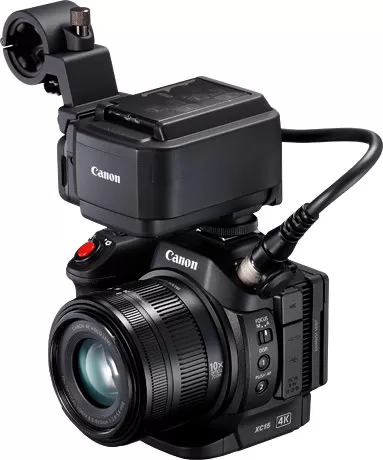
Canon XC10 firmware
Canon · XC10 · XC10 · Photo
Latest firmware for the Canon XC10 is v1.0.3.0 (March 15, 2017).
Specifications
XC10 specifications
- Body type
- Large Sensor Compact
- Resolution
- 12 MP
- Sensor
- CMOS
- Sensor size
- 12.8 × 9.6 mm
- Processor
- DIGIC DV5
- ISO range
- 100–20000
- Fastest shutter
- 1/2000
- Burst rate
- 3.8 fps
- Storage
- CFast, SD/SDHC/SDXC
- Video
- XFAVC, H.264
- Weight
- 1040 g
- Dimensions
- 125 × 102 × 122 mm
- Weather sealed
- No
- Price at launch
- $2499
Changelog
XC10 firmware changelog
-
v1.0.3.0first tracked
Firmware history
-
Release notes & download
Show release notes Hide release notes
Firmware Version 1.0.3.0 incorporates the following enhancement.
- Support for CFast cards (VPG130) has been added.
- For detailed information about CFast cards that have been verified to work with this camera, please visit Canon's Web site. Caution: You cannot perform the firmware update using CFast 2.0 cards. Please use a commercially available SD/SDHC/SDXC memory card that is 64MB or more for the firmware update. Firmware Version 1.0.3.0 is for camcorders with Firmware Version 1.0.0.0 - 1.0.2.0. If your camera's firmware is already Version 1.0.3.0, it is not necessary to update the firmware. Once the camera is updated to the latest version, it cannot be restored to a previous version. For further details, please refer to the latest version of the instruction manual for this product, which will be released at the same time as this firmware update. Preparations for the Firmware Update: After the Firmware update has been performed, the camera's menu and custom picture settings will be reset. It is recommended that users save their menu and custom picture settings as settings data to an SD card, separate from the one that will be used to carry out the update, before starting update operations. This saved data can be loaded into the camera and the settings can be changed after the update has been completed. For further information on this, please refer to the section in the unit's Instruction Manual titled "Saving and Loading Camera Settings". The downloaded folder contains the firmware (file name: VLA4. FIM / file size: 23,658,524 bytes), and instructions on the firmware update procedures (a PDF file in five languages: Japanese, English, French, Spanish and Simplified Chinese). Before starting the firmware update operations, please be sure to carefully confirm your understanding of these instructions. The following things are required to perform this firmware update:
- A XC10 camcorder
- A computer (OS: Windows 10, Windows 8.1, Windows 8, Windows 7 SP1)
- A 64 MB or higher-capacity SD/SDHC/SDXC memory card (both commercially available)
- An SD card reader/writer (commercially available) or an SD card slot built into the computer
- A fully charged battery pack for the camera
- Compact power adapter bundled with the camera
- The firmware (the downloaded file) History: Changes Version 1.0.2.0 1. Enables users to select an MP4 recording format for recording HD video.
- Increases the AF speed by a maximum of approximately two times.
- Adds an AF speed settings menu (Fast/Normal/Slow).
- Enhances the image quality in low brightness during HD shooting.
- Makes onscreen displays possible during HDMI output (for HD video only).
- Adds a shutter setting value (NTSC:1/25, 1/50; PAL:1/30) as a flicker reduction measure. Changes Version 1.0.1.0 1. Adds Rolling Shutter Distortion Reduction function in Camera Setup Menu to enable image recording with reduced rolling shutter distortion when shooting 4K movies.
Watch the XC10 for updates
Get an email the moment Canon publishes new firmware. Just your email — no account or password needed.