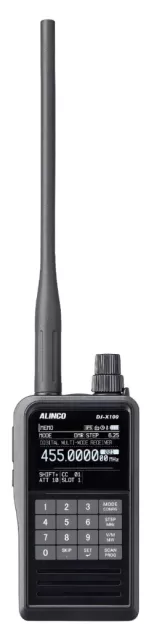
Alinco DJ-X100E firmware
Alinco · DJ-X100E · DJ-X100E · Handheld
Latest firmware for the Alinco DJ-X100E is v4.00-04 (July 25, 2025).
Specifications
DJ-X100E specifications
- Type
- VHF/UHF receiver/scanner
- Frequency range
- Europe / 30-470 MHz
- Modes
- Analog: / AM / NAM / FM / NFM (Not between 76-108 MHz) / WFM (76-108 MHz only) / DV modes (Not between 76-108 MHz): / D-Star / DCR/NXDN / DMR/MotoTRBO / dPMR / Yaesu C4FM "Fusion"
Show the full specification Hide the full specification
General
- Mode
- Analog: AM / NAM / FM / NFM (Not between 76-108 MHz) WFM (76-108 MHz only) DV modes (Not between 76-108 MHz): D-Star DCR/NXDN DMR/MotoTRBO dPMR Yaesu C4FM "Fusion" Data modes (Not between 76-108 MHz): ACARS AIS
- Type
- VHF/UHF receiver/scanner
- Weight
- 260 g (9.17 oz), with EBP-114 and antenna
- Power supply
- 3.6 VDC (Li-Ion battery pack) or 4.5 VDC (Optional alkaline battery case) or 5 VDC external (USB-C jack)
- Tuning steps
- 1 / 3.125 / 5 / 6.25 / 8.33 / 10 / 12.5 / 15 / 20 / 25 / 30 / 50 / 100 / 125 / 150 / 200 KHz
- Other features
- CTCSS/PL and DCS decoder. 2" color TFT (320*240 pixels). GPS receiver for positioning and location based scanning. USB-C jack for charging, external power and PC programming. The headphone cord can also be used as an antenna. Voice inversion descrambler. F-Count (Tunes to nearby transmissions, similar to Bearcat Close Call). 12 KHz IF output. IP67 resistant. DSP/SDR technology.
- Frequency range
- Europe 30-470 MHz
- Dimensions (W*H*D)
- 58*110*32 mm (2.28*4.33*1.26")
- Frequency stability
- -7 to +3 ppm @ -10 to +60°C (-4 to +140°F)
- Channels / memory management
- 999 regular in 26 banks 50 search pairs Alpha tags (14 or 28 characters, depending on font size)
- Antenna impedance / connector
- 50 ohm / SMA
- Current drain / power consumption
- 150-500 mA
Miscellaneous
- Manufactured
- Japan, 2024-202x
Receiver Section
- Sensitivity
- AM/NAM: 1.25 uV (10 dB S/N) FM/NFM: 0.3 uV (12 dB SINAD) WFM: 0.8 uV (12 dB SINAD) T98: 0.3 uV (BER 1%) DMR: 0.45 uV (BER 1%) D-Star: 0.3 uV (BER 1%) C4FM: 0.45 uV (BER 1%) AIS: 0.56 uV (BER 1%)
- Receiver system
- Direct conversion (WFM) Triple conversion superheterodyne (AM/NAM/FM/NFM/DV) 1st IF: 243.95 MHz 2nd IF: 50.85 MHz 3rd IF: 450 KHz
- AF output power / speaker
- 400 mW at 10% distortion / 8 ohm
- External speaker connector
- TRS "Minijack" (3.5 mm)
Changelog
DJ-X100E firmware changelog
-
v4.00-04first tracked Adds NXDN digital modes and improved shift scanning, removes DCR mode.
Firmware history
All versions below were published by Alinco on alinco.com. Third-party and modified firmware is never listed.
-
Adds NXDN digital modes and improved shift scanning, removes DCR mode. — summary by updatemystuff.com
Source:
alinco.comRelease notes & downloadShow release notes Hide release notes
Major changes
- Removed DCR mode from both E and T models.
- NXDN(N) and (VN) modes are added.
- Minor correction to AM sensitivity
- FM radio step corrected to 100kHz (T-version only)
Added functions
-Improved scan operation for shift scanning ; high-speed scans between in and output freq. so it receives a semi-dupelex channel as if it were a simplex.
Works both in VFO and Memory ch.Press FUNC then MODE/CONFIG to enter CONFIG screen.
Use upper dial to select Freq.
Shift menu.
Press SET to enter "Shift Frequency" screen.
As instructed in the User's manual, set shift width in MHz and shift direction.
Use SET and MONI keys to return to the ST-BY screen.
SHIFT+/-will be displayed at the left bottom of the screen.
Press and hold SCAN key on VFO/Memory ch that shift freq. is assigned.
Use uppe dial to select Shift scan.
Press SET key, then use upper dial to select ON.
Press set to start shift scan.
Scan stops when a signal is received or while MONI key is pressed.
Pressing and holding SCAN key while scanning , select "shift scan"and select OFF to stop shift scan.
In OFF state, use MONI key to switch 2 frequencies manually.
-Added "Stop scan" and "Power off" to one-time skip In Timer-skip operation, while scan is stopping, long-press SKIP key to display T-SKIP screen. 2 new parameters are added: One time SKIP: Skip setting will be released when scan is stopped.
One time off: Skip setting will be released when the X100 is turned off.
-Added a setting to reverse short and long press of the SKIP key In the SET mode>SCAN menu, Skip Long press menu is added to reverse key press operation. Default is short press for skip and long press for timer skip.
-Adjust the inversion frequency using Dial when inversion scrambling decode is set. (E-version only) While receiving with Voice Reverse ON at the CONFIG setting, press FUNC to display SCRF below the battery icon. Rotate dial to adjust the inversion frequency value.
-Enhanced manual memory writing procedures while receiving (including quick memory mode) While scanning or receiving in VFO mode, press FUNC then long press V/M until beep sounds to register the current status in memory ch.
-Enable automatic reconfiguration of the encryption/sequence codes analysis function in digital modes. Press FUNC then 0(zero)key to display a magnifying glass icon. The auto-analysis will be held while icon is displayed.
-Added a setting to swap the functions of the FUNC and MONI keys In the SET mode>Operation menu, MONI/Func swap menu is added to reverse FUNC/MONI key position. FUNC key is often assigned at the top of side keys like our previous radios and many users get used to it.
-Added an ATT setting that is independent of the CONFIG setting In the SET mode>Operation menu, ATT set menu is added. Select Individual to use ATT according to CONFIG setting. Select 10dB or 20dB to set attenuator to all VFO bands/Memory channels at once. Select OFF to turn off the ATT.
-Displays an E icon to the left of the BUSY icon when the earphone antenna is activated. -Increased message log storage (3 messages/up to 512bytes@ → 10messages/up to 480 bytes@) -Added a message deletion function to the message log Written messages in digital communication tends to be short, so 480bite will be enough for 1 message.
A delete option is added to the Message menu in SETTING.
It appears only when you have messages in the log.
-Added a protection for quick recall setting In the SET mode>Operation menu, QR(protection) menu is added. Select ON to block overwriting quick recall settings.
-Changed the map icon of Position Viewer software in AIS mode to blue for stopped ship, red for actual operation, and green for anchor. Use PositionViewer software to check it out.
- Detailed Bug fix
End
Watch the DJ-X100E for updates
Get an email the moment Alinco publishes new firmware. Just your email — no account or password needed.